TELEVISION CAMERA REMOVAL

-
REMOVE CENTER BACK DOOR GARNISH
-
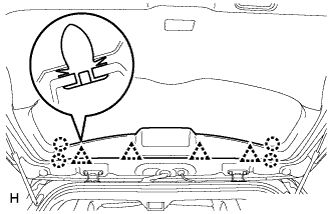
Detach the 4 clips and 4 claws, and remove the center back door garnish.
-
-
REMOVE BACK DOOR SIDE GARNISH LH
-
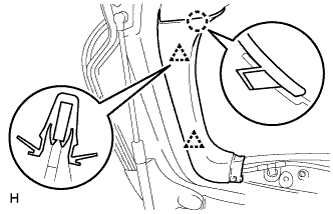
Detach the 2 clips and claw, and remove the back door side garnish.
-
-
REMOVE BACK DOOR SIDE GARNISH RH
-
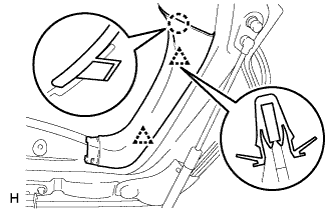
Detach the 2 clips and claw, and remove the back door side garnish.
-
-
REMOVE BACK DOOR INSIDE HANDLE
-
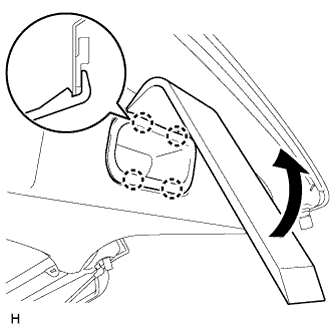
Using moulding remover D, detach the 4 claws and remove the back door inside handle.
-
-
REMOVE BACK DOOR TRIM PANEL ASSEMBLY
-
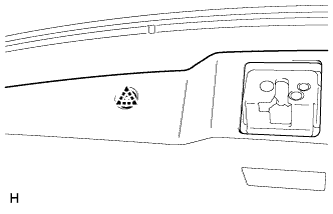
Detach the clip.
-
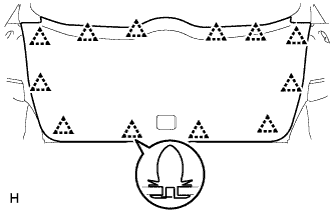
Detach the 12 clips and remove the back door trim board.
-
-
REMOVE BACK DOOR OUTSIDE GARNISH
-
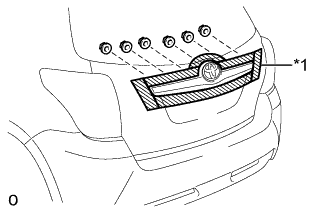
Text in Illustration *1 Protective Tape Put protective tape around the back door outside garnish.
-
Remove the 6 nuts.
-
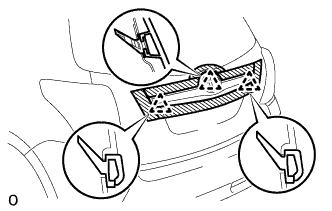
Detach the 3 clips and remove the back door outside garnish.
Tech Tips
Detach the clip from the backside of the back door outside garnish.
-
-
REMOVE REAR TELEVISION CAMERA ASSEMBLY
-
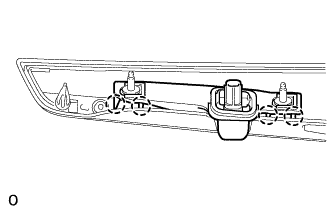
Detach the 4 claws and remove the rear television camera assembly assembly.
-