CLEARANCE WARNING ECU INSTALLATION

Tech Tips
-
Use the same procedure for RHD and LHD vehicles.
-
The procedure listed below is for LHD vehicles.
-
INSTALL CLEARANCE WARNING ECU ASSEMBLY
-
Connect the connector.
-
Install the clearance warning ECU with the bolt.
-
-
INSTALL AIR CONDITIONING CONTROL ASSEMBLY (for Automatic Air Conditioning System)
-
Connect the connector.
-
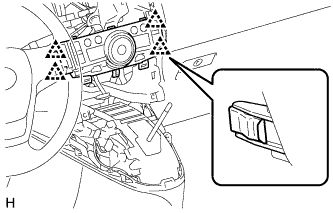
Attach the 4 clips to install the air conditioning control.
-
-
INSTALL CENTER INSTRUMENT CLUSTER FINISH PANEL ASSEMBLY (for Manual Air Conditioning System)
-
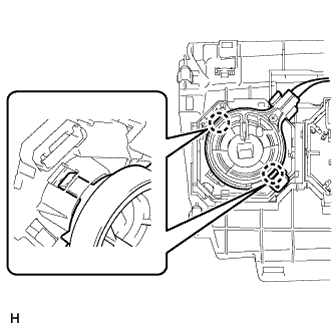
Attach the 2 claws to connect the air mix damper control cable sub-assembly.
-
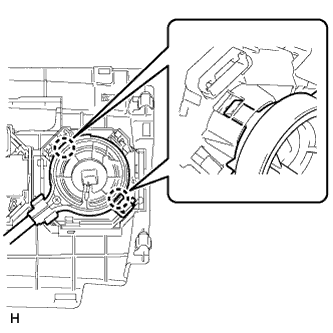
Attach the 2 claws to connect the No. 2 heater control cable sub-assembly.
-
Connect each connector.
-
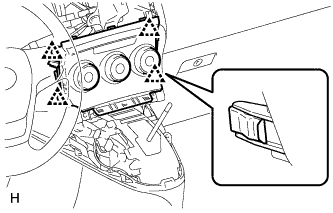
Attach the 4 clips to install the center instrument cluster finish panel assembly.
-
-
INSTALL LOWER CENTER INSTRUMENT PANEL FINISH PANEL
-
except Manual Transaxle:
Install the lower center instrument panel finish panel Click here.
-
fort Manual Transaxle:
Install the lower center instrument panel finish panel Click here.
-
-
INSTALL POSITION INDICATOR HOUSING ASSEMBLY (except Manual Transaxle)
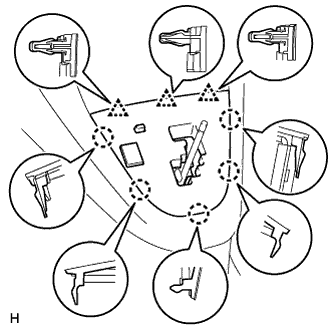
-
Connect the connector.
-
Attach the 5 claws and 3 clips to install the position indicator housing.
-
-
INSTALL SHIFTING HOLE COVER (for Manual Transaxle)
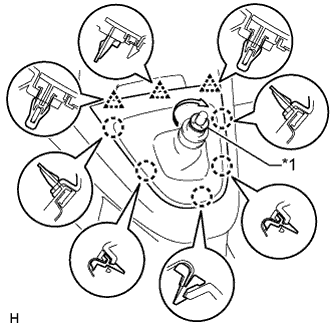
Text in Illustration *1 T Washer
-
Attach the 5 claws and 3 clips to install the shifting hole cover.
-
Install the knob spring.
-
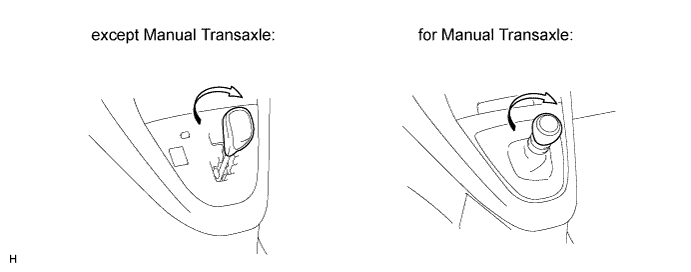
Install the T washer and twist it in the direction indicated by the arrow.
-
-
INSTALL SHIFT LEVER KNOB SUB-ASSEMBLY
-
Install the shift lever knob and twist it in the direction indicated by the arrow.
-
-
INSTALL RADIO RECEIVER ASSEMBLY WITH BRACKET (w/ Audio)
-
for Radio Receiver Type:
Install the radio receiver assembly with bracket Click here.
-
for Radio and Display Type:
Install the navigation receiver assembly with bracket Click here.
-
-
INSTALL STEREO OPENING COVER WITH BRACKET (w/o Audio)
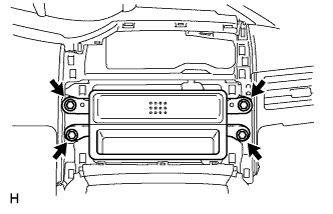
-
Install the stereo opening cover with the 4 bolts.
-
-
INSTALL CENTER INSTRUMENT CLUSTER FINISH PANEL SUB-ASSEMBLY (w/o Audio)
-
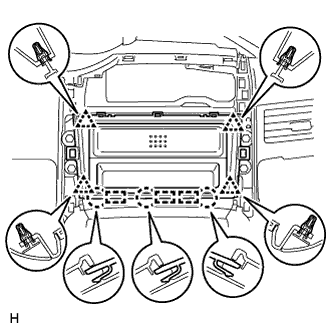
Attach the 4 clips, 3 claws and 3 guides to install the center instrument cluster finish panel.
-
-
INSTALL CENTER INSTRUMENT PANEL REGISTER ASSEMBLY
-
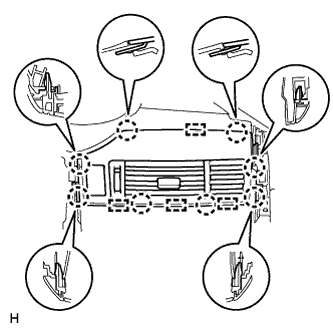
Connect the connector.
-
Attach the 8 claws and 4 guides to install the center instrument panel register.
-
-
INSTALL INSTRUMENT PANEL FINISH PANEL END LH
-
for Automatic Air Conditioning System:
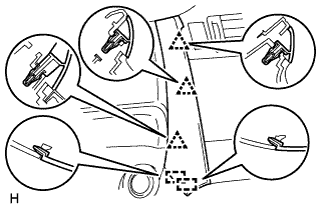
Attach the 3 clips and 2 guides to install the instrument panel finish panel end.
-
for Manual Air Conditioning System:
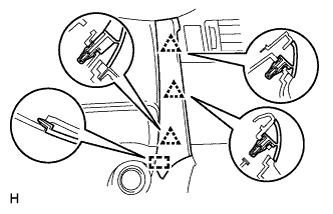
Attach the 3 clips and guide to install the instrument panel finish panel end.
-
-
INSTALL INSTRUMENT PANEL FINISH PANEL END RH
Tech Tips
Use the same procedure described for the LH side.