NAVIGATION ANTENNA INSTALLATION

-
INSTALL NAVIGATION ANTENNA CORD SUB-ASSEMBLY (for LHD)
-
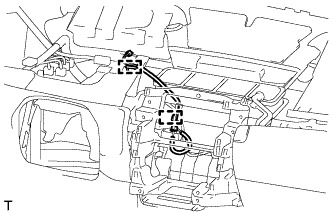
Attach the 2 clamps to install the navigation antenna cord.
-
-
INSTALL NAVIGATION ANTENNA ASSEMBLY (for LHD)
-
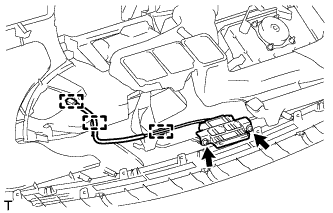
Install the navigation antenna with the 2 screws.
-
Attach the 3 clamps.
-
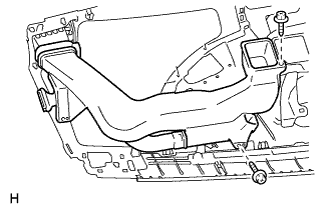
Install the heater to register duct assembly with the 2 screws.
-
-
INSTALL INSTRUMENT PANEL STAY LH (for LHD)
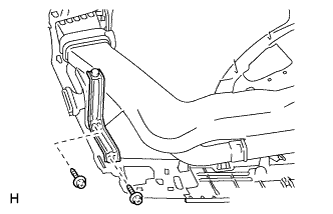
-
Install the instrument panel stay with the 2 screws <B>.
-
-
INSTALL NAVIGATION ANTENNA CORD SUB-ASSEMBLY (for RHD)
-
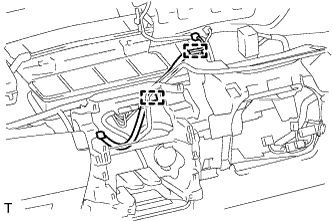
Attach the 2 clamps to install the navigation antenna cord.
-
-
INSTALL NAVIGATION ANTENNA ASSEMBLY (for RHD)
-
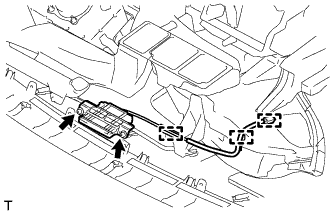
Install the navigation antenna with the 2 screws.
-
Attach the 3 clamps.
-
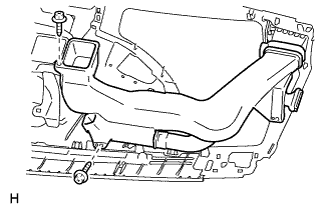
Install the heater to register duct assembly with the 2 screws.
-
-
INSTALL INSTRUMENT PANEL STAY RH (for RHD)
Tech Tips
Use the same procedure described for the LH side.
-
INSTALL INSTRUMENT PANEL SAFETY PAD SUB-ASSEMBLY
-
Install the instrument panel safety pad Click here.
-
-
CONNECT CABLE TO NEGATIVE BATTERY TERMINAL
Note
When disconnecting the cable, some systems need to be initialized after the cable is reconnected Click here.
-
CHECK SRS WARNING LIGHT
-
Check the SRS warning light Click here.
-