NAVIGATION ANTENNA REMOVAL

-
PRECAUTION
Note
After turning the ignition switch off, waiting time may be required before disconnecting the cable from the battery terminal. Therefore, make sure to read the disconnecting the cable from the battery terminal notice before proceeding with work. Click here.
-
DISCONNECT CABLE FROM NEGATIVE BATTERY TERMINAL
CAUTION:
Wait at least 90 seconds after disconnecting the cable from the negative (-) battery terminal to disable the SRS system.
Note
When disconnecting the cable, some systems need to be initialized after the cable is reconnected Click here.
-
REMOVE INSTRUMENT PANEL SAFETY PAD SUB-ASSEMBLY
-
Remove the instrument panel safety pad Click here.
-
-
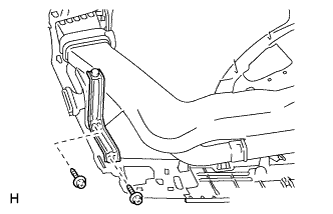
REMOVE INSTRUMENT PANEL STAY LH (for LHD)
-
Remove the 2 screws <B> and instrument panel stay.
-
-
REMOVE NAVIGATION ANTENNA ASSEMBLY (for LHD)
-
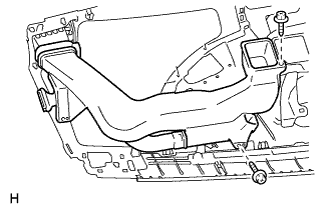
Remove the 2 screws and heater to register duct assembly.
-
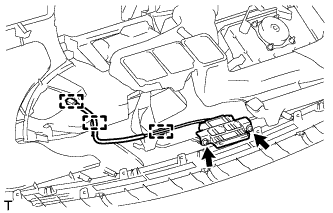
Detach the 3 clamps.
-
Remove the 2 screws and navigation antenna.
-
-
REMOVE NAVIGATION ANTENNA CORD SUB-ASSEMBLY (for LHD)
-
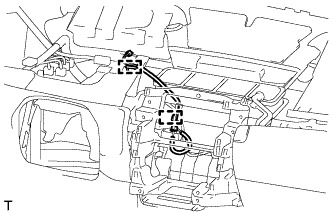
Detach the 2 clamps and remove the navigation antenna cord.
-
-
REMOVE INSTRUMENT PANEL STAY RH (for RHD)
Tech Tips
Use the same procedure described for the LH side.
-
REMOVE NAVIGATION ANTENNA ASSEMBLY (for RHD)
-
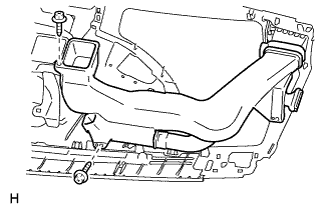
Remove the 2 screws and heater to register duct assembly.
-
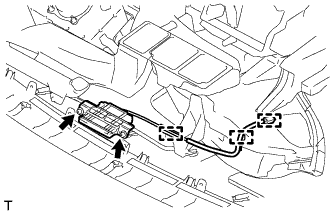
Detach the 3 clamps.
-
Remove the 2 screws and navigation antenna.
-
-
REMOVE NAVIGATION ANTENNA CORD SUB-ASSEMBLY (for RHD)
-
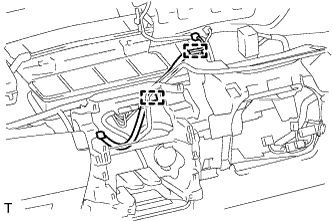
Detach the 2 clamps and remove the navigation antenna cord.
-