-
Use the same procedure for the RH and LH sides.
-
The procedure listed below is for the LH side.
- Click here
INSTALL FRONT NO. 2 SPEAKER ASSEMBLY
-
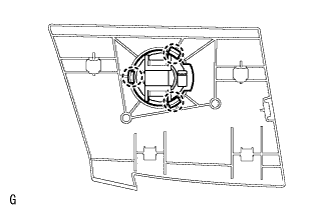
Attach the 3 claws to install the front No. 2 speaker.
Note:Do not touch the cone part of the speaker.
-
- Click here
INSTALL NO. 1 INSTRUMENT PANEL SPEAKER PANEL SUB-ASSEMBLY
-
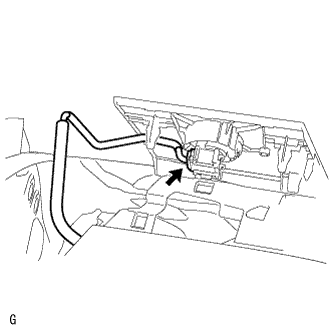
Connect the speaker connector.
-
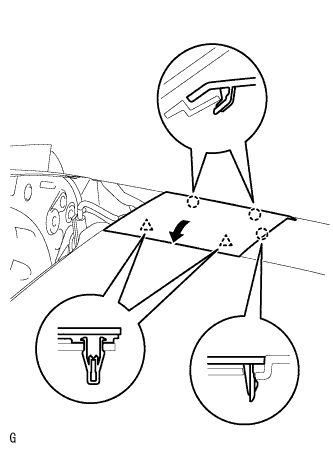
Set the 2 claws on the side of the speaker panel towards the front of the vehicle in place and using them as pivot points, lower the panel in the direction indicated by the arrow in the illustration, and then attach the claws and clips to the instrument panel to install the speaker panel.
-
-
Click here
INSTALL FRONT PILLAR GARNISH LH
-
Remove the protective cover.
-
Attach the 2 claws.
-
Turn the end of the front pillar garnish clip 90° with needle-nose pliers and install it to the front pillar garnish.
Tip:Tape the tips of the needle-nose pliers before use.
Table 1. Text in Illustration *1 Front Pillar Garnish Clip *2 Protective Tape -
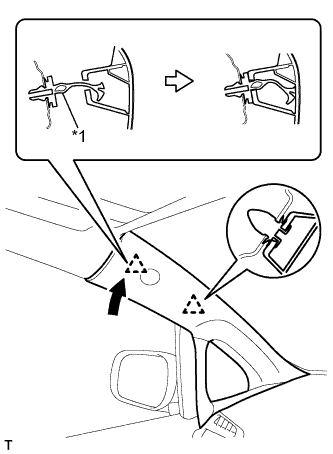
Attach the 2 clips to install the front pillar garnish.
*1 Front Pillar Garnish Clip
-
- Click here
CONNECT CABLE TO NEGATIVE BATTERY TERMINAL
Note:When disconnecting the cable, some systems need to be initialized after the cable is reconnected (Click here).