-
Use the same procedure for the RH and LH sides.
-
The procedure listed below is for the LH side.
- Click here
REMOVE BATTERY SERVICE HOLE COVER
-
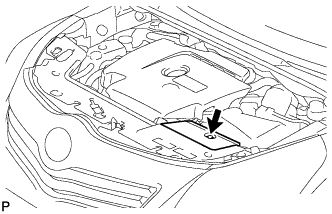
Remove the clip and battery service hole cover.
-
- Click here
DISCONNECT CABLE FROM NEGATIVE BATTERY TERMINAL
Note:
-
w/ Navigation System (for HDD):
After the ignition switch is turned off, the HDD navigation system requires approximately a minute to record various types of memory and settings. As a result, after turning the ignition switch off, wait a minute or more before disconnecting the cable from the negative (-) battery terminal.
-
When disconnecting the cable, some systems need to be initialized after the cable is reconnected (Click here).
-
- Click here
REMOVE FRONT BUMPER COVER
-
Remove the front bumper cover (Click here).
-
- Click here
REMOVE HEADLIGHT ASSEMBLY LH
-
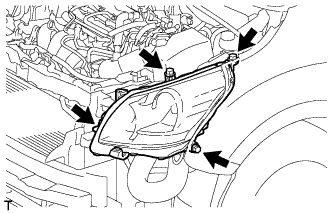
Remove the bolt and 3 screws.
-
Disconnect the connectors and remove the headlight.
-