BACK DOOR OUTSIDE GARNISH DISASSEMBLY

-
REMOVE REAR TELEVISION CAMERA ASSEMBLY (w/ Rear View Monitor System)
-
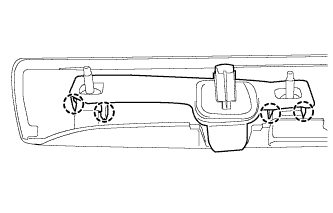
Detach the 4 claws and remove the rear television camera.
-
-
REMOVE SYMBOL EMBLEM
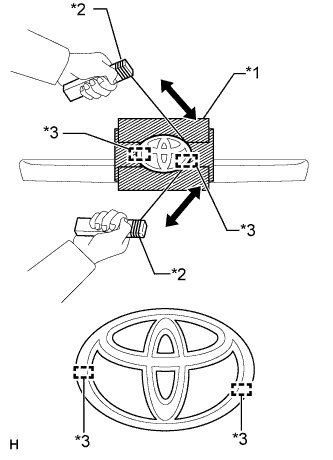
Text in Illustration *1 Protective Tape *2 Wooden Block *3 Boss
-
Put protective tape around the symbol emblem.
-
Insert piano wire between the vehicle body and symbol emblem.
Tech Tips
Be careful of the boss positions.
-
Tie objects that can serve as handles (for example, wooden blocks) to the piano wire ends.
-
Pull the piano wire and scrape off the double-sided tape that holds the symbol emblem to the vehicle body.
Note
Be careful not to damage the vehicle body.
-
Remove the symbol emblem.
-
-
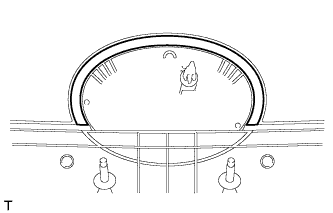
REMOVE BACK DOOR OUTSIDE GARNISH PAD
-
Remove the back door outside garnish pad.
-
-
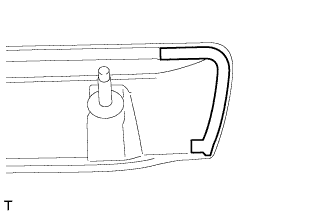
REMOVE BACK DOOR GARNISH SIDE PROTECTOR LH
-
Remove the back door garnish side protector.
-
-
REMOVE BACK DOOR GARNISH SIDE PROTECTOR RH
Tech Tips
Use the same procedure described for the LH side.
-
REMOVE BACK DOOR OUTSIDE GARNISH PROTECTOR
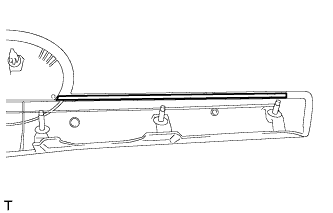
Tech Tips
Use the same procedure for the other back door outside garnish protector.
-
Remove the back door outside garnish protector.
-