OIL COOLER REMOVAL
-
REMOVE RADIATOR SUPPORT OPENING COVER
-
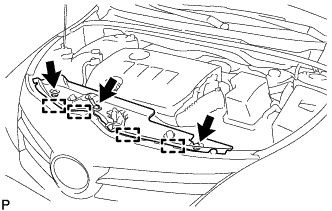
Remove the 3 clips.
-
Detach the 4 hooks and remove the radiator support opening cover.
-
-
DISCONNECT CABLE FROM NEGATIVE BATTERY TERMINAL
Note
-
w/ Navigation System for HDD:
After the ignition switch is turned off, the HDD navigation system requires approximately a minute to record various types of memory and settings. As a result, after turning the ignition switch off, wait a minute or more before disconnecting the cable from the negative (-) battery terminal.
-
When disconnecting the cable, some systems need to be initialized after the cable is reconnected Click here.
-
-
REMOVE BATTERY
-
Disconnect the cable from the positive (+) battery terminal.
-
Remove the bolt and loosen the nut.
-
Remove the battery clamp.
-
Remove the battery.
-
Remove the battery tray.
-
-
REMOVE BATTERY CARRIER
-
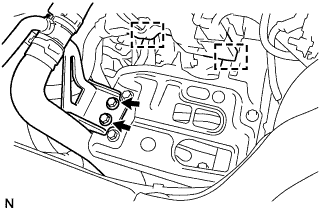
Disconnect the 2 wire harness clamps from the battery carrier.
-
Remove the 2 bolts and disconnect the radiator pipe from the battery carrier.
-
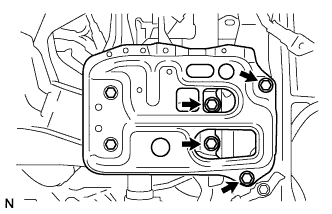
Remove the 4 bolts and battery carrier.
-
-
REMOVE NO. 1 ENGINE UNDER COVER
-
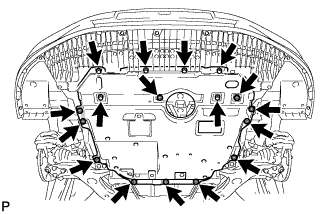
Remove the 11 clips, 6 bolts and under cover.
-
-
REMOVE REAR ENGINE UNDER COVER LH
-
Remove the 5 clips and under cover.
-
-
DRAIN ENGINE COOLANT
-
Loosen the radiator drain cock plug.
Tech Tips
Collect the coolant in a container and dispose of it according to the regulations in your area.
-
Remove the radiator reservoir cap.
CAUTION:
Do not remove the radiator reservoir cap while the engine and radiator are still hot.
Pressurized, hot engine coolant and steam may be released and cause serious burns.
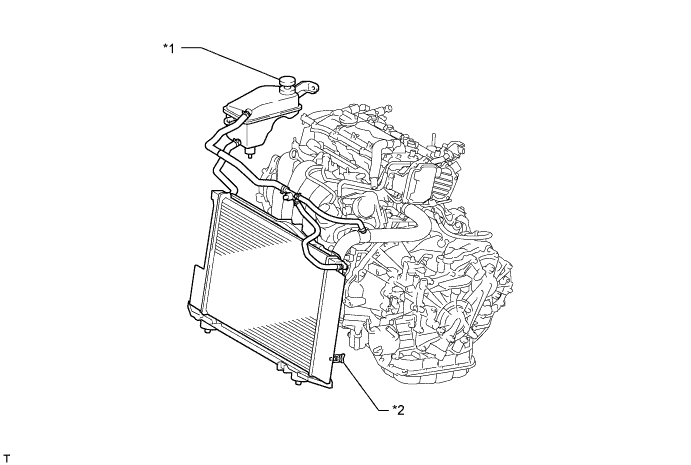
Text in Illustration *1 Radiator Reservoir Cap *2 Radiator Drain Cock Plug
-
-
REMOVE TRANSMISSION OIL COOLER ASSEMBLY
-
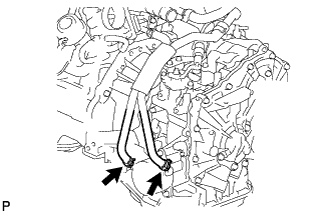
Disconnect the 2 water by-pass hoses from the transmission oil cooler.
-
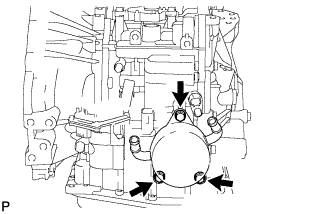
Remove the 3 bolts and transmission oil cooler from the continuously variable transaxle.
-
Remove the 2 O-rings from the transmission oil cooler.
-