- Click here
INSTALL TRANSMISSION CONTROL CABLE ASSEMBLY
-
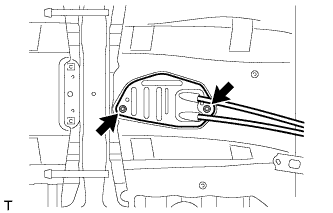
Attach the grommet of the control cable assembly with the 2 nuts.
5.0 N*m 51 kgf*cm 44 in.*lbf -
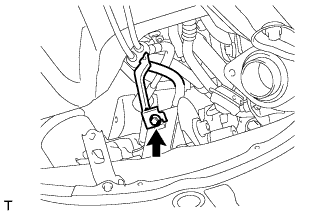
Attach the bracket of the control cable assembly with the bolt.
5.0 N*m 51 kgf*cm 44 in.*lbf -
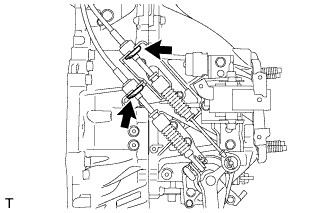
Connect the 2 cables to the control cable bracket with 2 new clips.
-
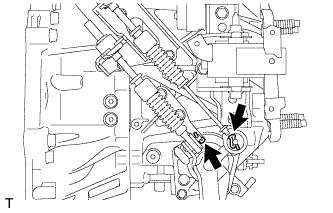
Connect the 2 cables to the transaxle and install the 2 clips.
-
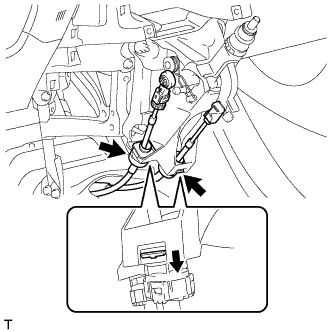
Engage the 2 claws, and install the control cable assembly to the shift lever assembly.
Note:Make sure that the claws are firmly engaged.
-
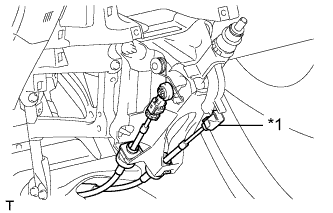
Install the control shift cable to the shift lever assembly.
Table 1. Text in Illustration *1 Select Cable -
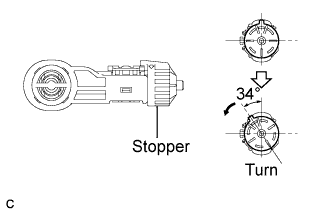
Release the lock of the cable length adjustment structure of the select cable.
-
Turn the stopper.
-
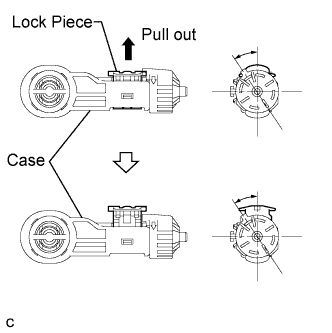
Pull the lock piece outward from the case to release the lock.
-
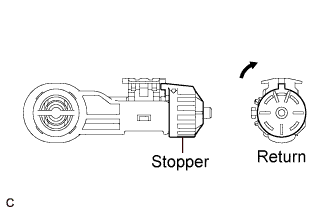
Return the stopper.
-
-
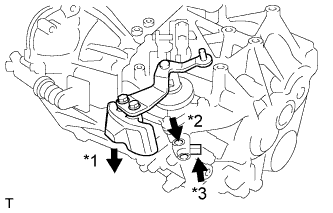
While pressing the shift and select lever shaft (*1) and pin (*2), push in the pin (*3) and check that the shift and select lever shaft is secured at the 1st-2nd gear selected position (the shaft comes to a stop at the position 8 mm (0.315 in.) below the N position).
-
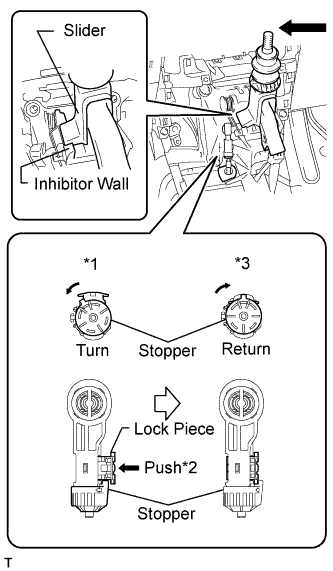
Connect the control select cable to the shift lever assembly.
-
Push the slider against the inhibitor wall.
Note:
-
Do not pull up the slider.
-
When adjusting the cable, make sure that the shift lever is not in the 1 or 2.
-
-
Lock the cable length adjustment structure of the select cable.
-
Turn the stopper.*1
-
Push the lock piece into the case.*2
-
Return the stopper to prevent the lock from being released.*3
Note:
-
Push the lock piece as far as it will go.
-
Confirm whether the cable length adjustment structure is locked securely.
-
-
-
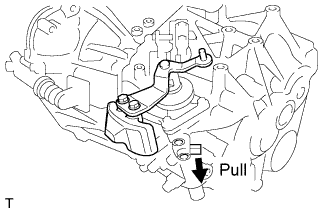
Release the pin that fixes the transmission outer lever.
-
Pull the pin toward the left front side of the vehicle.
-
-
-
Click here
INSTALL FRONT NO. 1 FLOOR HEAT INSULATOR
-
Install the front No. 1 floor heat insulator with the 3 nuts.
5.5 N*m 56 kgf*cm 49 in.*lbf
-
-
Click here
INSTALL LOWER NO. 1 INSTRUMENT PANEL FINISH PANEL
-
Attach the 4 clips to install the lower No. 1 instrument panel finish panel.
-
Connect the connector.
-
Install the screw <D>.
-
- Click here
INSTALL FRONT NO. 2 CONSOLE BOX INSERT
-
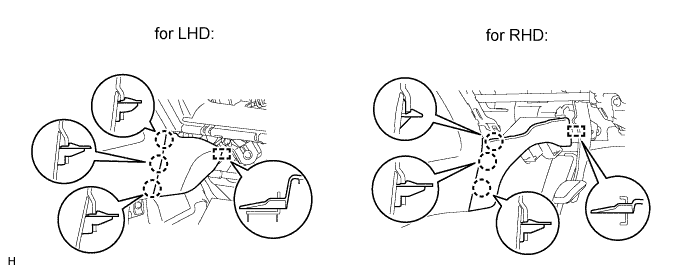
Attach the 3 claws and guide to install the front No. 2 console box insert.
-
- Click here
INSTALL FRONT NO. 1 CONSOLE BOX INSERT
-
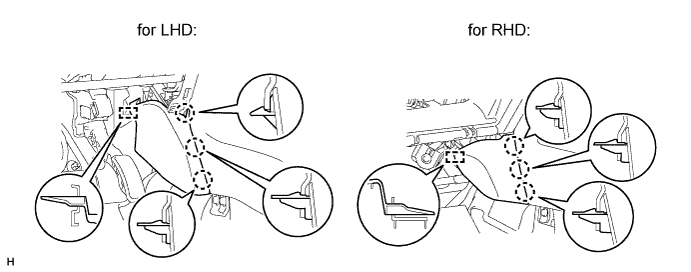
Attach the 3 claws and guide to install the front No. 1 console box insert.
-
-
Click here
INSTALL LOWER CENTER INSTRUMENT PANEL FINISH PANEL
-
for Automatic Air Conditioning System:
-
Attach the 2 claws, 4 clips and 5 guides to install the lower center instrument panel finish panel.
-
Install the 2 screws <C>.
-
-
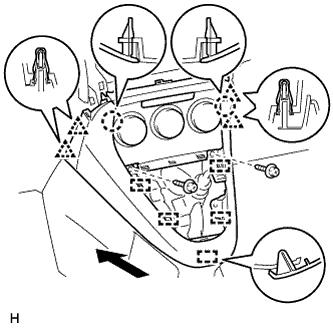
for Manual Air Conditioning System:
-
Attach the 4 clips, 2 claws and 5 guides to install the lower center instrument panel finish panel.
-
Install the 2 screws <C>.
-
-
-
Click here
INSTALL SHIFTING HOLE COVER
-
Attach the 5 claws and 3 clips to install the shifting hole cover.
-
Install the knob spring.
-
Install the T washer and twist it in the direction indicated by the arrow.
Table 2. Text in Illustration *1 T Washer
-
- Click here
INSTALL SHIFT LEVER KNOB SUB-ASSEMBLY
-
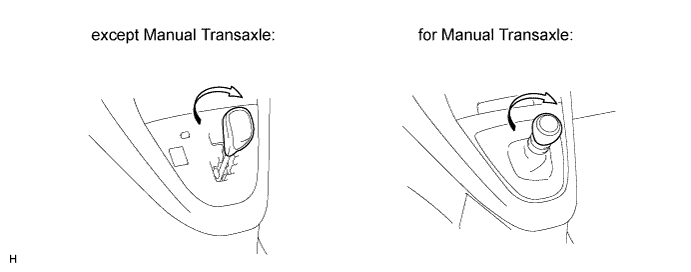
Install the shift lever knob and twist it in the direction indicated by the arrow.
-
-
Click here
INSTALL STEREO OPENING COVER WITH BRACKET (w/o Audio)
-
Install the stereo opening cover with the 4 bolts.
-
-
Click here
INSTALL CENTER INSTRUMENT CLUSTER FINISH PANEL SUB-ASSEMBLY (w/o Audio)
-
Attach the 4 clips, 3 claws and 3 guides to install the center instrument cluster finish panel.
-
- Click here
INSTALL RADIO RECEIVER ASSEMBLY (w/ Audio)
-
for Radio Receiver Type:
Install the radio receiver assembly (Click here).
-
for Radio and Display Type:
Install the radio receiver assembly (Click here).
-
-
Click here
INSTALL CENTER INSTRUMENT PANEL REGISTER ASSEMBLY
-
Connect the connector.
-
Attach the 8 claws and 4 guides to install the center instrument panel register.
-
-
Click here
INSTALL INSTRUMENT PANEL FINISH PANEL END RH
-
for Automatic Air Conditioning System:
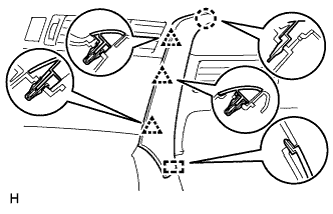
Attach the 3 clips, claw and 2 guides to install the instrument panel finish panel end.
-
for Manual Air Conditioning System:
Attach the 3 clips, claw and guide to install the instrument panel finish panel end.
-
-
Click here
INSTALL INSTRUMENT PANEL FINISH PANEL END LH
-
for Automatic Air Conditioning System:
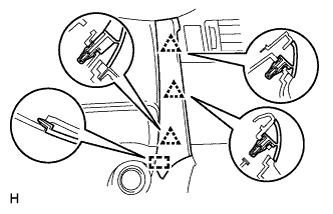
Attach the 3 clips and 2 guides to install the instrument panel finish panel end.
-
for Manual Air Conditioning System:
Attach the 3 clips and guide to install the instrument panel finish panel end.
-
- Click here
INSTALL BOX PANEL SUB-ASSEMBLY
-
Install the box panel sub-assembly (Click here).
-
- Click here
INSTALL AIR CLEANER CASE
-
Install the air cleaner case with the 3 bolts.
7.0 N*m 71 kgf*cm 62 in.*lbf
-
- Click here
INSTALL AIR CLEANER FILTER ELEMENT SUB-ASSEMBLY
- Click here
INSTALL AIR CLEANER CAP SUB-ASSEMBLY
-
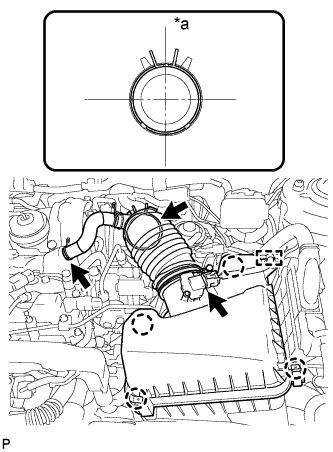
Connect the air cleaner hose.
Table 3. Text in Illustration *a Upper Tip:The direction of the hose clamp is indicated in the illustration.
-
Attach the 4 clamps to install the air cleaner cap.
-
Connect the PCV hose.
-
Attach the clamp and connect the mass air flow meter connector.
-
- Click here
INSTALL BATTERY CARRIER
-
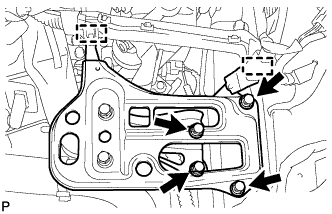
Install the battery carrier with the 4 bolts.
19 N*m 189 kgf*cm 14 ft.*lbf -
Attach the 2 clamps to connect the wire harness.
-
- Click here
INSTALL BATTERY TRAY
- Click here
INSTALL BATTERY
- Click here
INSTALL BATTERY INSULATOR
- Click here
INSTALL BATTERY CLAMP SUB-ASSEMBLY
-
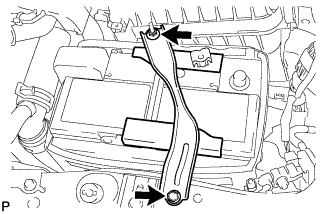
Attach the hook of the battery clamp to the battery carrier.
-
Partially tighten the nut and temporarily install the bolt.
-
Adjust the battery clamp position.
-
Tighten the nut and bolt.
for bolt 17 N*m 168 kgf*cm 12 ft.*lbf for nut 3.5 N*m 36 kgf*cm 31 in.*lbf
-
- Click here
INSTALL RADIATOR SUPPORT OPENING COVER
-
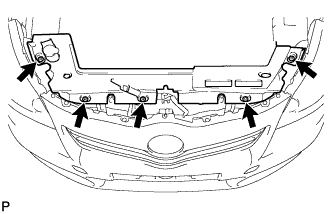
Install the radiator support opening cover with the 5 clips.
-
- Click here
INSTALL NO. 1 ENGINE COVER
-
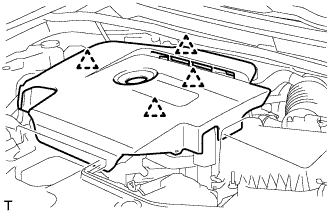
Attach the 4 clips to install the No. 1 engine cover.
-
- Click here
CONNECT CABLE TO POSITIVE BATTERY TERMINAL
- Click here
CONNECT CABLE TO NEGATIVE BATTERY TERMINAL
Note:When disconnecting the cable, some systems need to be initialized after the cable is reconnected (Click here).
- Click here
INSTALL BATTERY SERVICE HOLE COVER
-
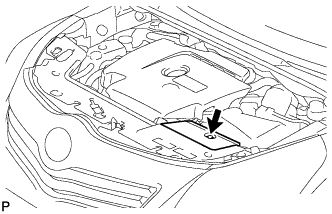
Install the battery service hole cover with the clip.
-
- Click here
INSTALL FRONT EXHAUST PIPE ASSEMBLY
-
Install the front exhaust pipe assembly (Click here).
-