DESCRIPTION
The purpose of this circuit is to prevent the engine from stalling when the brakes are suddenly applied while driving in lock-up.
When the brake pedal is depressed, this switch sends a signal to the TCM. Then the TCM cancels the operation of the lock-up clutch while braking is in progress.
| DTC Code | DTC Detection Condition | Trouble Area |
|---|---|---|
| P0724 | The stop light switch remains on even when the vehicle is driven in a STOP (less than 3 km/h (2 mph)) and GO (30 km/h (19 mph) or more) pattern 5 times (2-trip detection logic). |
|
MONITOR DESCRIPTION
This DTC indicates that the stop light switch remains on. When the stop light switch remains on during "stop and go" driving, the TCM interprets this as a fault in the stop light switch, illuminates the MIL and stores the DTC. The vehicle must stop (less than 3 km/h (2 mph)) and go (30 km/h (19 mph) or more) five times for two consecutive driving cycles in order for this DTC to be stored.
INSPECTION PROCEDURE
Click here
-
DATA LIST
Tip:Using the intelligent tester to read the Data List allows the values or states of switches, sensors, actuators and other items to be read without removing any parts. This non-intrusive inspection can be very useful because intermittent conditions or signals may be discovered before parts or wiring is disturbed. Reading the Data List information early in troubleshooting is one way to save diagnostic time.
Note:In the table below, the values listed under "Normal Condition" are reference values. Do not depend solely on these reference values when deciding whether a part is faulty or not.
-
Warm up the engine.
-
Turn the ignition switch off.
-
Connect the intelligent tester to the DLC3.
-
Turn the ignition switch to ON.
-
Turn the intelligent tester on.
-
Enter the following menus: Powertrain / ECT / Data List.
-
According to the display on the tester, read the Data List.
Table 1. ECT Tester Display Measurement Item/Range Normal Condition Diagnostic Note Stop Light Switch Stop light switch status/
ON or OFF
-
ON: Brake pedal depressed
-
OFF: Brake pedal released
- -
-
PROCEDURE
- Click here
INSPECT STOP LIGHT SWITCH ASSEMBLY
-
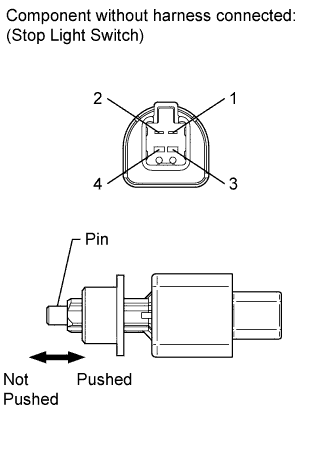
Remove the stop light switch assembly (Click here).
-
Measure the resistance according to the value(s) in the table below.
Standard Resistance Tester Connection Switch Condition Specified Condition 1 - 2 Pin not pushed Below 1 Ω 3 - 4 Pin pushed Below 1 Ω 1 - 2 Pin pushed 10 kΩ or higher 3 - 4 Pin not pushed 10 kΩ or higher
- OKClick here
- NGClick here
-
- Click here
CHECK HARNESS AND CONNECTOR (BATTERY - TCM)
-
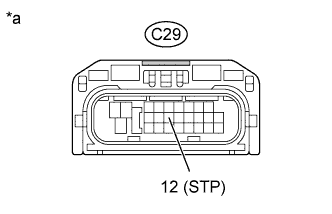
Disconnect the TCM connector.
-
Measure the voltage according to the value(s) in the table below.
Standard Voltage Tester Connection Condition Specified Condition C29-12 (STP) - Body ground Brake pedal depressed 7.5 to 14 V C29-12 (STP) - Body ground Brake pedal released Below 1 V Table 2. Text in Illustration *a Front view of wire harness connector
(to TCM)
- OKClick here
- NGClick here
-
- Click here
REPLACE TCMClick here
- Click here
REPLACE STOP LIGHT SWITCH ASSEMBLYClick here
- Click here
REPAIR OR REPLACE HARNESS OR CONNECTOR