- Click here
PERFORM REGISTRATION
- Click here
PRECAUTION
Note:After turning the ignition switch off, waiting time may be required before disconnecting the cable from the battery terminal. Therefore, make sure to read the disconnecting the cable from the battery terminal notice before proceeding with work (Click here).
- Click here
DISCONNECT CABLE FROM NEGATIVE BATTERY TERMINAL
Note:When disconnecting the cable, some systems need to be initialized after the cable is reconnected (Click here).
- Click here
REMOVE NO. 1 ENGINE COVER
-
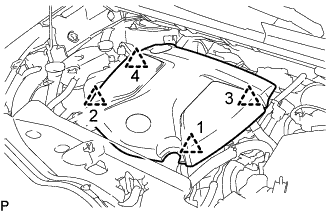
Lift the No. 1 engine cover to detach the 4 clips in the order shown in the illustration and remove the No. 1 engine cover.
Note:Attempting to disengage both front and rear clips at the same time may cause the No. 1 engine cover to break.
-
- Click here
REMOVE RADIATOR SUPPORT OPENING COVER
-
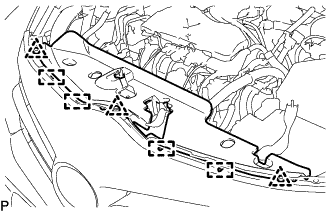
Remove the 3 clips.
-
Detach the 4 hooks and remove the radiator support opening cover.
-
- Click here
REMOVE AIR CLEANER CAP SUB-ASSEMBLY WITH AIR CLEANER HOSE ASSEMBLY
-
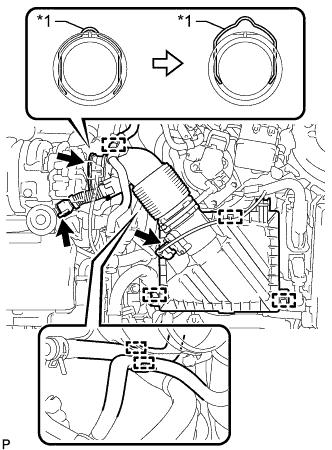
Detach the clamp and disconnect the mass air flow meter sub-assembly connector.
Table 1. Text in Illustration *1 Retainer -
Detach the clamp and disconnect the vacuum hose from the air cleaner hose assembly.
-
Detach the clamp and disconnect the No. 1 fuel hose from the air cleaner hose assembly.
-
Detach the clamp and disconnect the No. 2 fuel hose from the air cleaner hose assembly.
-
Disconnect the ventilation hose from the cylinder head cover sub-assembly.
-
Release the retainer and disconnect the air cleaner hose assembly from the turbocharger sub-assembly as shown in the illustration.
-
Detach the 2 clamps and remove the air cleaner cap sub-assembly with air cleaner hose assembly.
-
- Click here
REMOVE AIR CLEANER FILTER ELEMENT SUB-ASSEMBLY
- Click here
REMOVE AIR CLEANER CASE SUB-ASSEMBLY
-

Remove the 3 bolts and air cleaner case sub-assembly.
-
- Click here
DISCONNECT NO. 1 AIR CLEANER INLET
-
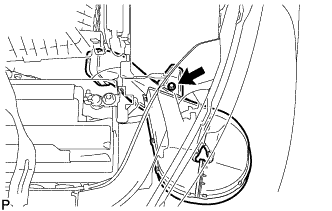
Remove the bolt and disconnect the No. 1 air cleaner inlet.
Note:Slide the No. 1 air cleaner inlet to ensure a space for the removal and installation of the ECM installation bolt.
-
- Click here
REMOVE ECM
-
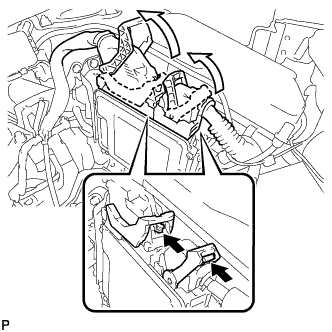
Push in the locks on the 2 levers, raise the levers and disconnect the 2 ECM connectors.
Table 2. Text in Illustration 
Push Note:After disconnecting the ECM connectors, make sure that dirt, water or other foreign matter does not contact the connecting parts of the ECM connectors.
-
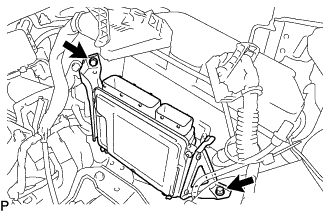
Remove the 2 bolts and ECM with bracket.
-
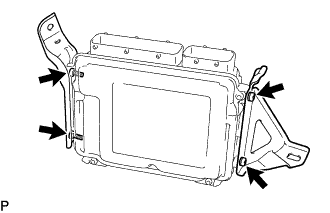
Remove the 2 screws and No. 1 ECM bracket.
-
Remove the 2 screws and No. 2 ECM bracket.
-