Click here
-
CUSTOMIZING FUNCTION WITH INTELLIGENT TESTER
Tip:The following items can be customized.
Note:
-
When the customer requests a change in a function, first make sure that the function can be customized.
-
Be sure to make a note of the current settings before customizing.
-
When troubleshooting a function, first make sure that the function is set to the default setting.
-
POWER DOOR LOCK CONTROL SYSTEM
Table 1. Door Lock Display Default Contents Setting Auto Lock/Shift* OFF Function that locks all the doors when the shift lever is moved from P to any position other than P while the engine is running and all the doors are closed. ON/OFF Auto Unlock/Shift* OFF Function that unlocks all the doors when the shift lever is moved to P from any position other than P while the ignition switch is ON. ON/OFF All Unlock/Open-Close OFF Function that unlocks the other doors when the driver side door is opened within 10 seconds after the ignition switch is turned off. ON/OFF
-
*: except Manual Transaxle
-
-
WIRELESS DOOR LOCK CONTROL SYSTEM (w/ Entry and Start System)
Table 2. Wireless Door Lock Display Default Contents Setting Hazard Answer Back ON When the lock switch on the transmitter is pressed, this function illuminates the hazard warning lights and side turn signal lights once. When the unlock switch is pressed, the hazard warning lights and side turn signal lights illuminate twice. ON/OFF Wireless Control ON Function that turns the wireless door lock function on or off. ON/OFF Open Door Warning ON If a door is not completely closed and the transmitter lock switch is pressed, this function makes the buzzer sound for 5 seconds. ON/OFF Auto Lock Time 30 s Function that changes the time until relocking after unlocking the doors with the wireless door lock function. 30 s/60 s/120 s -
WIRELESS DOOR LOCK CONTROL SYSTEM (w/o Entry and Start System)
Table 3. Wireless Door Lock Display Default Contents Setting Hazard Answer Back ON When the lock switch on the transmitter is pressed, this function illuminates the hazard warning lights and side turn signal lights once. When the unlock switch is pressed, the hazard warning lights and side turn signal lights illuminate twice. ON/OFF Wireless Control ON Function that turns the wireless door lock function on or off. ON/OFF Auto Lock Time 30 s Function that changes the time until relocking after unlocking the doors with the wireless door lock function. 30 s/60 s/120 s -
ENTRY AND START SYSTEM (for Entry Function)
Table 4. Entry&Start Display Default Contents Setting Ignition Available Area
(Entry ignition available area)
All Function to choose the available area for the key to start the engine and cancel the steering lock. Front or All Park Wait Time (Waiting time to permit unlocking door after locking) 2.5s Function that sets the waiting time to permit unlocking the door after the door is locked with the entry lock function. 0.5s, 1.5s, 2.5s or 5s Back Door Opening Operation (Back door open mode when vehicle is locked) Long Function to choose the back door open operation mode when the vehicle is locked. Long, Twice or OFF Table 5. Warning Display Default Contents Setting Key Left in Vehicle Buzzer ON Function that warns the driver when a key is taken out of the vehicle by a passenger. ON or OFF Key Low Battery Warning (Warn when key battery becomes weak) ON Function that warns the driver that the key battery power is low. ON or OFF
-
ENTRY UNLOCK MODE SWITCHING FUNCTION
-
To use the entry unlock mode switching function, make sure the engine switch is off and simultaneously press and hold the lock switch on the key and another key switch for 5 seconds.
When the switches are pressed and held for 5 seconds, the entry door unlock mode changes in the following order: all door unlock mode, driver door unlock mode.
Note:After pressing and holding the switches for 5 seconds, wait 5 seconds before performing the same procedure again.
-
-
All door unlock mode (default):
When a touch sensor is touched, all doors unlock.
-
Driver door unlock mode:
When the driver door touch sensor is touched, only the driver door unlocks. When another touch sensor is touched, all doors unlock.
-
-
The certification ECU receives this signal from the key and changes the entry and start system to the appropriate entry unlock mode.
-
The certification ECU sounds the wireless door lock buzzer and combination meter buzzer to inform the user that the mode has been switched.
Tip:The function only changes the entry unlock mode of the entry and start system. It does not switch the unlocking of the wireless door lock control.
-
-
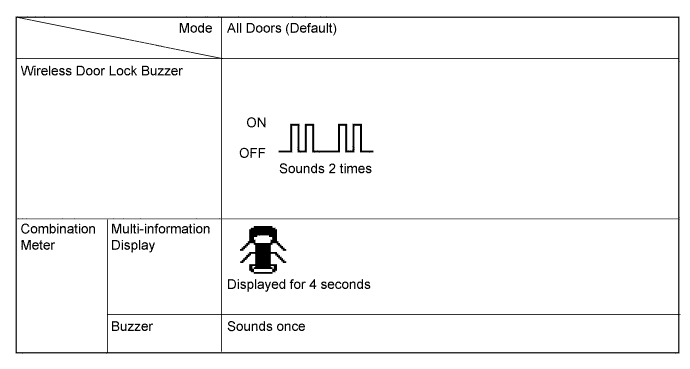
All door unlock mode:
-
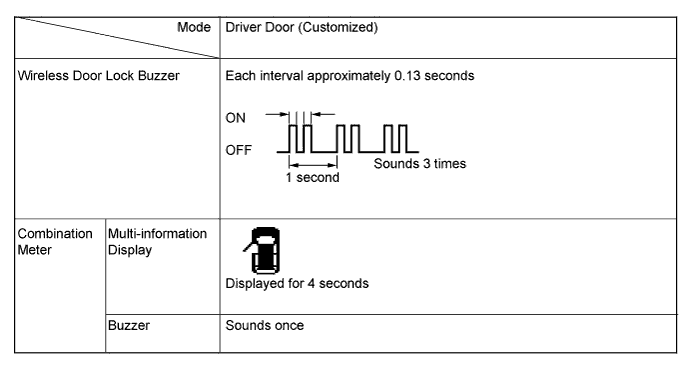
Driver door unlock mode:
Tip:The above illustrations are for LHD vehicles. For RHD vehicles, the left side and right side are reversed.
-
-
-
KEY CANCEL
The key cancel operation disables the following functions:
-
Entry Unlock/Lock
-
Key Lock-in Prevention
-
Entry Back Door Open
-
Warning
-
Entry Ignition
-
-
The operation procedures are as follows:
Precondition:
Engine switch off, driver side door closed and unlocked.
-
-
Unlock the driver side door once with the unlock switch of the key.
-
pen the driver door within 5 seconds.
-
Unlock the driver side door twice with the unlock switch of the key within 5 seconds.
-
Perform close → open twice for the driver door within 30 seconds.
(Driver door: Open condition → Close → Open → Close → Open)
-
Unlock the driver side door twice with the unlock switch of the key within 5 seconds.
-
Perform close → open once for the driver door within 30 seconds.
(Driver door: Open condition → Close → Open)
-
Close the driver door within 5 seconds.
When key cancel is activated, the wireless door lock buzzer sounds twice.
To return to the original condition, perform the procedure again. When the original condition is returned, the wireless door lock buzzer sounds once.
-
-
-
-
-
LIGHTING SYSTEM (for Interior)
Table 6. Illuminated Entry Display Default Content Setting Lighting Time 15s A function that changes the duration that the lights remain on after closing the doors (the lights quickly fade out when the ignition switch is turned to ON). 7.5s/15s/30s I/L when ACC OFF ON A function that turns on the lights when the ignition switch is turned from ON or ACC to off (the room light turns on when the map light switch is set to DOOR). ON/OFF I/L ON W/Door Key Unlock ON A function that turns on the room light when the door is unlocked with the door key cylinder (the room light turns on when the map light switch is set to DOOR). ON/OFF Room Light when Aprchd*1 ON A function that turns on the room light when the key is brought within the vehicle exterior detection area (the room light turns on when the map light switch is set to DOOR). ON/OFF Inside Foot Light ON A function that enables or disables the operation of the No. 1 interior illumination light assemblies and console box illumination light assembly*3. ON/OFF Light Control ON A function that illuminates the No. 1 interior illumination light assemblies and console box illumination light assembly*3 when the ignition switch is ON and the shift lever is not in P*2. ON/OFF
-
*1: w/ Entry and Start System
-
*2: except Manual Transaxle
-
*3: w/ Console Box Lid
-
-
METER / GAUGE SYSTEM
Table 7. Warning Display Default Contents Setting Key Remind Volume LARGE To change the volume of the key reminder buzzer. LARGE/MEDIUM/SMALL Key Remind Sound SLOW To change the frequency of the key reminder buzzer. NORMAL/FAST/SLOW Driver Side Seatbelt Warning Buzzer ON To enable or disable the seat belt warning buzzer. ON/OFF Front Passenger Side Seatbelt Warning Buzzer ON To enable or disable the seat belt warning buzzer. ON/OFF Rear Seatbelt Warning Buzzer*1, *2 ON To enable or disable the seat belt warning buzzer. ON/OFF
-
*1: w/ Rear No. 1 Seat
-
*2: w/ Rear No. 2 Seat
Table 8. Display Display Default Contents Setting ECO Drive Indicator* ON To enable or disable the Eco Driving Indicator Zone Display. ON/OFF
-
*: except Manual Transaxle
-
CUSTOMIZING ECO DRIVING INDICATOR LIGHT
Tip:The driver can stay off.
When the eco driving indicator light is deactivated, the system check for the indicator is disabled.
-
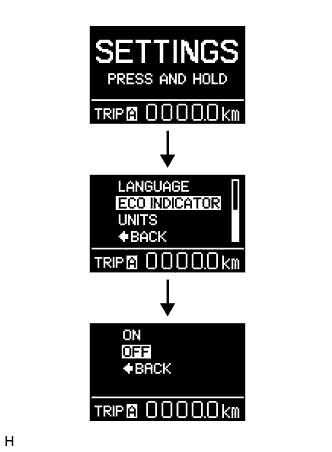
Select "SETTING" of Multi-information display while the vehicle is recognized as stopped (vehicle speed is below 8 km/h).
-
Keep the DISP switch pressed for a while.
-
Select "ECO INDICATOR" from the displayed items.
-
Keep the DISP switch pressed for a while.
-
Select "OFF" from the displayed items. Then keep the switch pressed for a while. the eco drive indicator light is deactivated.
Tip:To activate the eco driving indicator light, select "ON".
-
-
-
SEAT BELT WARNING SYSTEM
Table 9. Seat Belt Warning Display Default Contents Setting Driver Side Seatbelt Warning Buzzer ON If the driver side seat belt is unfastened and the vehicle is driven at approximately 20 km/h (12.5 mph) or more, the system sounds the seat belt warning buzzer. ON/OFF Front Passenger Side Seatbelt Warning Buzzer ON If the front passenger side seat belt is unfastened with the front passenger seat occupied, and the vehicle is driven at approximately 20 km/h (12.5 mph) or more, the system sounds the seat belt warning buzzer. ON/OFF Rear Seatbelt Warning Buzzer* ON After a rear door is opened and closed, if a rear seat belt is unfastened and the vehicle is driven at approximately 20 km/h (12.5 mph) or more, the system sounds the seat belt warning buzzer. ON/OFF
-
*: w/ Rear No. 1 Seat, w/ Rear No. 2 Seat
-
-
AIR CONDITIONING SYSTEM (for Automatic Air Conditioning System)
Table 10. Air Conditioner Display Default Contents Setting Set Temperature Shift Normal Function to set the temperature shift. +2 C/+1 C/Normal/-1 C/-2 C Evaporator Control Automatic Function to set the evaporator control to the automatic position (Automatic) to save power, or to the coldest position (Manual) to dehumidify the air and to prevent the windows from fogging up. Automatic/Manual Compressor Mode Automatic Function to turn the A/C on automatically by pressing the AUTO button when the blower is on and the A/C is off. Automatic/Manual Air Inlet Mode Automatic Function to automatically change to recirculation mode when the A/C is turned on. Automatic/Manual Foot/DEF Auto Mode ON Function to turn on the airflow from the front and rear footwell register ducts and front defroster automatically when auto mode is on. ON/OFF Foot/DEF Automatic Blow Up Function ON Function to change the blower level automatically when the front defroster is on. ON/OFF -
LIGHTING SYSTEM (for Exterior)
Table 11. Light Control Display Default Content Setting Sensitivity NORMAL A function to adjust the ambient light sensitivity of the automatic light control system.* Normal/Dark2/Dark1/Light1/Light2 Follow Me Home Lighting Time 30 s Changes the low beam headlight lighting time when ignition switch is off and light control switch is pulled to flash headlights once. 30 s, 60 s, 90 s, or 120 s Tip:*: The sensitivity adjustment may be difficult to confirm. Check by driving the customer's vehicle.
Table 12. Sensitivity of Automatic Light Control System System Setting 
Setting Dark2 Dark1 Normal Light1 Light2 Tip:When the setting is closer to the "Light" side, the system turns the lights on even when the surrounding area is relatively bright. When the setting is closer to the "Dark" side, the system waits until the surrounding area is darker before turning on the lights
-