- Click here
PRECAUTION (w/ Navigation System for HDD)
Note:After the power switch is turned off, the display and navigation module display (HDD navigation system) records various types of memory and settings. As a result, after turning the power switch off, make sure to wait for the time specified in the following table before disconnecting the cable from the negative (-) battery terminal.
Table 1. Waiting Time before Disconnecting Cable from Negative (-) Battery Terminal Specification Waiting Time w/o Telematics transceiver 60 sec. w/ Telematics transceiver 120 sec. - Click here
REMOVE REAR DECK FLOOR BOX
-
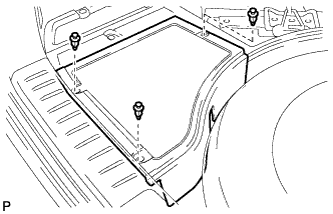
Remove the 3 clips and the rear deck floor box.
-
- Click here
REMOVE STEERING COLUMN COVER
-
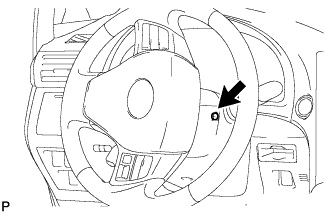
Turn the steering wheel assembly to the right and remove the screw as shown in the illustration.
-
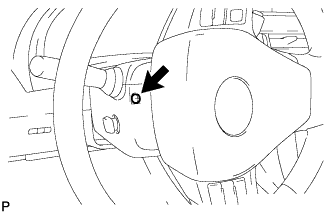
Turn the steering wheel assembly to the left and remove the screw as shown in the illustration.
-
Disable the auto tilt away function by changing the customize parameter (Click here).
Note:Record the current customize parameter setting (whether the auto tilt away function is enabled or disabled) in order to restore the current setting after finishing this operation.
Tip:Performing the above operation disables the auto tilt away function when the power switch is turned off.
-
Turn the power switch on (IG). Operate the tilt and telescopic switch to fully extend and upper the steering column assembly.
-
Turn the power switch off and disconnect the cable from the negative (-) battery terminal.
Note:When disconnecting the cable, some systems need to be initialized after the cable is reconnected (Click here).
-
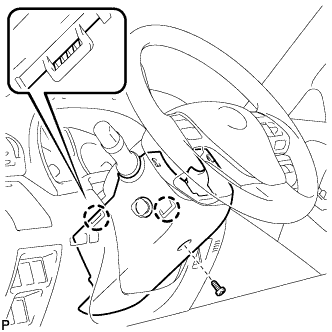
Remove the screw.
-
Disengage the 2 claws and remove the lower steering column cover.
Note:Do not damage the tilt and telescopic switch.
-
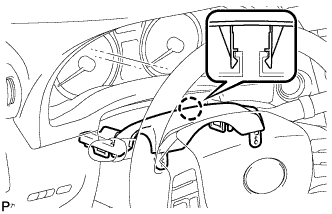
Disengage the claw.
-
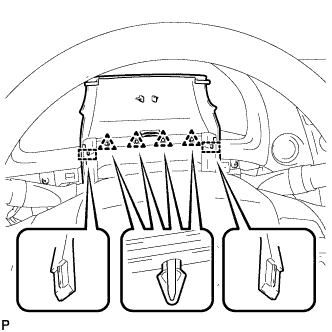
Disengage the 4 clips and 2 guides to remove the upper steering column cover as shown in the illustration.
-
- Click here
REMOVE WINDSHIELD WIPER SWITCH ASSEMBLY
-

Disconnect the connector.
-
Disengage the claw and remove the windshield wiper switch assembly as shown in the illustration.
Note:If the claw is pushed with excessive force, it may break.
-