OUTER REAR VIEW MIRROR REMOVAL

-
PRECAUTION (w/ Navigation System for HDD)
Note
After the power switch is turned off, the display and navigation module display (HDD navigation system) records various types of memory and settings. As a result, after turning the power switch off, make sure to wait for the time specified in the following table before disconnecting the cable from the negative (-) battery terminal.
Waiting Time before Disconnecting Cable from Negative (-) Battery Terminal Specification Waiting Time w/o Telematics transceiver 60 sec. w/ Telematics transceiver 120 sec. -
REMOVE REAR DECK FLOOR BOX
-
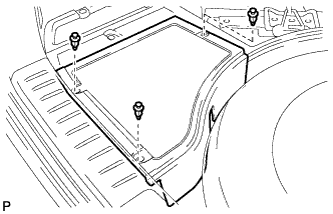
Remove the 3 clips and the rear deck floor box.
-
-
DISCONNECT CABLE FROM NEGATIVE BATTERY TERMINAL
CAUTION:
Wait at least 90 seconds after disconnecting the cable from the negative (-) battery terminal to disable the SRS system.
Note
When disconnecting the cable, some systems need to be initialized after the cable is reconnected Click here.
-
REMOVE FRONT DOOR INSIDE HANDLE BEZEL PLUG
-
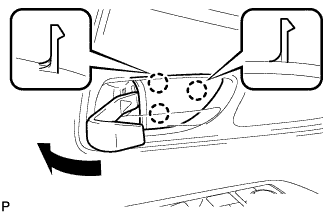
Using a moulding remover, disengage the 3 claws and remove the front door inside handle bezel plug as shown in the illustration.
-
-
REMOVE POWER WINDOW REGULATOR MASTER SWITCH ASSEMBLY WITH FRONT DOOR ARMREST BASE PANEL (for Driver Side)
-
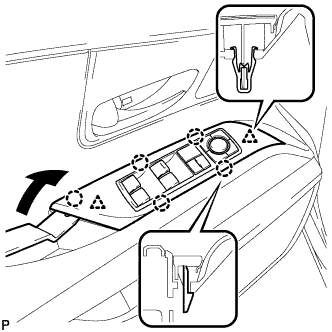
Using a moulding remover, disengage the 2 clips and 5 claws as shown in the illustration.
-
Disconnect the connector and remove the power window regulator master switch assembly with front door armrest base panel.
-
-
REMOVE POWER WINDOW REGULATOR SWITCH ASSEMBLY WITH FRONT DOOR ARMREST BASE PANEL (for Front Passenger Side)
-
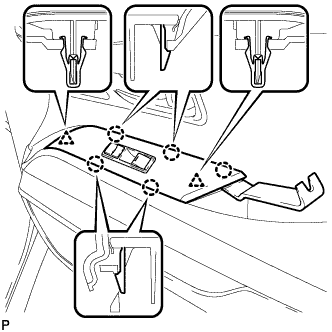
Using a moulding remover, disengage the 2 clips and 5 claws.
-
Disconnect the connector and remove the power window regulator switch assembly with front door armrest base panel.
-
-
REMOVE DOOR ARMREST COVER
-
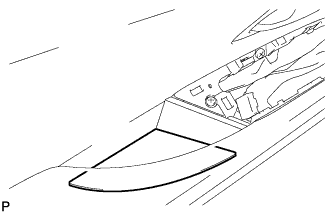
Remove the door armrest cover.
-
-
REMOVE COURTESY LIGHT ASSEMBLY
-
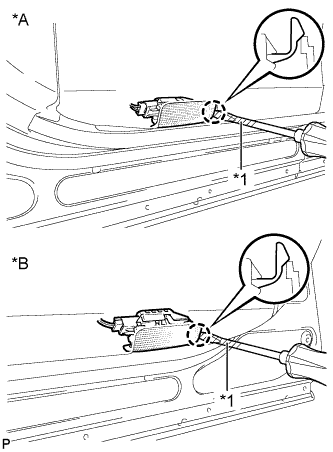
Text in Illustration *A for LH Side *B for RH Side *1 Protective Tape Using a screwdriver wrapped with protective tape, disengage the claw.
-
Disconnect the connector and remove the courtesy light assembly.
-
-
REMOVE NO. 1 FRONT DOOR STIFFENER CUSHION
-
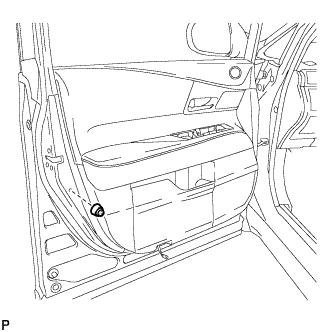
Remove the screw and No. 1 front door stiffener cushion.
-
-
REMOVE FRONT DOOR TRIM BOARD SUB-ASSEMBLY
-
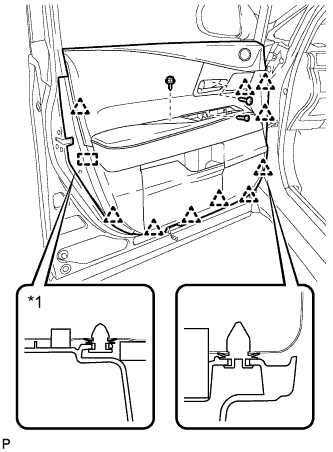
Remove the 3 screws.
-
Using a clip remover, disengage the 10 clips and front door trim board retainer.
Text in Illustration *1 Front Door Trim Board Retainer -
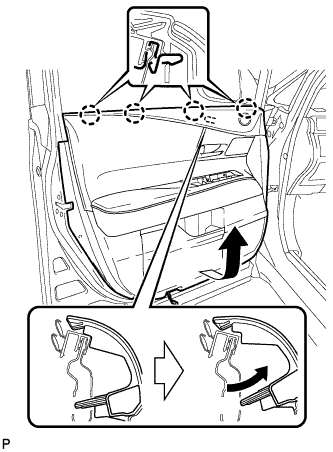
Pull out the front door trim board sub-assembly in the direction indicated by the arrow as shown in the illustration.
-
Raise the front door trim board sub-assembly to disengage the 4 claws and remove the front door trim board sub-assembly together with the front door inner glass weatherstrip.
-
Disconnect each connector.
-
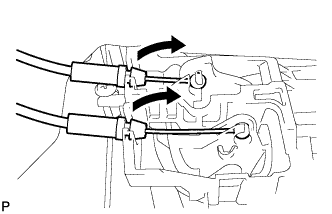
Disconnect the front door lock remote control cable assembly and front door inside locking cable assembly.
-
Remove the front door trim board retainer (green) from the front door trim board sub-assembly.
-
-
REMOVE FRONT DOOR INNER GLASS WEATHERSTRIP
-
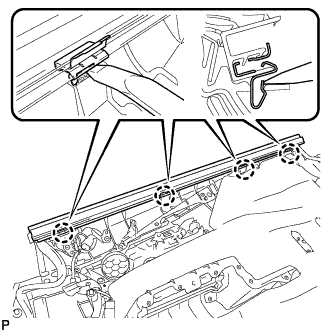
Using a moulding remover, disengage the 4 claws and remove the front door inner glass weatherstrip from the front door trim board sub-assembly as shown in the illustration.
-
-
REMOVE DOOR FRAME GARNISH
-
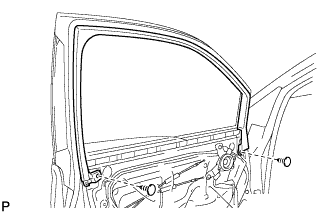
Remove the 2 clips and door frame garnish.
-
-
REMOVE NO. 3 FRONT SPEAKER ASSEMBLY
-
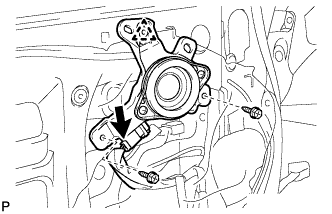
Disconnect the connector.
-
Remove the 2 screws.
-
Disengage the clip and remove the front No. 3 speaker assembly.
-
-
REMOVE OUTER MIRROR CONTROL ECU ASSEMBLY
-
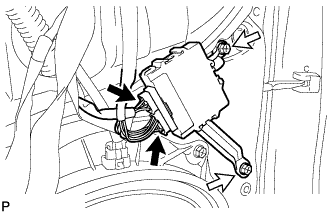
Disconnect each connector.
-
Remove the 2 screws and the outer mirror control ECU assembly.
-
-
REMOVE NO. 1 FRONT DOOR TRIM BRACKET
-
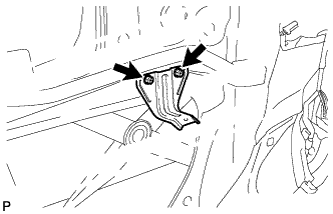
Remove the 2 screws and No. 1 front door trim bracket.
-
-
REMOVE FRONT DOOR SERVICE HOLE COVER
-
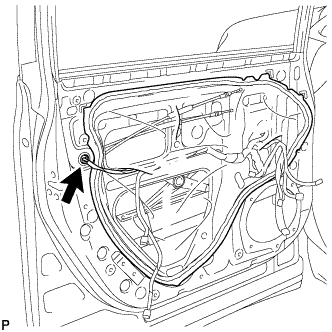
Disconnect the connector.
-
Remove the front door service hole cover.
Tech Tips
Remove any remaining butyl tape from the door.
-
-
REMOVE OUTER MIRROR PROTECTOR
-
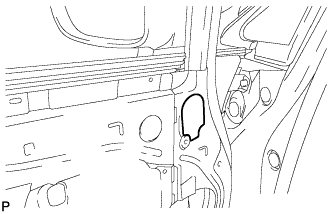
Remove the outer mirror protector.
-
-
REMOVE OUTER MIRROR INSTALL HOLE COVER
-
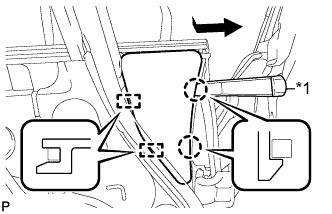
Text in Illustration *1 Moulding Remover Using a moulding remover, disengage the 2 claws and 2 guides, and remove the outer mirror install hole cover.
-
-
REMOVE OUTER REAR VIEW MIRROR ASSEMBLY
-
w/o Side Monitor System:
-
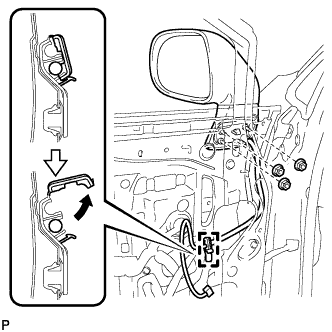
Disengage the clamp as shown in the illustration.
-
Remove the 3 nuts.
-
-
w/ Side Monitor System:
-
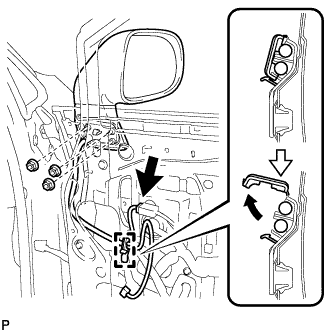
Disconnect the connector.
-
Disengage the clamp as shown in the illustration.
-
Remove the 3 nuts.
-
-
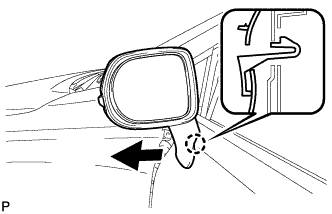
Disengage the claw and remove the outer rear view mirror assembly as shown in the illustration.
-