ELECTRICAL KEY OSCILLATOR (for Center Floor) REMOVAL

-
PRECAUTION (w/ Navigation System for HDD)
Note
After the power switch is turned off, the display and navigation module display (HDD navigation system) records various types of memory and settings. As a result, after turning the power switch off, make sure to wait for the time specified in the following table before disconnecting the cable from the negative (-) battery terminal.
Waiting Time before Disconnecting Cable from Negative (-) Battery Terminal Specification Waiting Time w/o Telematics transceiver 60 sec. w/ Telematics transceiver 120 sec. -
REMOVE REAR DECK FLOOR BOX
-
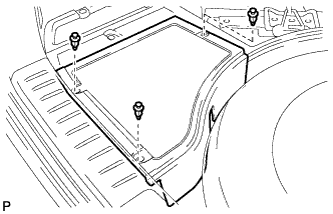
Remove the 3 clips and the rear deck floor box.
-
-
DISCONNECT CABLE FROM NEGATIVE BATTERY TERMINAL
CAUTION:
Wait at least 90 seconds after disconnecting the cable from the negative (-) battery terminal to disable the SRS system.
Note
When disconnecting the cable, some systems need to be initialized after the cable is reconnected Click here.
-
REMOVE REAR SEAT HEADREST ASSEMBLY LH
-
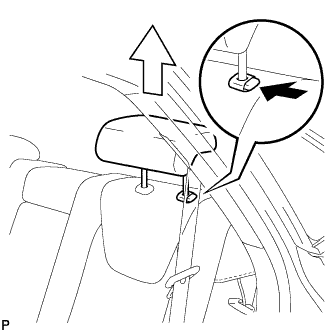
Press the headrest support button and pull up the headrest as shown in the illustration.
-
-
REMOVE REAR SEAT OUTER TRACK BRACKET COVER LH
-
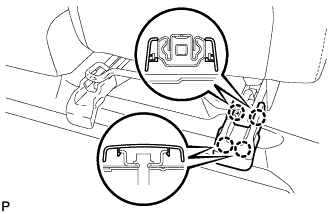
Disengage the 4 claws and remove the rear seat outer track bracket cover LH.
-
-
REMOVE REAR SEAT INNER TRACK BRACKET COVER LH
-
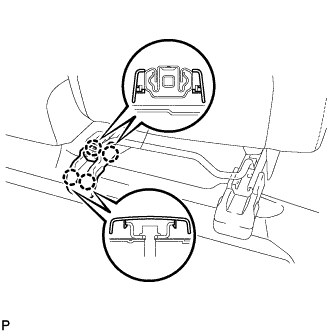
Disengage the 4 claws and remove the rear seat inner track bracket cover LH.
-
-
DISCONNECT REAR SEAT LOCK CABLE ASSEMBLY LH
-
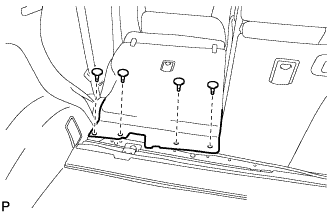
Remove the 4 clips.
-
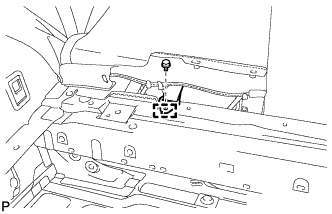
Remove the bolt.
-
Disengage the guide and disconnect the No. 1 fold seat stopper band assembly.
-
Pull down the adjuster lock piece to release the lock as shown in the illustration.
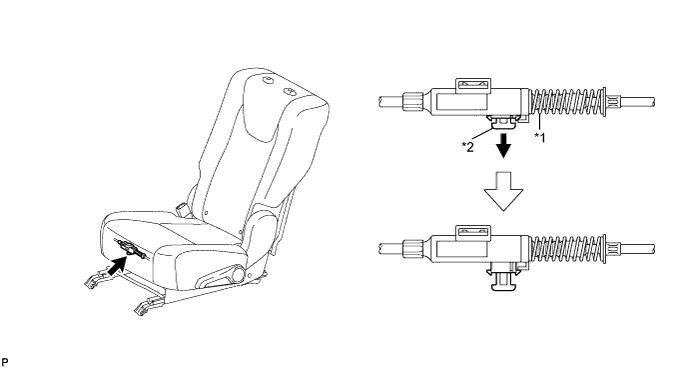
Text in Illustration *1 Adjuster Spring *2 Lock Piece -
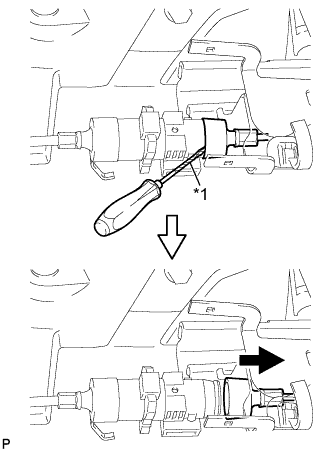
Text in Illustration *1 Protective Tape Using a screwdriver wrapped with protective tape, disconnect the No. 2 reclining control cable as shown in the illustration.
-
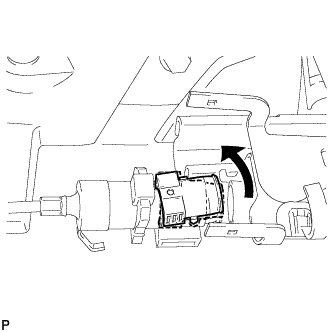
Remove the rear seat reclining control cable from the cover as shown in the illustration.
-
Lift up the seat track adjusting handle to the uppermost position and hold the handle in this position as shown in the illustration.
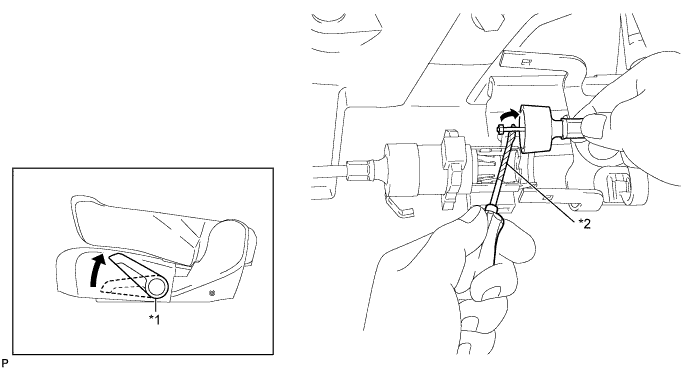
Text in Illustration *1 Seat Track Adjusting Handle *2 Protective Tape -
Using a screwdriver wrapped with protective tape, disconnect the No. 2 rear seat reclining control cable as shown in the illustration.
-
Using a screwdriver wrapped with protective tape, disconnect the rear seat lock cable assembly LH as shown in the illustration.
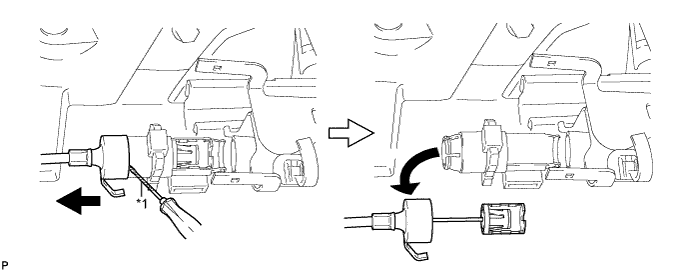
Text in Illustration *1 Protective Tape -
When replacing the rear seat assembly LH or No. 2 rear seat reclining control cable with a new one:
-
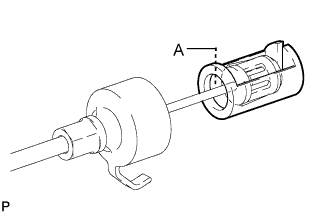
Cut portion A shown in the illustration to separate the rear seat assembly LH or No. 2 rear seat reclining control cable.
-
-
When replacing the rear seat lock cable assembly LH with a new one:
-
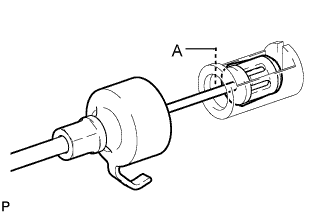
Cut portion A shown in the illustration to separate the rear seat lock assembly LH.
-
-
-
REMOVE REAR SEAT ASSEMBLY LH
-
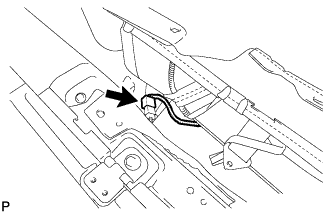
Disconnect the connector.
-
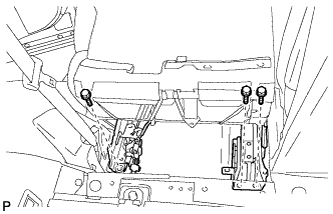
Remove the 3 bolts on the rear side of the seat.
-
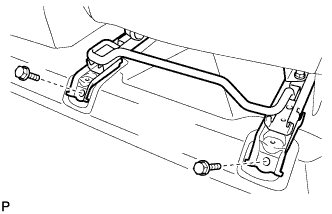
Remove the 2 bolts on the front side of the seat and the rear seat assembly LH.
Note
Be careful not to damage the vehicle body.
-
-
REMOVE REAR SEAT HEADREST ASSEMBLY RH
-
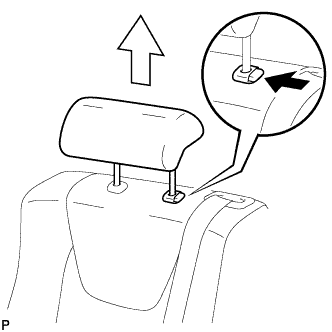
Press the headrest support button and pull up the headrest as shown in the illustration.
-
-
REMOVE REAR SEAT CENTER HEADREST ASSEMBLY
-
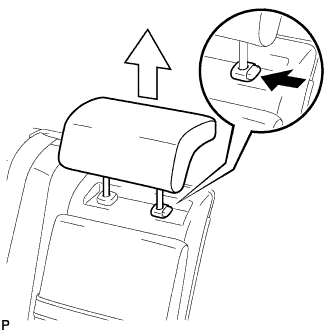
Press the headrest support button and pull up the headrest as shown in the illustration.
-
-
REMOVE REAR SEAT OUTER TRACK BRACKET COVER RH
-
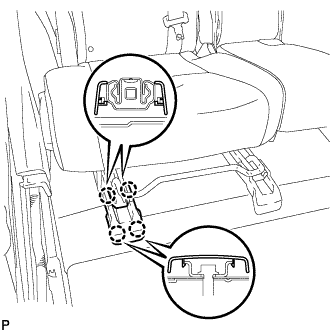
Disengage the 4 claws and remove the rear seat track bracket cover RH.
-
-
REMOVE REAR SEAT INNER TRACK BRACKET COVER RH
-
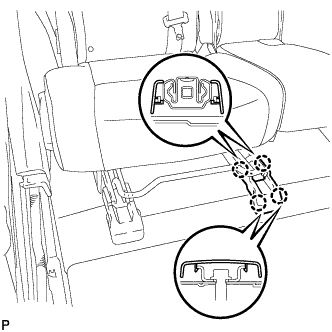
Disengage the 4 claws and remove the 4 rear seat track bracket cover RH.
-
-
DISCONNECT REAR SEAT LOCK CABLE ASSEMBLY RH
-
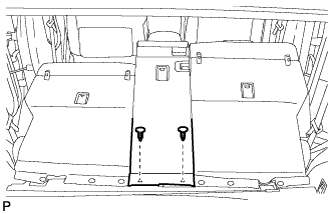
Using a clip remover, remove the 2 clips and disconnect the rear seatback board sub-assembly.
-
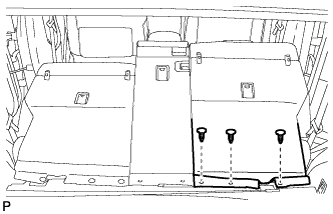
Using a clip remover, remove the 3 clips and disconnect the rear seatback board carpet assembly RH.
-
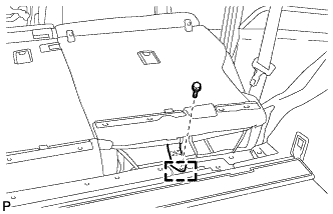
Remove the bolt.
-
Disengage the guide and disconnect the No. 1 fold seat stopper band assembly.
-
Pull down the adjusters lock piece to release the lock as shown in the illustration.
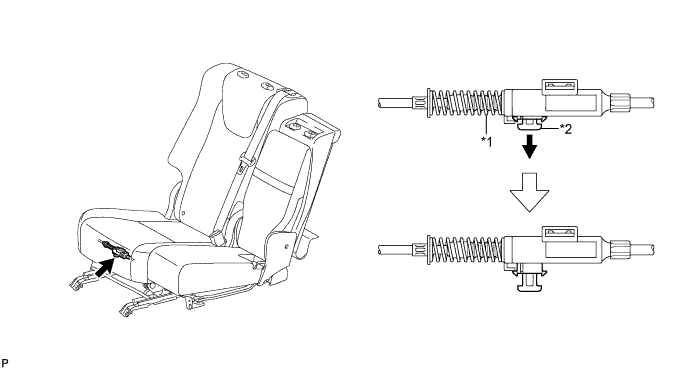
Text in Illustration *1 Adjusters Spring *2 Lock Piece -
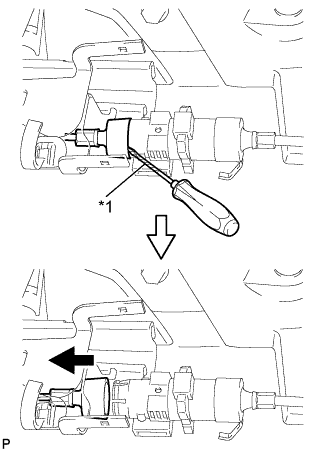
Text in Illustration *1 Protective Tape Using a screwdriver wrapped with protective tape, disconnect the No. 1 reclining control cable as shown in the illustration.
-
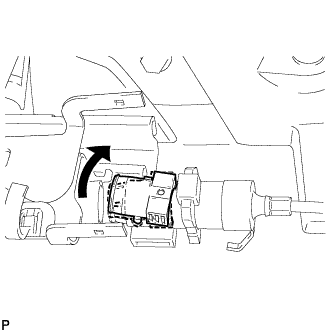
Remove the rear seat reclining control cable from the cover as shown in the illustration.
-
Lift up the seat track adjusting handle to the uppermost position and hold the handle in this position as shown in the illustration.
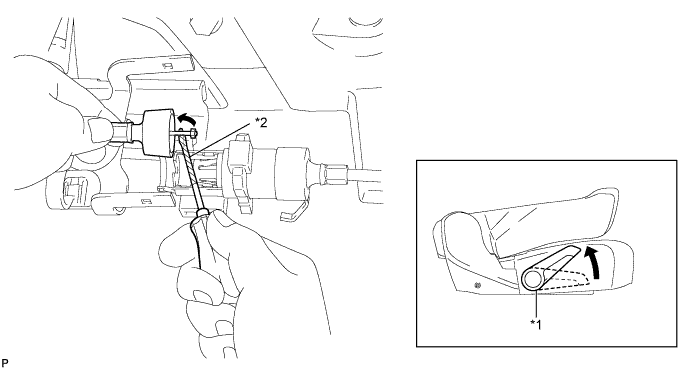
Text in Illustration *1 Seat Track Adjusting Handle *2 Protective Tape -
Using a screwdriver wrapped with protective tape, disconnect the No. 1 rear seat lock cable assembly as shown in the illustration.
-
Using a screwdriver wrapped with protective tape, disconnect the rear seat lock cable assembly RH as shown in the illustration.
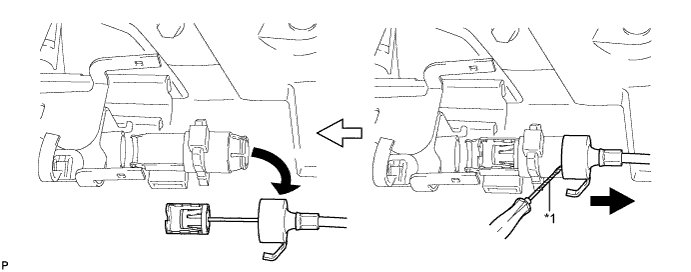
Text in Illustration *1 Protective Tape -
When replacing the rear seat assembly RH or rear seat reclining control cable with a new one:
-
Cut portion A shown in the illustration to separate the rear seat assembly RH or rear seat reclining control cable.
-
-
When replacing the rear seat lock cable assembly RH with a new one:
-
Cut portion A shown in the illustration to separate the rear seat lock assembly RH.
-
-
-
REMOVE REAR SEAT ASSEMBLY RH
-
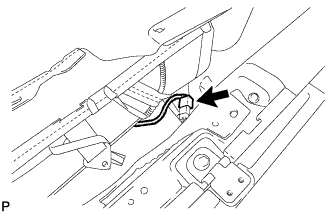
Disconnect the connector.
-
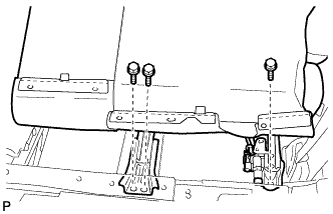
Remove the 3 bolts on the rear side of the seat.
-
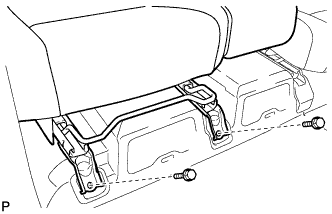
Remove the 2 bolts on the front side of the seat and the rear seat assembly RH.
Note
Be careful not to damage the vehicle body.
-
-
REMOVE AIR INTAKE COVER
-
Remove the air intake cover LH.
-
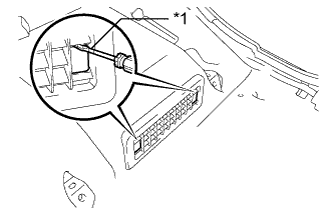
Text in Illustration *1 Protective Tape Release the claw by using a screwdriver with the tip taped, and remove its 2 hole covers.
-
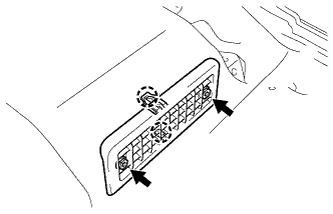
Remove the 2 screws, then release the 2 claws and remove the air intake cover LH.
-
-
Remove the air intake cover CTR.
-
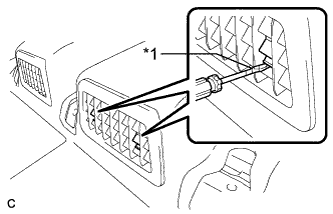
Text in Illustration *1 Protective Tape Release the claw by using a screwdriver with the tip taped, and remove its 2 hole covers.
-
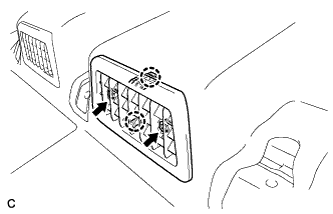
Remove the 2 screws, then release the 2 claws and remove the center air intake cover.
-
-
Remove the air intake cover RH.
-
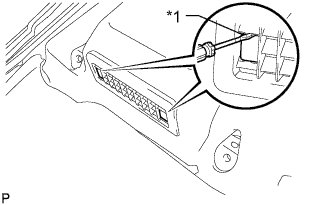
Text in Illustration *1 Protective Tape Release the claw by using a screwdriver with its tip taped, and remove the 2 hole covers.
-
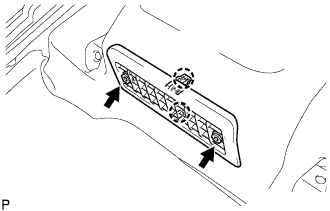
Remove the 2 screws, then release the 2 claws and remove the air intake cover RH.
-
-
-
REMOVE ELECTRICAL KEY OSCILLATOR
-
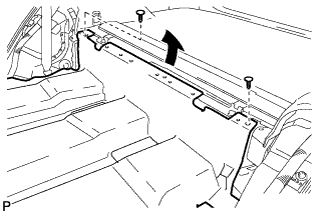
Remove the 2 clips and turn over the floor carpet as shown in the illustration.
-
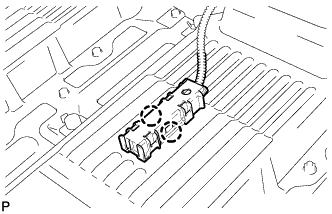
Disengage the 2 claws and remove the electrical key oscillator.
-
Disconnect the connector.
Note
Be careful when removing the electrical key oscillator. If the oscillator is dropped, replace it with a new one.
-