TIRE PRESSURE WARNING RESET SWITCH INSTALLATION

-
INSTALL TIRE PRESSURE WARNING RESET SWITCH (for LHD)
-
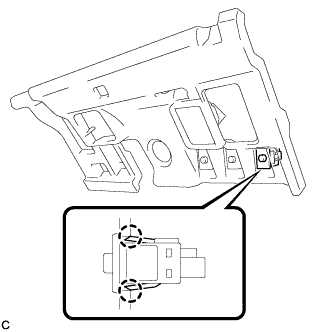
Engage the 2 claws to install the tire pressure warning reset switch to the No. 1 instrument panel under cover sub-assembly.
-
-
INSTALL TIRE PRESSURE WARNING RESET SWITCH (for RHD)
-
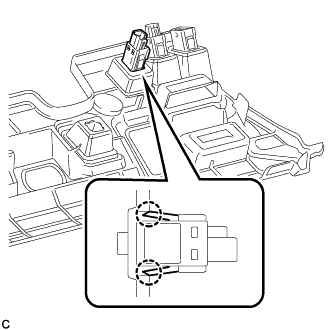
Engage the 2 claws to install the tire pressure warning reset switch to the No. 1 instrument panel under cover sub-assembly.
-
-
INSTALL NO. 1 INSTRUMENT PANEL UNDER COVER SUB-ASSEMBLY (for LHD)
-
Engage each clamp.
-
Connect each connector.
-
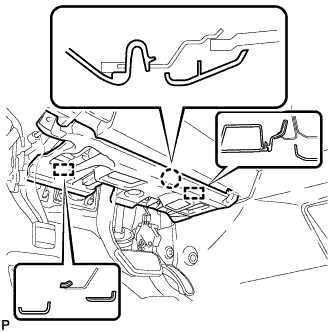
Engage the claw and 2 guides.
-
Install the No. 1 instrument panel under cover sub- assembly with the 2 screws <D>.
-
-
INSTALL NO. 1 INSTRUMENT PANEL UNDER COVER SUB-ASSEMBLY (for RHD)
-
Engage each clamp.
-
Connect each connector.
-
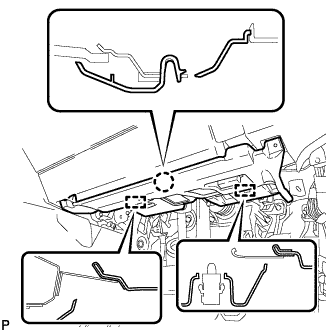
Engage the claw and 2 guides.
-
Install the No. 1 instrument panel under cover sub- assembly with the 2 screws <D>.
-
-
CONNECT CABLE TO NEGATIVE AUXILIARY BATTERY TERMINAL
Note
When disconnecting the cable, some systems need to be initialized after the cable is reconnected Click here.
-
INSPECT TIRE PRESSURE WARNING SYSTEM