SIDE MONITOR SYSTEM TERMINALS OF ECU

-
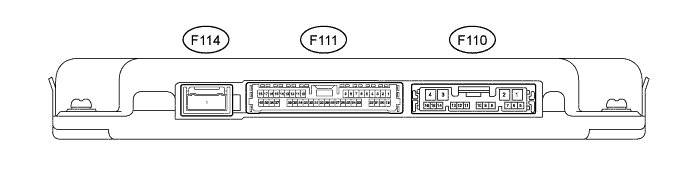
PARKING ASSIST ECU
-
Disconnect the F110 and F111 parking assist ECU connectors.
-
Measure the voltage and resistance according to the value(s) in the table below.
Terminal No. (Symbol) Wiring Color Terminal Description Condition Specified Condition F110-1 (+B) - F110-4 (GND1) R - W-B Power source signal Power switch off 11 to 14 V F110-4 (GND1) - Body ground W-B - Body ground Ground Always Below 1 Ω F110-8 (IG) - F110-4 (GND1) W - W-B IG Power source signal Power switch on (IG) 11 to 14 V F110-9 (ACC) - F110-4 (GND1) GR - W-B ACC Power source signal Power switch off (ACC) 11 to 14 V F111-7 (BLSW) - F110-4 (GND1) BR - W-B Side monitor main switch power source signal Power switch on (IG), side monitor main switch on 11 to 14 V -
Reconnect the F110 and F111 parking assist ECU connectors.
-
Measure the voltage according to the value(s) in the table below.
Terminal No. (Symbol) Wiring Color Terminal Description Condition Specified Condition F111-39 (CANL) - F110-4 (GND1) L - W-B CAN communication signal CAN communication circuit Pulse generation F111-40 (CANH) - F110-4 (GND1) Y - W-B CAN communication signal CAN communication circuit Pulse generation F110-10 (TX-) L AVC-LAN communication signal - - F110-11 (TX+) P AVC-LAN communication signal - - F111-34 (SCV-) - F111-33 (SGND) W - Shielded Side television camera ground Always Below 1 V F111-10 (SCV+) - F111-33 (SGND) R - Shielded Side television camera display signal input Power switch on (IG), side monitor main switch on Pulse generation
(See waveform 1)
F111-33 (SGND) - F110-4 (GND1) Shielded - W-B Side television camera ground (shield) Always Below 1 V F111-32 (SCB+) - F111-33 (SGND) B - Shielded Power source to side television camera Power switch on (IG), side monitor main switch on 5.5 to 7.05 V -
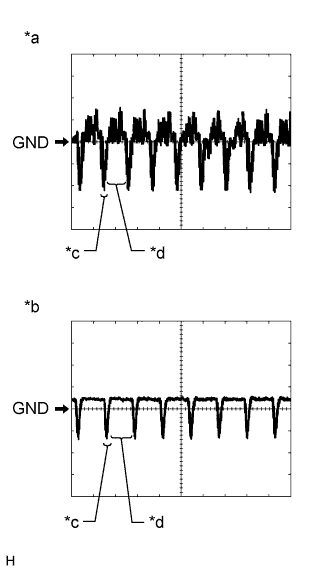
Text in Illustration *1 Waveform A (under normal conditions) *2 Waveform B (camera lens is covered, blacking out the screen) *3 Synchronized Signal *4 Video Waveform Reference (Oscilloscope waveform):
Tech Tips
The video waveform changes according to the image sent by the side television camera assembly.
-
Waveform 1
Item Content Terminal No. (Symbol) F111-10 (SCV+) - F111-33 (SGND) Tool Setting 200 mV/DIV., 50 μsec./DIV. Condition
-
Waveform A: Power switch on (IG), side monitor main switch on and camera lens is not covered, displaying an image
-
Waveform B: Power switch on (IG), side monitor main switch on and camera lens is not covered, displaying an image.
-
-
-
-
SIDE TELEVISION CAMERA ASSEMBLY
-
Disconnect the side television camera assembly connector.

-
Measure the voltage according to the value(s) in the table below.
Terminal No. (Symbol) Terminal Description Condition Specified Condition 4 - Body ground Ground Always Below 1 V 1 - 4 Power source Power switch on (IG), side monitor main switch on 5.5 to 7.05 V -
Reconnect the side television camera assembly connector.
Tech Tips
A waterproof connector is used for the front television camera assembly. Therefore, inspect the waveform at the parking assist ECU with the connector connected.
-
Measure the voltage according to the value(s) in the table below.
Terminal No. (Symbol) Terminal Description Condition Specified Condition 3 - 4 Display signal Power switch on (IG), side monitor main switch on Pulse generation
(See waveform 1)
4 - 6 Side television camera ground Always Below 1 V -
Text in Illustration *1 Waveform A (under normal conditions) *2 Waveform B (camera lens is covered, blacking out the screen) *3 Synchronized Signal *4 Video Waveform Reference (Oscilloscope waveform):
Tech Tips
The video waveform changes according to the image sent by the side television camera assembly.
-
Waveform 1
Item Content Terminal No. (Symbol) 3 - 4 Tool Setting 200 mV/DIV., 50 μsec./DIV. Condition
-
Waveform A: Power switch on (IG), side monitor main switch on and camera lens is not covered, displaying an image.
-
Waveform B: Power switch on (IG), side monitor main switch on and camera lens is covered, blacking out the screen.
-
-
-
-
MULTI-MEDIA MODULE RECEIVER ASSEMBLY Click here
-
MULTI-DISPLAY ASSEMBLY Click here