NAVIGATION SYSTEM, Diagnostic DTC:B15DB

| DTC Code | DTC Name |
|---|---|
| B15DB | Telematics Transceiver Disconnected |
DESCRIPTION
If the multi-media module receiver assembly cannot detect the telematics transceiver for a certain period of time (15 seconds) after the power switch is turned on (ACC) and the multi-media module receiver assembly confirms that the information is missing by checking past telematics transceiver recognition information (registered information), this DTC will be stored.
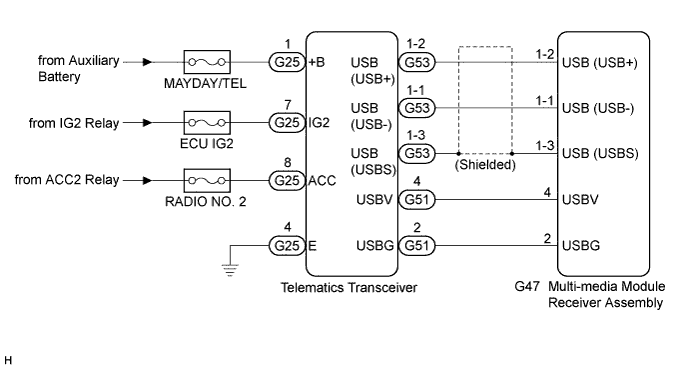
The G-BOOK system uses USB communication between devices. If an open, short, short to +B or short to ground occurs in the USB circuit, communication is interrupted and the G-BOOK system will not operate normally.
| DTC No. | DTC Detection Condition | Trouble Area |
|---|---|---|
| B15DB | Telematics transceiver disconnected |
|
Tech Tips
This DTC may be stored due to environmental reasons such as electrical noise or interference.
WIRING DIAGRAM
INSPECTION PROCEDURE
Note
-
Inspect the fuses for circuits related to this system before performing the following inspection procedure.
-
When replacing the multi-media module receiver assembly or telematics transceiver, perform vehicle contract setting (w/ Telematics Transceiver) Click here.
-
When replacing the multi-media module receiver assembly, perform vehicle contract setting (w/o Telematics Transceiver) Click here.
w/ G-BOOK System:
PROCEDURE
-
CHECK HARNESS AND CONNECTOR (TELEMATICS TRANSCEIVER POWER SOURCE)
-
Disconnect the G25 telematics transceiver connector.
-
Measure the resistance according to the value(s) in the table below.
Standard Resistance Tester Connection Condition Specified Condition G25-4 (E) - Body ground Always Below 1 Ω -
Measure the voltage according to the value(s) in the table below.
Standard Voltage Tester Connection Condition Specified Condition G25-1 (+B) - Body ground Power switch off 11 to 14 V G25-7 (IG2) - Body ground Power switch on (IG) 11 to 14 V G25-8 (ACC) - Body ground Power switch on (ACC) 11 to 14 V
NG 
REPAIR OR REPLACE HARNESS OR CONNECTOR
OK 
-
-
INSPECT MULTI-MEDIA MODULE RECEIVER ASSEMBLY
-
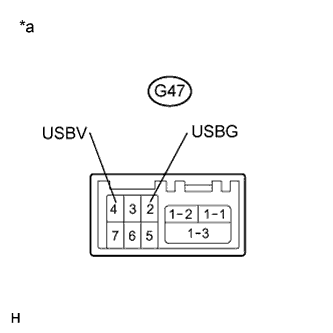
Text in Illustration *a Component without harness connected
(Multi-media Module Receiver Assembly)
Disconnect the G47 multi-media module receiver assembly connector.
-
Measure the resistance according to the value(s) in the table below.
Standard Resistance Tester Connection Condition Specified Condition G47-2 (USBG) - Body ground Always Below 1 Ω -
Measure the voltage according to the value(s) in the table below.
Standard Voltage Tester Connection Condition Specified Condition G47-4 (USBV) - G47-2 (USBG) Power switch on (IG) 4.75 to 5.25 V
NG
REPLACE MULTI-MEDIA MODULE RECEIVER ASSEMBLY Click here
OK
-
-
CHECK HARNESS AND CONNECTOR (MULTI-MEDIA MODULE RECEIVER ASSEMBLY - TELEMATICS TRANSCEIVER)
-
Check the installation condition.
-
Check the USB communication cable (digital communication cable) between the multi-media module receiver assembly and telematics transceiver for any installation or connection problems.
-
-
Disconnect the G47 multi-media module receiver assembly connector.
-
Disconnect the G51 telematics transceiver connector.
-
Measure the resistance according to the value(s) in the table below.
Standard Resistance Tester Connection Condition Specified Condition G47-4 (USBV) - G51-4 (USBV) Always Below 1 Ω G47-2 (USBG) - G51-2 (USBG) Always Below 1 Ω G47-4 (USBV) - Body ground Always 10 kΩ or higher G47-2 (USBG) - Body ground Always 10 kΩ or higher Standard Resistance (USB Cable) Tester Connection Condition Specified Condition G47-1-2 (USB+) - G51-1-2 (USB+) Always Below 1 Ω G47-1-1 (USB-) - G51-1-1 (USB-) Always Below 1 Ω G47-1-3 (USBS) - G51-1-3 (USBS) Always Below 1 Ω G51-1-2 (USB+) - Body ground Always 10 kΩ or higher G51-1-1 (USB-) - Body ground Always 10 kΩ or higher G51-1-3 (USBS) - Body ground Always 10 kΩ or higher
NG
REPAIR OR REPLACE HARNESS OR CONNECTOR
OK
-
-
REPLACE TELEMATICS TRANSCEIVER
-
Replace the telematics transceiver with a known good one and check if the same DTC is output again Click here.
-
Clear the DTCs Click here.
-
Recheck for DTCs and check that no DTCs are output.
OK No DTCs are output.
-
NG
REPLACE MULTI-MEDIA MODULE RECEIVER ASSEMBLY Click here
OK 
END
-