REAR SEAT ENTERTAINMENT SYSTEM, Diagnostic DTC:B15B0

| DTC Code | DTC Name |
|---|---|
| B15B0 | Display Screen Malfunction |
DESCRIPTION
This DTC is stored when a malfunction occurs in the multi-media module receiver assembly or multi-display controller sub-assembly.
Tech Tips
-
The trouble area cannot be determined by checking DTCs with the intelligent tester. It is necessary to display the "System Check Mode" screen to determine the trouble area.
-
If the picture circuit is faulty, the multi-media module receiver assembly stores this DTC.
-
If the picture circuit between the multi-display controller sub-assembly and the television display assembly LH or television display assembly RH is faulty, the multi-display controller sub-assembly stores this DTC.
| DTC No. | DTC Detection Condition | Trouble Area |
|---|---|---|
| B15B0 | Picture circuit (TFT unit) malfunction |
|
INSPECTION PROCEDURE
PROCEDURE
-
CHECK DTC
-
Clear the DTCs Click here.
-
Recheck for DTCs.
Tech Tips
-
The trouble area cannot be determined by checking DTCs with the intelligent tester. It is necessary to display the "System Check Mode" screen to determine the trouble area.
-
If the picture circuit is faulty, the multi-media module receiver assembly stores this DTC.
-
If the picture circuit between the multi-display controller sub-assembly and the television display assembly LH or television display assembly RH is faulty, the multi-display controller sub-assembly stores this DTC.
-
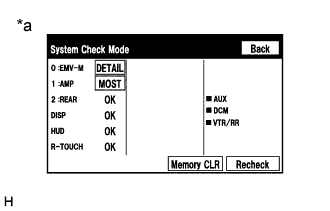
Text in Illustration *a Example Display the "System Check Mode" screen. Click here.
-
Check the result on the "System Check Mode" screen.
Result Result Proceed to No DTCs are output. A DTC "B15B0" is output from "EMV-M". B DTC "B15B0" is output from "REAR". C
-
B 
GO TO NAVIGATION SYSTEM Click here
C 
CHECK TELEVISION DISPLAY ASSEMBLY Click here
A 
USE SIMULATION METHOD TO CHECK Click here
-
-
CHECK TELEVISION DISPLAY ASSEMBLY
-
Check television display assembly operation.
-
Check which television display assembly does not operate.
Result Result Proceed to Both television display assemblies do not operate. A The television display assembly LH does not operate. B The television display assembly RH does not operate. C
-
B
REPLACE TELEVISION DISPLAY ASSEMBLY LH Click here
C
REPLACE TELEVISION DISPLAY ASSEMBLY RH Click here
A
REPLACE MULTI-DISPLAY CONTROLLER SUB-ASSEMBLY Click here
-
-
REPLACE TELEVISION DISPLAY ASSEMBLY LH
-
Replace the television display assembly LH Click here.
-
Clear the DTCs Click here.
-
Recheck for DTCs and check that no DTCs are output.
OK No DTCs are output.
NG
REPLACE MULTI-DISPLAY CONTROLLER SUB-ASSEMBLY Click here
OK
END
-
-
REPLACE TELEVISION DISPLAY ASSEMBLY RH
-
Replace the television display assembly RH Click here.
-
Clear the DTCs Click here.
-
Recheck for DTCs and check that no DTCs are output.
OK No DTCs are output.
NG
REPLACE MULTI-DISPLAY CONTROLLER SUB-ASSEMBLY Click here
OK
END
-