Click here
INSPECTION PROCEDURE
Click here
PROCEDURE
- Click here
CHECK AUDIO SETTINGS
-
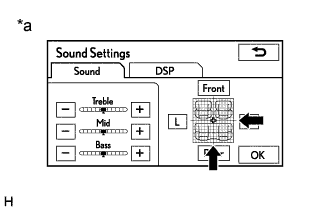
Display the "Sound Settings" screen.
-
Set volume, fader and balance to the initial values and check that sound is normal.
OK Audio system returns to normal. Tip:Sound quality adjustment measures vary according to the type of amplifier.
Table 1. Text in Illustration *a Example
- OKClick here
- NGClick here
-
- Click here
PROCEED TO NEXT SUSPECTED AREA SHOWN IN PROBLEM SYMPTOMS TABLEClick here
- Click here
END