- Click here
INSTALL PARKING BRAKE CONTROL PEDAL ASSEMBLY
-

Install the parking brake control pedal assembly with the 3 nuts.
21 N*m 214 kgf*cm 15 ft.*lbf -

Engage the 2 clamps to install the wire harness clamp.
-

Connect the parking brake switch connector.
-
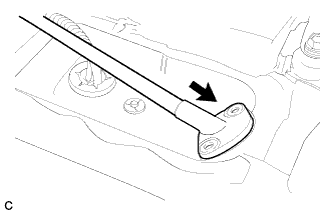
Insert the No. 1 parking brake cable assembly toward the outside of the cabin.
-

Install the No. 1 parking brake cable assembly with the 2 bolts and 2 nuts.
Bolt 8.5 N*m 87 kgf*cm 75 in.*lbf Nut 6.0 N*m 61 kgf*cm 53 in.*lbf -
Install the clamp.
-
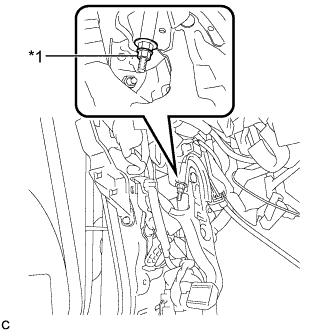
Temporarily install the lock nut.
Table 1. Text in Illustration *1 Lock Nut Tip:After adjusting parking brake pedal travel, tighten the lock nut.
-
- Click here
INSTALL INSTRUMENT PANEL JUNCTION BLOCK ASSEMBLY
-
Connect the connectors to the back of the instrument panel junction block assembly.
-
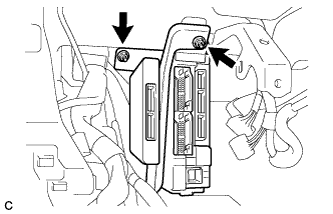
Install the instrument panel junction block assembly with the 2 nuts.
8.0 N*m 82 kgf*cm 71 in.*lbf -
Connect the connectors to the instrument panel junction block assembly.
-
- Click here
INSTALL PARKING BRAKE EQUALIZER
-
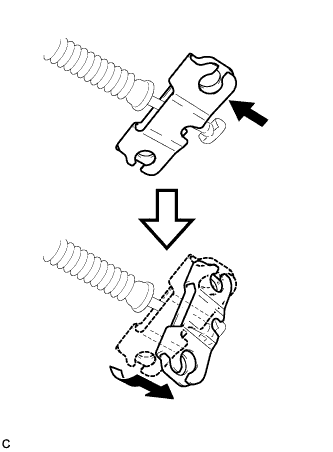
Install the parking brake equalizer to the No. 1 parking brake cable assembly as shown in the illustration.
-

Slide the rubber boot back as shown in the illustration.
-
- Click here
CONNECT NO. 3 PARKING BRAKE CABLE ASSEMBLY
-

Connect the No. 3 parking brake cable assembly to the parking brake equalizer.
-
- Click here
CONNECT NO. 2 PARKING BRAKE CABLE ASSEMBLY
Tip:Perform the same procedure as for the No. 3 parking brake cable assembly.
- Click here
INSTALL REAR ENGINE SERVICE COVER ASSEMBLY
-

Install the rear engine service cover assembly with the 2 bolts.
-
- Click here
INSTALL CENTER FRONT FLOOR COVER
-

Engage the 3 clips to install the center front floor cover.
-

Install the 7 bolts and 2 screws.
-
- Click here
INSTALL FRONT FLOOR FOOTREST
-

Engage the 2 clips to install the front floor footrest.
-
- Click here
INSTALL REAR NO. 1 AIR DUCT
-

Install the rear No. 1 air duct.
-
Engage the wire harness clamp.
-
- Click here
INSTALL REAR NO. 2 AIR DUCT
-

Install the rear No. 2 air duct with the clip.
-
Install the floor carpet.
-
- Click here
INSTALL CONSOLE BOX
-
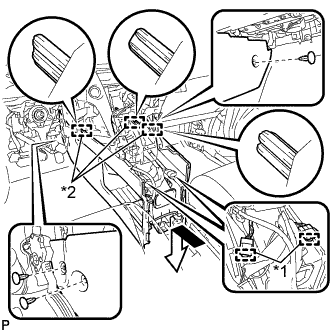
Engage the 3 guides as shown in the illustration.
Table 2. Text in Illustration *1 Clamp *2 Guide -
Engage the 2 clamps.
-
Install the 3 clips.
-
Install the console box with the 5 screws <D>.
-
- Click here
INSTALL FRONT CONSOLE BOX COVER
-
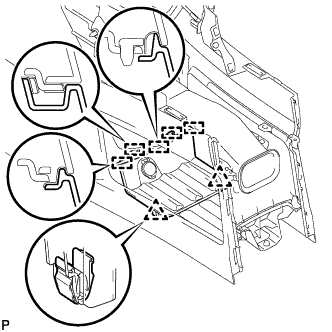
Connect the connector.
-
Engage the 5 guides and 2 clips, and install the front console box cover.
-
- Click here
INSTALL INSTRUMENT PANEL FINISH PANEL
-
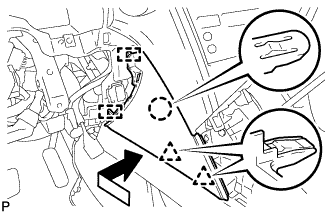
Engage the 2 guides, claw and 2 clips to install the instrument panel finish panel as shown in the illustration.
-
- Click here
INSTALL DRIVER SIDE KNEE AIRBAG ASSEMBLY
Tip:Refer to the instructions for Installation of the driver side knee airbag assembly (Click here).
- Click here
INSTALL REAR CONSOLE BOX ASSEMBLY
Tip:Refer to the instructions for Installation of the rear console box assembly (Click here).
- Click here
INSTALL FRONT SEAT ASSEMBLY LH
Tip:Refer to the instructions for Installation of the front seat assembly (Click here).
- Click here
ADJUST PARKING BRAKE SHOE CLEARANCE AND PARKING BRAKE PEDAL TRAVEL
-
Remove the No. 1 instrument panel under cover sub-assembly (Click here).
-
Completely release the parking brake pedal.
-
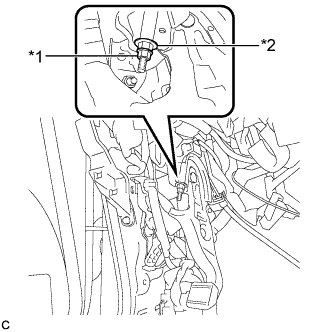
Loosen the lock nut and the adjusting nut to completely release the parking brake cable.
Table 3. Text in Illustration *1 Lock Nut *2 Adjusting Nut -
Remove the rear wheels.
-
Temporarily install the hub nuts to the hub bolts.
Tip:Securely install the hub nuts to the rear disc.
-
Remove the parking brake shoe adjusting hole plug.
-
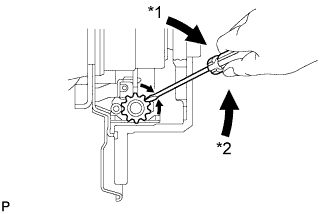
Turn the shoe adjuster and expand the shoe until the disc locks.
Table 4. Text in Illustration *1 Expand *2 Contract -
Turn and contract the shoe adjuster until the disc can rotate smoothly.
Standard Returns 8 notches. -
Check that there is no brake drag against the shoe.
-
Install the parking brake shoe adjusting hole plug.
-
Turn the adjusting nut until the parking brake pedal travel is corrected to be within the specified range.
Parking brake pedal travel 7 to 10 notches at 300 N (31 kgf, 67.5 lbf) -
Using a wrench or an equivalent tool, hold the adjusting nut and tighten the lock nut.
Table 5. Text in Illustration *1 Lock Nut *2 Adjusting Nut 7.0 N*m 71 kgf*cm 62 in.*lbf -
Operate the parking brake pedal 3 to 4 times, and check the parking brake pedal travel.
-
Check that there is no brake drag against the shoe.
-
Remove the hub nuts from the hub bolts.
-
Install the rear wheels.
103 N*m 1050 kgf*cm 76 ft.*lbf -
Install the No. 1 instrument panel under cover sub-assembly (Click here).
-
- Click here
INSPECT BRAKE WARNING LIGHT
-
When operating the parking brake pedal, check that the brake warning light illuminates.
Standard The brake warning light always illuminates at the first click.
-