REAR BUMPER REMOVAL

-
REMOVE NO. 2 LUGGAGE COMPARTMENT SIDE COVER PROTECTOR
-
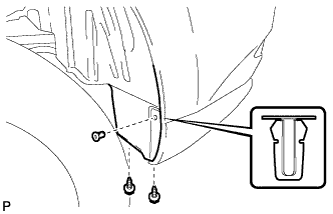
Remove the 2 screws and grommet.
-
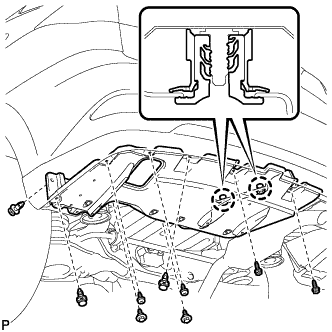
Remove the 4 screws.
-
Remove the 2 bolts and 3 clips.
-
Disengage the 2 claws and remove the No. 2 luggage compartment side cover protector.
-
-
REMOVE NO. 1 LUGGAGE COMPARTMENT SIDE COVER PROTECTOR
-
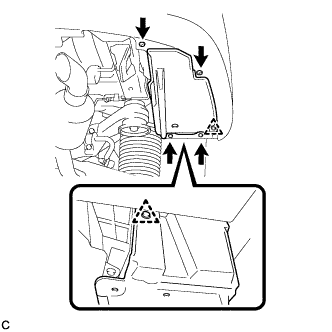
Remove the 2 bolts and 2 screws.
-
Remove the 2 clips and No. 1 luggage compartment side cover protector.
-
-
REMOVE REAR BUMPER ASSEMBLY
-
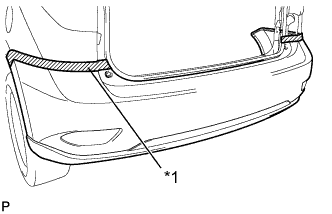
Text in Illustration *1 Protective Tape Put protective tape around the rear bumper assembly.
-
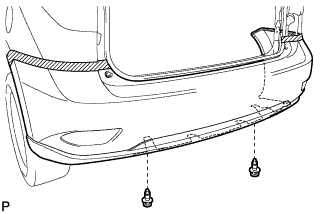
Using a clip remover, remove the 2 clips.
-
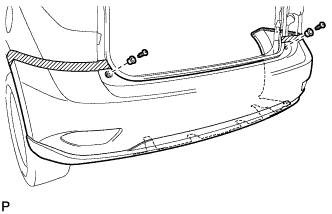
Remove the 2 screws and 2 rear bumper upper stoppers.
-

Remove the screw.
Tech Tips
Use the same procedure for the RH side and LH side.
-
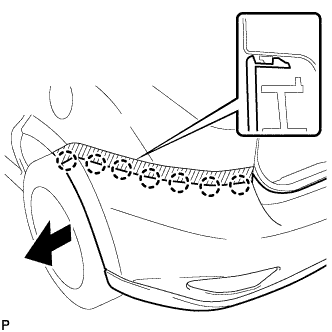
Disengage the 7 claws.
Tech Tips
Use the same procedure for the RH side and LH side.
-
Disconnect each connector.
-
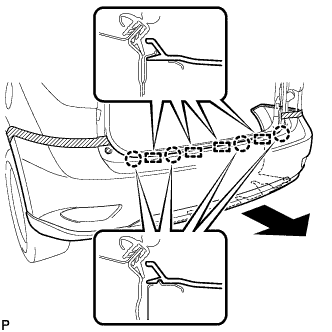
Disengage the 4 claws and 4 guides, and remove the rear bumper assembly as shown in the illustration.
-