REAR AIRBAG SENSOR REMOVAL

Tech Tips
-
Use the same procedure for the RH side and LH side.
-
The procedure listed below is for the LH side.
-
PRECAUTION
CAUTION:
Be sure to read Precaution thoroughly before servicing Click here.
Note
w/ Navigation System for HDD:
After the engine switch is turned off, the display and navigation module display (HDD navigation system) records various types of memory and settings. As a result, after turning the engine switch off, make sure to wait for the time specified in the following table before disconnecting the cable from the negative (-) battery terminal.
Waiting Time before Disconnecting Cable from Negative (-) Battery Terminal Specification Waiting Time w/o Telematics transceiver 60 sec. w/ Telematics transceiver 120 sec. -
DISCONNECT CABLE FROM NEGATIVE BATTERY TERMINAL
CAUTION:
Wait at least 90 seconds after disconnecting the cable from the negative (-) battery terminal to disable the SRS system.
Note
When disconnecting the cable, some systems need to be initialized after the cable is reconnected Click here.
-
REMOVE REAR SEAT ASSEMBLY
Tech Tips
Refer to the procedure up to Remove Rear Seat Assembly Click here for LH Side, Click here for RH side).
-
REMOVE REAR DOOR SCUFF PLATE
-
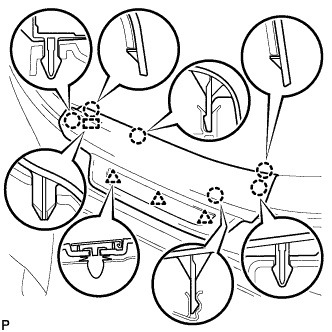
Disengage the 6 claws, 3 clips and guide, and remove the rear door scuff plate LH.
-
-
REMOVE REAR SEAT SIDE COVER
-
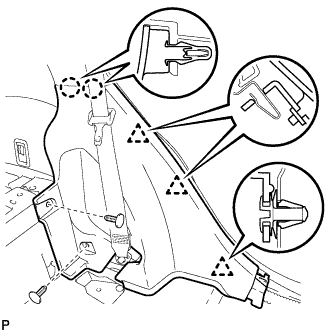
Remove the 2 clips.
-
Disengage the 2 claws and 3 clips, and remove the rear seat side cover LH.
Tech Tips
A part of the clip remains on the vehicle side.
-
-
REMOVE REAR AIRBAG SENSOR
-
Check that the engine switch is off.
-
Check that the cable is disconnected from the negative (-) battery terminal.
CAUTION:
Wait at least 90 seconds after disconnecting the cable from the negative (-) battery terminal to disable the SRS system.
-
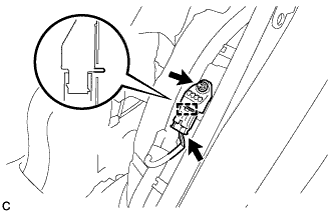
Disconnect the connector.
Note
When disconnecting the airbag connector, take care not to damage the airbag wire harness.
-
While holding the sides of the outer connector locking sleeve, slide the sleeve in the direction indicated by the arrow shown in the illustration.
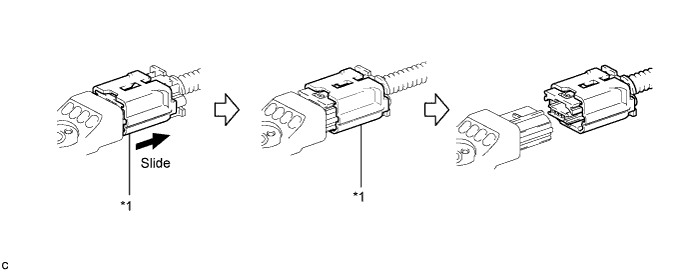
Text in Illustration *1 Outer Connector Locking Sleeve - - -
When the connector lock is released, the connectors can be disconnected.
Tech Tips
Be sure to hold both outer flank sides. Holding the top and bottom will make disconnection difficult.
-
-
Remove the nut and rear airbag sensor.
Note
Loosen the nut while holding the rear airbag sensor because the rear airbag sensor pin (stopper) is easily damaged.
-