- Click here
INSTALL SATELLITE SWITCH SET
-
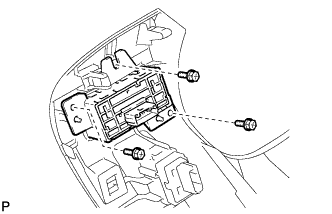
Install the satellite switch set with the 3 screws.
-
- Click here
INSTALL LOWER INSTRUMENT PANEL FINISH PANEL SUB-ASSEMBLY
-
Connect each connector.
-
Engage the 8 clips and 2 guides.
-
Install the lower instrument panel finish panel sub-assembly with the 2 screws <D>.
-
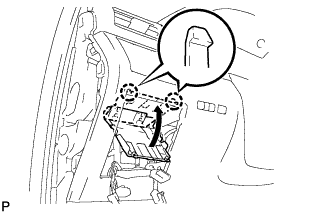
Engage the 2 claws to close the cover as shown in the illustration.
-
- Click here
INSTALL NO. 1 SWITCH HOLE BASE
-
Connect each connector.
-
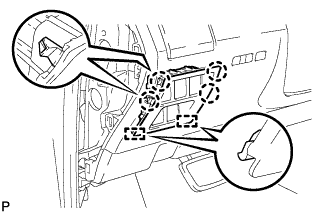
Engage the 4 claws and 2 guides to install the No. 1 switch hole base.
-
- Click here
INSTALL INSTRUMENT PANEL GARNISH LH
-
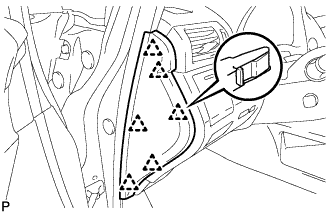
Engage the 6 clips to install the instrument panel garnish LH.
-
- Click here
CONNECT CABLE TO NEGATIVE BATTERY TERMINAL (w/ Air Suspension)
Note:When disconnecting the cable, some systems need to be initialized after the cable is reconnected (Click here).
- Click here
INSPECT SUSPENSION CONTROL SYSTEM (w/ Air Suspension)