METER / GAUGE SYSTEM ON-VEHICLE INSPECTION

-
INSPECT SPEEDOMETER
-
Check speedometer operation.
-
Using a speedometer tester (calibrated chassis dynamometer), check the speedometer indication according to the table below.
Reference: mph (for RHD except Australia and New Zealand) Chassis Dynamometer Indication (mph) Acceptable Range (mph) 20 21.0 to 23.5 40 42.0 to 44.5 60 62.5 to 66.0 80 83.1 to 87.1 100 103.9 to 108.4 120 124.7 to 129.6 140 145.4 to 150.7 Reference: km/h (for LHD) Chassis Dynamometer Indication (km/h) Acceptable Range (km/h)
Data in ( ) is for reference
20 (21.0 to 25.0) 40 41.7 to 46.2 60 62.7 to 67.2 80 83.4 to 88.4 100 104.3 to 109.3 120 125.1 to 130.6 140 145.8 to 151.8 160 166.2 to 173.2 180 186.9 to 194.5 200 207.7 to 215.7 220 228.4 to 236.8 240 249.2 to 258.0 Reference: km/h (for Australia and New Zealand) Chassis Dynamometer Indication (km/h) Acceptable Range (km/h)
Data in ( ) is for reference
20 (20.7 to 24.7) 40 41.4 to 45.9 60 62.1 to 66.6 80 82.8 to 87.8 100 103.4 to 107.4 120 124.1 to 129.1 140 144.8 to 149.8 160 165.5 to 170.5 180 186.2 to 191.2 200 206.9 to 211.9 220 227.6 to 232.6 240 248.3 to 253.3 Note
Tire wear as well as over or under inflation will cause errors.
-
Check the deviation of the speedometer indication from the acceptable range.
Reference Less than 0.5 km/h (0.3 mph) Tech Tips
If the indication is not as specified, go to Problem Symptoms Table Click here.
-
-
-
INSPECT TACHOMETER
-
Connect the intelligent tester, and start the engine.
-
Compare the test results with the tachometer indications.
DC 13.5 V, at 25°C (77°F) Intelligent Tester Indication (rpm) Acceptable Range
Data in ( ) is for Reference
700 630 to 770 1000 (900 to 1100) 2000 (1850 to 2150) 3000 2800 to 3200 4000 (3800 to 4200) 5000 4800 to 5200 6000 (5750 to 6250) 7000 6700 to 7300 8000 (7700 to 8300) Tech Tips
If the indication is not as specified, go to Problem Symptoms Table Click here.
-
-
INSPECT HEADUP DISPLAY
Tech Tips
When the headup display position or illuminance has not got adjusted properly, headup display may not be seen in the front glass. Before starting following inspection, confirm the headup display position and illuminance.
-
Turn the engine switch off.
-
Turn the engine switch on (IG) while pressing and holding the headup display on switch.
-
Keep pressing the headup display on switch and turn the engine switch off.
-
Keep pressing the headup display on switch and turn the engine switch on (IG).
-
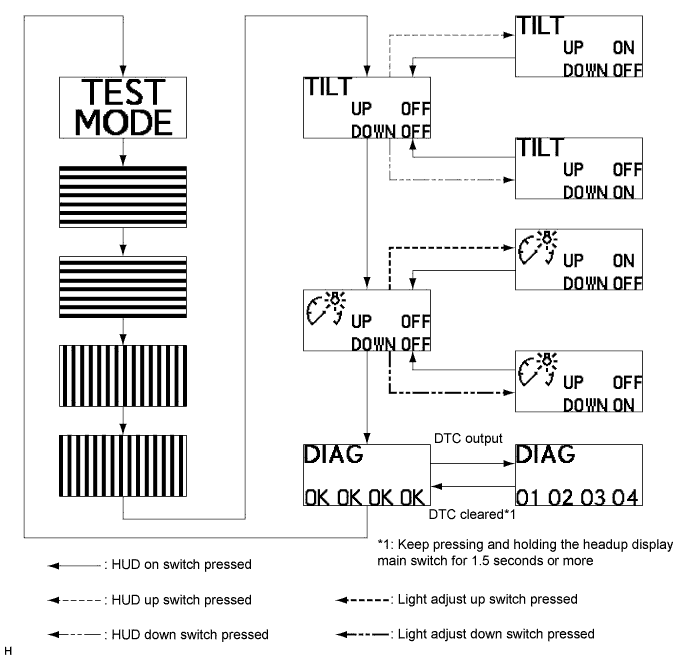
The headup display will show "TEST MODE".
-
Inspect the headup display as shown in the illustration.
-
Turn the engine switch off to finish test mode.
-