GENERATOR REMOVAL

-
PRECAUTION (w/ Air Suspension)
Note
Be sure to read Precaution thoroughly before servicing Click here.
-
PRECAUTION (w/ Navigation System for HDD)
Note
After the engine switch is turned off, the display and navigation module display (HDD navigation system) records various types of memory and settings. As a result, after turning the engine switch off, make sure to wait for the time specified in the following table before disconnecting the cable from the negative (-) battery terminal.
Waiting Time before Disconnecting Cable from Negative (-) Battery Terminal Specification Waiting Time w/o Telematics transceiver 60 sec. w/ Telematics transceiver 120 sec. -
REMOVE RADIATOR ASSEMBLY WITH FAN SHROUD AND FAN MOTOR
Tech Tips
-
REMOVE V-RIBBED BELT
Tech Tips
-
REMOVE V-BANK COVER SUB-ASSEMBLY
-
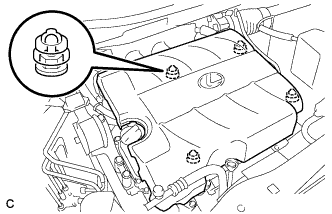
Hold the front of the V-bank cover sub-assembly and raise it to disengage the 2 retainers on the front of the V-bank cover sub-assembly. Continue to raise the V-bank cover sub-assembly to disengage the 2 retainers on the rear of the V-bank cover sub-assembly and remove the V-bank cover sub-assembly.
Note
Attempting to disengage both front and rear retainers at the same time may cause the V-bank cover sub-assembly to break.
-
-
DISCONNECT CABLE FROM NEGATIVE BATTERY TERMINAL
CAUTION:
Wait at least 90 seconds after disconnecting the cable from the negative (-) battery terminal to disable the SRS system.
Note
When disconnecting the cable, some systems need to be initialized after the cable is reconnected Click here.
-
REMOVE GENERATOR ASSEMBLY
-
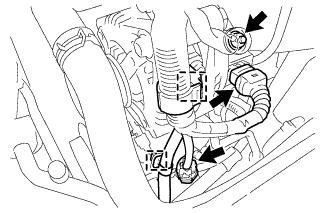
Turn back the terminal cap.
-
Remove the nut and disconnect the generator wire from terminal B.
-
Disconnect the generator connector from the generator assembly.
-
Disconnect the connector from the compressor and magnetic clutch.
-
Disconnect the wire harness clamps.
-
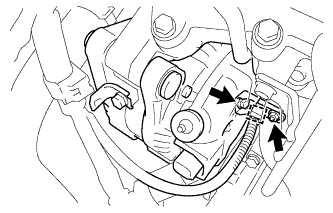
Remove the bolt and nut from the cylinder block.
-
Disconnect the wire harness clamp and remove the generator bracket.
-
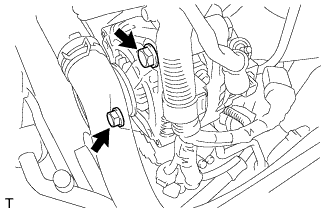
Remove the 2 bolts.
-
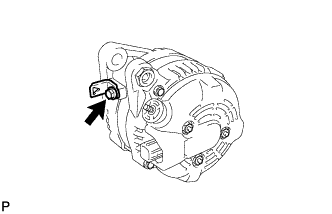
Remove the bolt and the wire harness clamp stay.
-