PARKING ASSIST MONITOR SYSTEM (w/o Side Monitor System) Guide Lines and Buttons are not Displayed for All Display Modes
DESCRIPTION
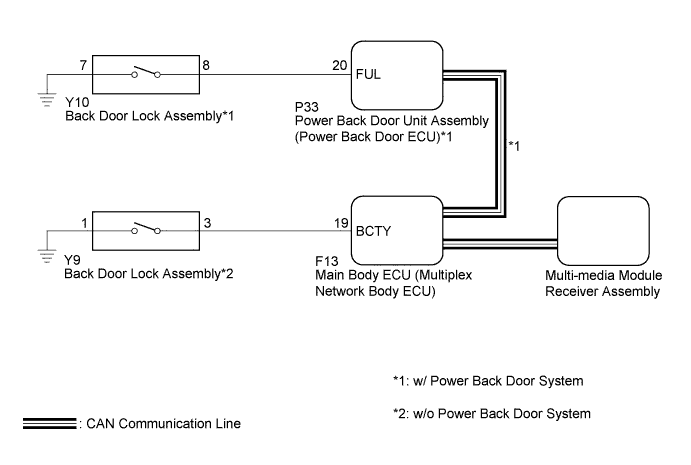
The multi-media module receiver assembly receives back door lock assembly open/close signals from the main body ECU (multiplex network body ECU) via CAN communication. When the back door is open, the camera aiming cannot be adjusted correctly because the rear television camera assembly is installed on the back door. Therefore, when adjusting the camera aiming calibration while the back door is open, a back door open warning message will be displayed on the screen and camera aiming adjustment will be canceled.
Tech Tips
-
Check the parking assist monitor screen display mode settings. (Check if the parking guide lines are set to off.)
-
The back door lock assembly is connected to the power back door unit assembly (power back door ECU)*1 or main body ECU (multiplex network body ECU)*2 by the vehicle wire harness.
-
*1: w/ Power Back Door System
-
*2: w/o Power Back Door System
WIRING DIAGRAM
INSPECTION PROCEDURE
Note
-
When "System initializing" is displayed on the multi-display assembly after disconnecting the cable from the negative (-) battery terminal, correct the steering angle neutral point Click here.
-
Depending on the parts that are replaced or operations that are performed during vehicle inspection or maintenance, calibration of other systems as well as the parking assist monitor system may be needed Click here.
PROCEDURE
-
READ VALUE USING INTELLIGENT TESTER
-
Connect the intelligent tester to the DLC3.
-
Turn the engine switch on (IG).
-
Turn the intelligent tester on.
-
Enter the following menus: Body / Back Door*1 or Main Body*2 / Data List.
-
*1: w/ Power Back Door System
-
*2: w/o Power Back Door System
-
-
Read the Data List according to the display on the intelligent tester.
Back Door (w/ Power Back Door System) Tester Display Measurement Item/Range Normal Condition Diagnostic Note Courtesy SW Back door courtesy light switch signal/ON or OFF ON: Back door open
OFF: Back door closed
- Main Body (w/o Power Back Door System) Tester Display Measurement Item/Range Normal Condition Diagnostic Note Back Door Courtesy SW Back door courtesy light switch signal/ON or OFF ON: Back door open
OFF: Back door closed
- OK The back door courtesy light switch functions as specified in the normal condition column.
NG 
INSPECT BACK DOOR LOCK ASSEMBLY Click here
OK 
REPLACE MULTI-MEDIA MODULE RECEIVER ASSEMBLY Click here
-
-
INSPECT BACK DOOR LOCK ASSEMBLY
-
Remove the back door lock assembly Click here.
-
Inspect the back door courtesy light switch built into the back door lock assembly Click here.
Result Result Proceed to OK (w/ Power Back Door System) A OK (w/o Power Back Door System) B NG C
B
CHECK HARNESS AND CONNECTOR (MAIN BODY ECU (MULTIPLEX NETWORK BODY ECU) - BACK DOOR LOCK ASSEMBLY) Click here
C 
REPLACE BACK DOOR LOCK ASSEMBLY Click here
A 
-
-
CHECK HARNESS AND CONNECTOR (POWER BACK DOOR UNIT ASSEMBLY (POWER BACK DOOR ECU) - BACK DOOR LOCK ASSEMBLY)
-
Disconnect the Y10 back door lock assembly connector.
-
Disconnect the P33 power back door unit assembly (power back door ECU) connector.
-
Measure the resistance according to the value(s) in the table below.
Standard Resistance Tester Connection Condition Specified Condition Y10-8 - P33-20 (FUL) Always Below 1 Ω Y10-7 - Body ground Always Below 1 Ω Y10-8 - Body ground Always 10 kΩ or higher
NG
REPAIR OR REPLACE HARNESS OR CONNECTOR
OK
REPLACE POWER BACK DOOR UNIT ASSEMBLY (POWER BACK DOOR ECU) Click here
-
-
CHECK HARNESS AND CONNECTOR (MAIN BODY ECU (MULTIPLEX NETWORK BODY ECU) - BACK DOOR LOCK ASSEMBLY)
-
Disconnect the F13 main body ECU (multiplex network body ECU) connector.
-
Disconnect the Y9 back door lock assembly connector.
-
Measure the resistance according to the value(s) in the table below.
Standard Resistance Tester Connection Condition Specified Condition Y9-3 - F13-19 (BCTY) Always Below 1 Ω Y9-3 - Body ground Always 10 kΩ or higher Y9-1 - Body ground Always Below 1 Ω
NG
REPAIR OR REPLACE HARNESS OR CONNECTOR
OK
REPLACE MAIN BODY ECU (MULTIPLEX NETWORK BODY ECU) Click here
-