- Click here
PRECAUTION (w/ Navigation System for HDD)
Note:After the engine switch is turned off, the display and navigation module display (HDD navigation system) records various types of memory and settings. As a result, after turning the engine switch off, make sure to wait for the time specified in the following table before disconnecting the cable from the negative (-) battery terminal.
Table 1. Waiting Time before Disconnecting Cable from Negative (-) Battery Terminal Specification Waiting Time w/o Telematics transceiver 60 sec. w/ Telematics transceiver 120 sec. - Click here
REMOVE WINDSHIELD WIPER MOTOR AND LINK ASSEMBLY
- Click here
SEPARATE HOSE BRACKET (for LHD)
-
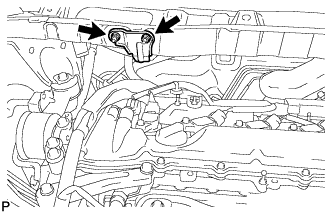
Remove the 2 nuts and separate the hose bracket from the outer cowl top panel sub-assembly.
-
- Click here
REMOVE OUTER COWL TOP PANEL SUB-ASSEMBLY (for LHD)
-
Place the front tires on the ground.
-
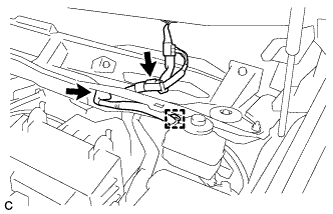
Disconnect the connector (w/ Windshield Deicer).
-
Disengage the grommet and clamp, and separate the wire harness.
-
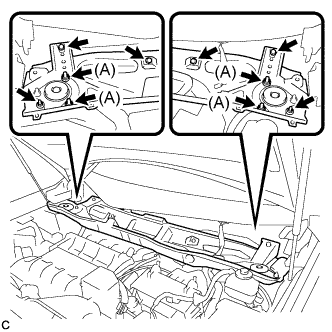
Remove the 6 nuts, 4 bolts and outer cowl top panel sub-assembly.
-
Temporarily tighten the 4 nuts (A) to support the front shock absorber.
-
- Click here
REMOVE OUTER COWL TOP PANEL SUB-ASSEMBLY (for RHD)
-
Place the front tires on the ground.
-
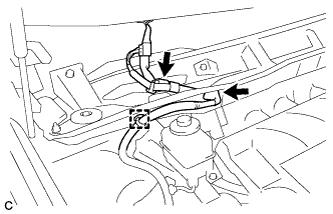
Disconnect the connector (w/ Windshield Deicer).
-
Disengage the grommet and clamp, and separate the wire harness.
-
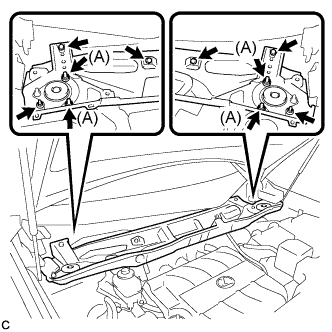
Remove the 6 nuts, 4 bolts and outer cowl top panel sub-assembly.
-
Temporarily tighten the 4 nuts (A) to support the front shock absorber.
-
- Click here
REMOVE NO. 1 ENGINE COVER SUB-ASSEMBLY
-
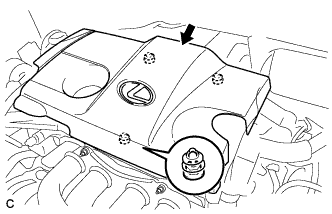
Lift the rear of the No. 1 engine cover sub-assembly to detach the cover from the 2 pins, and then lift the front of the No. 1 engine cover sub-assembly to detach the cover from the pin and remove the No. 1 engine cover sub-assembly.
Note:Attempting to disengage both front and rear clips at the same time may cause the No. 1 engine cover sub-assembly to break.
-
- Click here
DISCONNECT CABLE FROM NEGATIVE BATTERY TERMINAL
CAUTION:Wait at least 90 seconds after disconnecting the cable from the negative (-) battery terminal to disable the SRS system.
Note:When disconnecting the cable, some systems need to be initialized after the cable is reconnected (Click here).
- Click here
REMOVE NO. 2 AIR CLEANER INLET
-
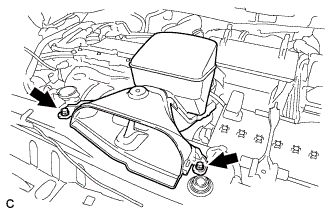
Remove the 2 bolts and No. 2 air cleaner inlet.
-
- Click here
REMOVE NO. 1 AIR CLEANER INLET
-
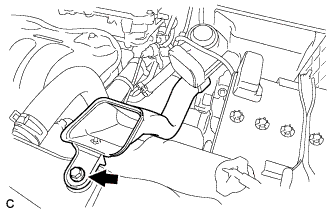
Remove the bolt and No. 1 air cleaner inlet.
-
- Click here
REMOVE BATTERY
-
Disconnect the positive (+) cable from the positive (+) battery terminal.
-
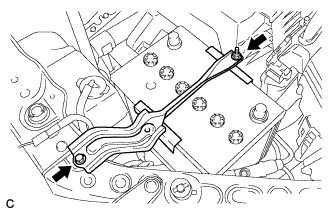
Loosen the nut, and remove the bolt from the battery clamp.
-
Remove the battery and battery tray.
-
- Click here
REMOVE AIR CLEANER ASSEMBLY
-
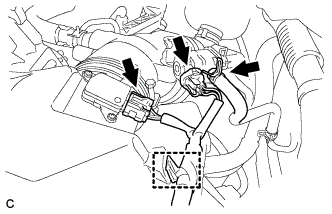
Disconnect the vacuum switching valve connector and fuel vapor feed hose.
-
Disconnect the mass air flow meter connector and separate the wire harness clamp from the air cleaner.
-
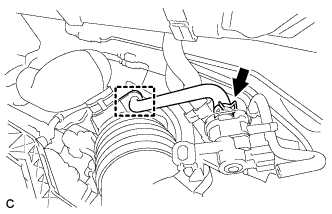
Disconnect the No. 2 fuel vapor feed hose from the vacuum switching valve and air cleaner hose.
-
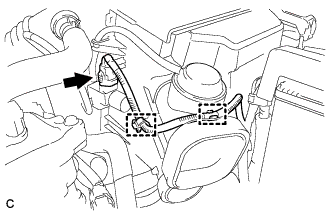
Disconnect the vacuum switching valve connector and 2 wire harness clamps from the air cleaner.
-
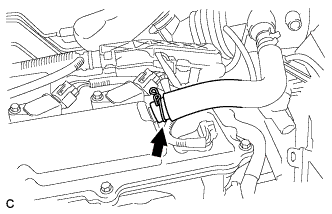
Disconnect the ventilation hose from the cylinder head cover.
-
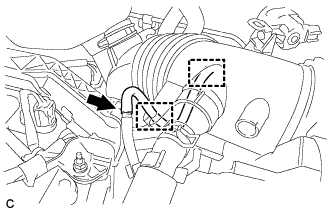
Disconnect the vacuum hose and separate it from the 2 hose clamps of the air cleaner hose.
-
Loosen the bolt of the hose clamp and disconnect the air cleaner hose from the throttle body assembly.
-
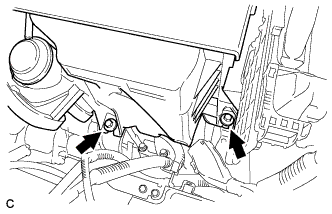
Remove the 2 bolts and move the air cleaner assembly upward to disengage and remove it from the throttle body assembly.
-
- Click here
REMOVE ECM
-
Disconnect the 2 ECM connectors.
-
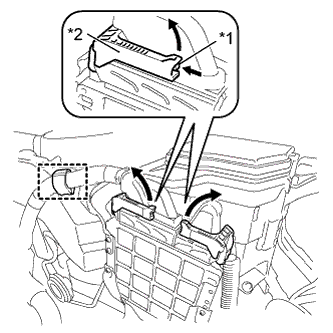
Disconnect the wire harness clamp.
Table 2. Text in Illustration *1 Lock *2 Lever -
Push in the locks on the 2 levers, raise the levers, and disconnect the 2 ECM connectors.
Note:After disconnecting the connectors, make sure that dirt, water or other foreign matter does not contact the connecting part of the connectors.
-
-
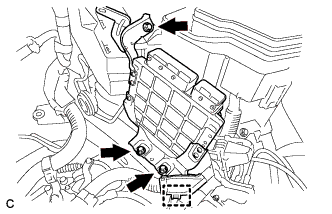
Disconnect the wire harness clamp.
-
Remove the 3 bolts and ECM.
-
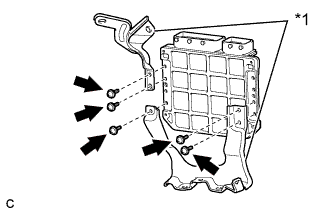
Remove the 5 screws and 2 ECM brackets.
Table 3. Text in Illustration *1 ECM Bracket
-