REAR DOOR ADJUSTMENT

CAUTION:
Before adjusting the door positions of vehicles equipped with side and curtain shield airbags, be sure to disconnect the battery. After adjustment, check that the SRS warning light is operating normally and there are no SRS DTCs output.
Tech Tips
-
Use the same procedure for the RH side and LH side.
-
The procedure listed below is for the LH side.
-
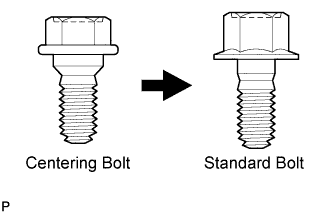
Centering bolts are used to mount the door hinge to the vehicle body and door. The door cannot be adjusted with the centering bolts installed. Substitute the centering bolts with standard bolts when making adjustments.
-
Specified torque for standard bolts is shown in the standard bolt chart Click here.
-
INSPECT REAR DOOR
-
Check that the clearance measurements of areas *1 through *25 are within each standard range.
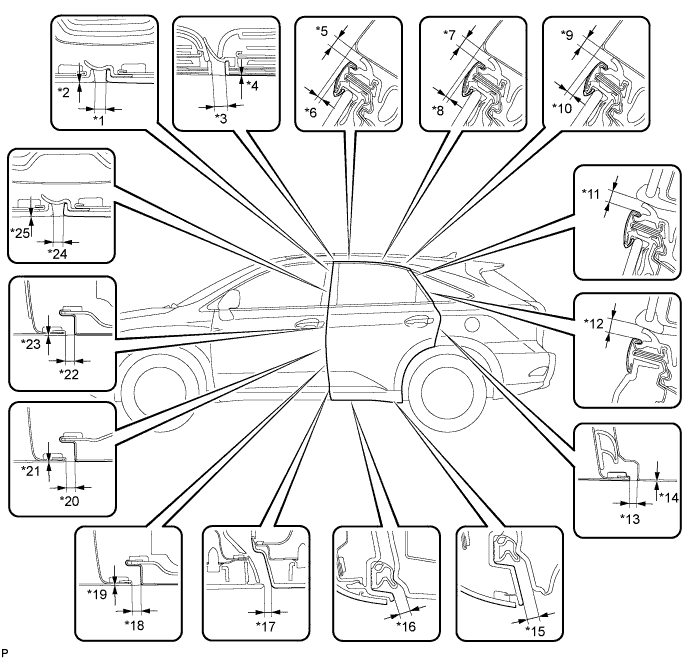
Standard Clearance Area Measurement Area Measurement *1 3.0 to 6.0 mm (0.118 to 0.236 in.) *2 -1.5 to 1.5 mm (-0.0591 to 0.0591 in.) *3 5.5 mm (0.217 in.) *4 -1.5 to 1.5 mm (-0.0591 to 0.0591 in.) *5 3.5 to 6.5 mm (0.138 to 0.256 in.) *6 0.5 to 3.5 mm (0.0197 to 0.138 in.) *7 3.5 to 6.5 mm (0.138 to 0.256 in.) *8 0.6 to 3.6 mm (0.0236 to 0.142 in.) *9 3.5 to 6.5 mm (0.138 to 0.256 in.) *10 1.9 to 4.9 mm (0.0748 to 0.193 in.) *11 5.0 to 8.0 mm (0.197 to 0.315 in.) *12 5.0 to 8.0 mm (0.197 to 0.315 in.) *13 2.8 to 5.8 mm (0.110 to 0.228 in.) *14 -1.5 to 1.5 mm (-0.0591 to 0.0591 in.) *15 5.5 to 10.5 mm (0.217 to 0.413 in.) *16 5.5 to 10.5 mm (0.217 to 0.413 in.) *17 3.0 to 7.0 mm (0.118 to 0.276 in.) *18 3.2 to 6.2 mm (0.126 to 0.244 in.) *19 -1.5 to 1.5 mm (-0.0591 to 0.0591 in.) *20 3.2 to 6.2 mm (0.126 to 0.244 in.) *21 -1.5 to 1.5 mm (-0.0591 to 0.0591 in.) *22 3.2 to 6.2 mm (0.126 to 0.244 in.) *23 -1.5 to 1.5 mm (-0.0591 to 0.0591 in.) *24 3.0 to 6.0 mm (0.118 to 0.236 in.) *25 -1.5 to 1.5 mm (-0.0591 to 0.0591 in.) - -
-
-
PRECAUTION (w/ Navigation System for HDD)
Note
After the engine switch is turned off, the display and navigation module display (HDD navigation system) records various types of memory and settings. As a result, after turning the engine switch off, make sure to wait for the time specified in the following table before disconnecting the cable from the negative (-) battery terminal.
Waiting Time before Disconnecting Cable from Negative (-) Battery Terminal Specification Waiting Time w/o Telematics transceiver 60 sec. w/ Telematics transceiver 120 sec. -
DISCONNECT CABLE FROM NEGATIVE BATTERY TERMINAL
CAUTION:
Wait at least 90 seconds after disconnecting the cable from the negative (-) battery terminal to disable the SRS system Click here.
Note
When disconnecting the cable, some systems need to be initialized after the cable is reconnected Click here.
-
ADJUST REAR DOOR
-
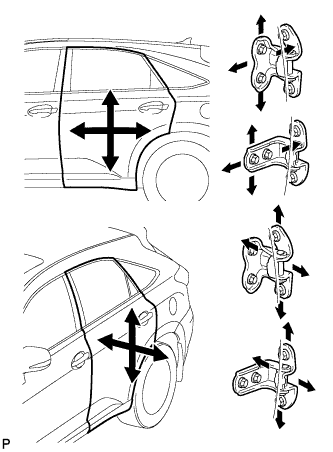
Using SST, loosen the hinge bolts on the vehicle body and adjust the door position.
- SST
- 09812-00010
-
Tighten the hinge bolts on the vehicle body after the adjustment.
- Torque:
- 26 N*m { 265 kgf*cm, 19 ft.*lbf }
-
Loosen the hinge bolts on the door and adjust the door position.
-
Tighten the hinge bolts on the door after the adjustment.
- Torque:
- 27 N*m { 275 kgf*cm, 20 ft.*lbf }
-
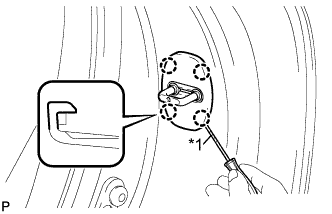
Text in Illustration *1 Protective Tape Using a screwdriver, disengage the 4 claws and remove door lock striker cover.
Tech Tips
Tape the screwdriver tip before use.
-
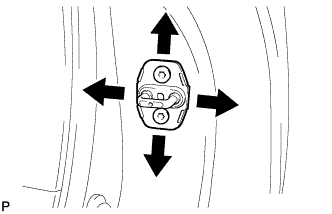
Using a T40 "TORX" socket wrench, slightly loosen the striker mounting screws.
-
Using a brass bar and a hammer, hit the striker to adjust its position.
-
Using a T40 "TORX" socket wrench, tighten the striker mounting screws after the adjustment.
- Torque:
- 23 N*m { 235 kgf*cm, 17 ft.*lbf }
-
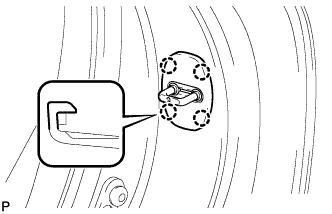
Engage the 4 claws and install the door lock striker cover.
-
-
CONNECT CABLE TO NEGATIVE BATTERY TERMINAL
Note
When disconnecting the cable, some systems need to be initialized after the cable is reconnected Click here.
-
INSPECT SRS WARNING LIGHT