CONDENSER REMOVAL

-
RECOVER REFRIGERANT FROM REFRIGERATION SYSTEM
-
Start up the engine.
-
Turn the A/C switch on.
-
Operate the cooler compressor at an engine speed of approximately 1000 rpm for 5 to 6 minutes to circulate the refrigerant. This causes most of the compressor oil from the various components of the A/C system to collect in the A/C compressor.
-
Stop the engine.
-
Recover the refrigerant from the A/C system using a refrigerant recovery unit.
-
-
PRECAUTION (w/ Navigation System for HDD)
Note
w/ Navigation System for HDD:After the engine switch is turned off, the display and navigation module display (HDD navigation system) records various types of memory and settings. As a result, after turning the engine switch off, make sure to wait for the time specified in the following table before disconnecting the cable from the negative (-) battery terminal.
Waiting Time before Disconnecting Cable from Negative (-) Battery Terminal Specification Waiting Time w/o Telematics transceiver 60 sec. w/ Telematics transceiver 120 sec. -
DISCONNECT CABLE FROM NEGATIVE BATTERY TERMINAL
Note
When disconnecting the cable, some systems need to be initialized after the cable is reconnected Click here.
-
REMOVE FRONT BUMPER ASSEMBLY
for Standard: Click here
for Sport Package: Click here
-
REMOVE MILLIMETER WAVE RADAR SENSOR ASSEMBLY (w/ Dynamic Radar Cruise Control System)
-
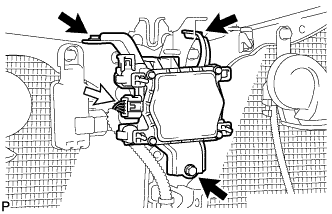
Disconnect the connector.
-
Remove the 3 bolts and the millimeter wave radar sensor assembly.
-
-
REMOVE LOW PITCHED HORN ASSEMBLY
-

Disconnect the connector.
-
Remove the bolt and low pitched horn assembly.
-
-
REMOVE HOOD LOCK CONTROL CABLE COVER (for LHD)
-

Remove the 3 screws.
-
Disengage the clamp and remove the hood lock control cable cover.
-
-
REMOVE HOOD LOCK CONTROL CABLE COVER (for RHD)
-

Remove the 3 screws.
-
Disengage the clamp and remove the hood lock control cable cover.
-
-
REMOVE HOOD LOCK ASSEMBLY (for LHD)
-

Text in Illustration *1 Protective Tape Using a screwdriver, remove the hood lock nut cap.
Tech Tips
Tape the screwdriver tip before use.
-

Remove the 2 bolts and hood lock nut.
-

Disconnect the connector.
-
Disconnect the hood lock control cable and remove the hood lock assembly.
-
-
REMOVE HOOD LOCK ASSEMBLY (for RHD)
-

Text in Illustration *1 Protective Tape Using a screwdriver, remove the hood lock nut cap.
Tech Tips
Tape the screwdriver tip before use.
-

Remove the 2 bolts and hood lock nut.
-

Disconnect the connector.
-
Disconnect the hood lock control cable and remove the hood lock assembly.
-
-
REMOVE HIGH PITCHED HORN ASSEMBLY
-

Disconnect the connector.
-
Remove the bolt and high pitched horn assembly.
-
-
REMOVE SMOG VENTILATION SENSOR (w/ Smog Ventilation Sensor)
-

Disconnect the connector.
-
Remove the bolt
-
Disengage the guide and remove the smog ventilation sensor.
-
-
REMOVE HOOD LOCK SUPPORT SUB-ASSEMBLY
-

Disengage each clamp.
-
Remove the 2 bolts and hood lock support sub-assembly.
-
-
REMOVE NO. 2 AIR CLEANER INLET
for 2GR-FE: Click here
for 1AR-FE: Click here
-
REMOVE NO. 1 AIR CLEANER INLET
for 2GR-FE: Click here
for 1AR-FE: Click here
-
DISCONNECT DISCHARGE TUBE SUB-ASSEMBLY
-

Remove the bolt and disconnect the discharge tube sub-assembly.
-
Remove the O-ring from the discharge tube sub-assembly.
Note
Seal the openings of the disconnected parts using vinyl tape to prevent entry of moisture and foreign matter.
-
-
DISCONNECT AIR CONDITIONING TUBE AND ACCESSORY ASSEMBLY
-

Remove the bolt and disconnect the air conditioning tube and accessory assembly.
-
Remove the O-ring from the air conditioning tube and accessory assembly.
Note
Seal the openings of the disconnected parts using vinyl tape to prevent entry of moisture and foreign matter.
-
-
REMOVE UPPER RADIATOR SUPPORT
for 2GR-FE: Click here
for 1AR-FE: Click here
-
REMOVE COOLER CONDENSER ASSEMBLY
-

Remove the 2 bolts and 2 cooler brackets.
-

Remove the cooler condenser assembly as shown in the illustration.
Note
-
Due to the potential of damaging the brackets, do not allow the brackets to touch the vehicle body etc. while installing the condenser.
-
Do not allow the condenser to contact the vehicle body or radiator while installing the condenser.
-
When storing the condenser, do not put the brackets facing down (toward the ground) because this may cause damage to the brackets.
-
-