SEAT POSITION SENSOR REMOVAL

Tech Tips
-
Use the same procedure for the driver side of RHD and LHD vehicles.
-
The procedures listed below is for the driver side of an LHD vehicle.
-
PRECAUTION
CAUTION:
Be sure to read Precaution thoroughly before servicing Click here.
-
REMOVE FRONT SEAT HEADREST ASSEMBLY LH
-
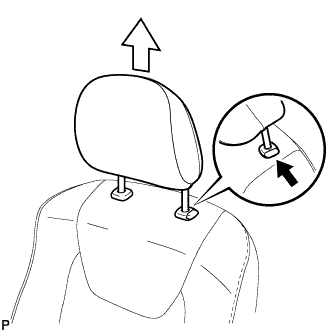
Press the headrest support button and pull up the headrest as shown in the illustration to remove it.
-
-
REMOVE FRONT OUTER SEAT TRACK BRACKET COVER LH
-
Operate the power seat switch knob and move the seat to the rearmost position.
-
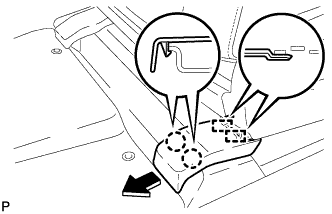
Disengage the 2 claws and 2 guides, and remove the front outer seat track bracket cover as shown in the illustration.
-
-
REMOVE FRONT INNER SEAT TRACK BRACKET COVER LH
-
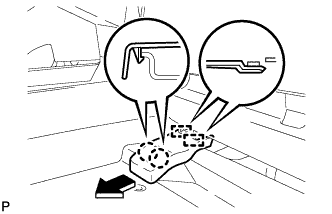
Disengage the 2 claws and 2 guides, and remove the front inner seat track bracket cover as shown in the illustration.
-
-
REMOVE REAR OUTER SEAT TRACK BRACKET COVER LH
-
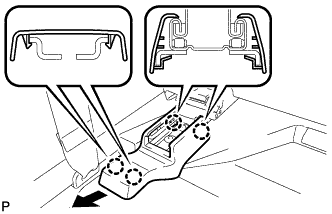
Disengage the 4 claws and remove the rear outer seat track bracket cover as shown in the illustration.
-
-
REMOVE REAR INNER SEAT TRACK BRACKET COVER LH
-
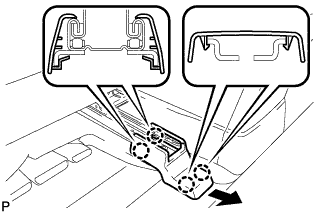
Disengage the 4 claws and remove the rear inner seat track bracket cover as shown in the illustration.
-
-
REMOVE FRONT SEAT ASSEMBLY LH
-
Operate the power seat switch knob and move the seat to the foremost position.
-
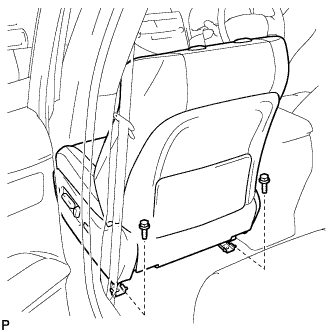
Remove the 2 bolts on the rear side of the seat.
-
Operate the power seat switch knob and move the seat to the rearmost position.
-
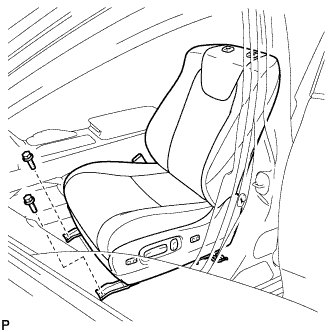
Remove the 2 bolts on the front side of the seat.
-
Operate the power seat switch knob and move the seat to the center position. Also, operate the power seat switch knob and move the seatback to the upright position.
-
w/ Navigation System for HDD:
Note
After the engine switch is turned off, the display and navigation module display (HDD navigation system) records various types of memory and settings. As a result, after turning the engine switch off, make sure to wait at least 60 seconds before disconnecting the cable from the negative (-) battery terminal.
-
Disconnect the cable from the negative (-) battery terminal.
CAUTION:
Wait at least 90 seconds after disconnecting the cable from the negative (-) battery terminal to disable the SRS system Click here.
Note
When disconnecting the cable, some systems need to be initialized after the cable is reconnected Click here.
-
Disconnect the connectors under the seat.
-
Remove the front seat assembly.
Note
Be careful not to damage the vehicle body.
-
-
REMOVE SEAT POSITION SENSOR
-
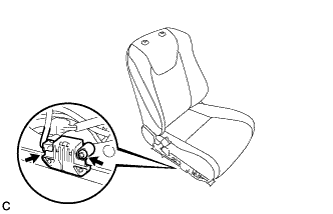
Disconnect the connector.
-
Using a T30 "TORX" socket wrench, remove the "TORX" screw and seat position sensor with the seat slide position sensor protector.
-
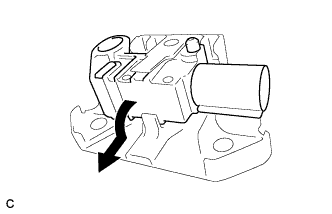
Remove the seat position sensor from the seat slide position sensor protector as shown in the illustration.
-