NAME PLATE INSTALLATION
PROCEDURE
-
INSTALL RADIATOR GRILLE EMBLEM (for Front Side)
-
Clean the attachment surface.
-
Using an infrared light, heat the double-sided adhesive tape remaining on the front bumper cover.
Heating Temperature Item Temperature Front Bumper Cover 40 to 60°C (104 to 140°F) CAUTION:
Do not burn yourself with the hot front bumper cover or with the infrared light.
Note
Do not heat the front bumper cover excessively.
-
Using a piece of cloth, rub the remaining double-sided tape off the front bumper cover while it is hot from the infrared light.
Note
Installing the radiator grille emblem while any double-sided tape remains on the front bumper cover may cause adhesion failure. Therefore, completely remove the double-sided adhesive tape.
-
Using a non-residue solvent, clean the attachment surface.
-
-
Using an infrared light, heat the radiator grille emblem installation surface of the front bumper cover and new radiator grille emblem.
Heating Temperature Item Temperature Front Bumper Cover 40 to 60°C (104 to 140°F) Radiator Grille Emblem 20 to 30°C (68 to 86°F) CAUTION:
Do not burn yourself withthe hot front bumper cover and radiator grille emblem or with the infrared light.
Note
Do not heat the front bumper cover and radiator grille emblem excessively.
-
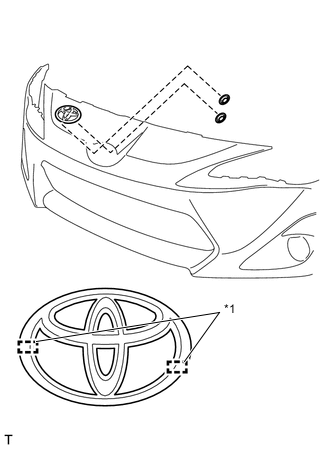
Text in Illustration *1 Location Pin Insert the 2 pins into the front bumper cover and install a new radiator grille emblem with the new 2 push nuts.
-
-
INSTALL FRONT BUMPER COVER
-
INSTALL RADIATOR GRILLE EMBLEM (for Rear Side)
-
Clean the attachment surface.
-
Using an infrared light, heat the double-sided adhesive tape remaining on the luggage compartment door panel.
Heating Temperature Item Temperature Luggage Compartment Door Panel 40 to 60°C (104 to 140°F) CAUTION:
Do not burn yourself with the hot luggage compartment door panel or with the infrared light.
Note
Do not heat the luggage compartment door panel excessively.
-
Using a piece of cloth, rub the remaining double-sided tape off the luggage compartment door panel while it is hot from the infrared light.
Note
Installing the radiator grille emblem while any double-sided tape remains on the luggage compartment door panel may cause adhesion failure. Therefore, completely remove the double-sided adhesive tape.
-
Using a non-residue solvent, clean the attachment surface.
-
-
Using an infrared light, heat the radiator grille emblem installation surface of the luggage compartment door panel and new radiator grille emblem.
Heating Temperature Item Temperature Luggage Compartment Door Panel 40 to 60°C (104 to 140°F) Radiator Grille Emblem 20 to 30°C (68 to 86°F) CAUTION:
Do not burn yourself with the hot luggage compartment door panel and radiator grille emblem or with the infrared light.
Note
Do not heat the luggage compartment door panel and radiator grille emblem excessively.
-
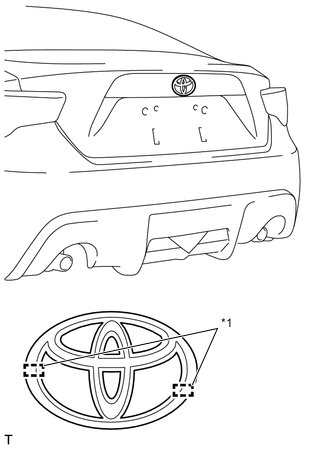
Text in Illustration *1 Location Pin Insert the 2 pins into the luggage compartment door panel and install a new radiator grille emblem.
-
-
INSTALL LUGGAGE COMPARTMENT DOOR NAME PLATE
-
Clean the attachment surface.
-
Using an infrared light, heat the double-sided adhesive tape remaining on the luggage compartment door panel.
Heating Temperature Item Temperature Luggage Compartment Door Panel 40 to 60°C (104 to 140°F) CAUTION:
Do not burn yourself with the hot luggage compartment door panel or with the infrared light.
Note
Do not heat the luggage compartment door panel excessively.
-
Using a piece of cloth, rub the remaining double-sided tape off the luggage compartment door panel while it is hot from the infrared light.
Note
Installing the back door name plate while any double-sided tape remains on the luggage compartment door panel may cause adhesion failure. Therefore, completely remove the double-sided adhesive tape.
-
Using a non-residue solvent, clean the attachment surface.
-
-
Using an infrared light, heat the back door name plate installation surface of the luggage compartment door panel and new luggage compartment door name plate.
Heating Temperature Item Temperature Luggage Compartment Door Panel 40 to 60°C (104 to 140°F) Luggage Compartment Door Name Plate 20 to 30°C (68 to 86°F) CAUTION:
Do not burn yourself with the hot luggage compartment door panel and luggage compartment door name plate or with the infrared light.
Note
Do not heat the luggage compartment door panel and luggage compartment door name plate excessively.
-
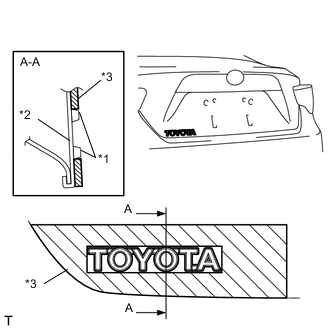
Text in Illustration *1 Luggage Compartment Door Name Plate *2 Luggage Compartment Door Panel *3 Bracket Install a new luggage compartment door name plate as shown in the illustration.
-
Install the enclosed bracket with luggage compartment door name plate, to the luggage compartment door panel.
-
Remove the release paper from the luggage compartment door name plate.
Tech Tips
After removing the release paper, keep the exposed adhesive free from foreign matter.
-
Using the bracket, install the luggage compartment door name plate.
-
Remove the bracket from luggage compartment door panel.
-
-