UPPER INSTRUMENT PANEL DISASSEMBLY
PROCEDURE
-
REMOVE NO. 2 HEATER TO REGISTER DUCT
-
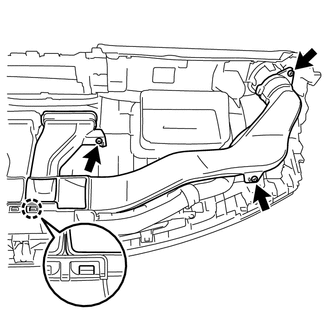
Remove the 3 screws.
-
Disengage the claw to remove the No. 2 heater to register duct.
-
-
REMOVE NO. 1 HEATER TO REGISTER DUCT
Tech Tips
Use the same procedure as for the No. 2 heater to register duct.
-
REMOVE DEFROSTER NOZZLE ASSEMBLY
-
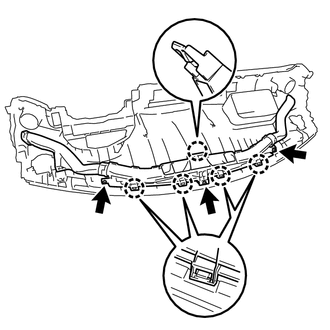
Remove the 3 screws.
-
Disengage the 5 claws and remove the defroster nozzle assembly, No. 2 heater to register duct, and No. 1 heater to register duct as a single unit.
-
-
REMOVE NO. 2 SIDE DEFROSTER NOZZLE DUCT
-
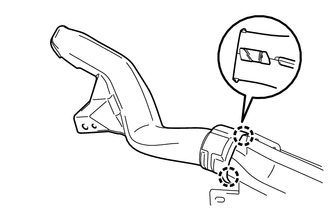
Disengage the 2 claws to remove the No. 2 side defroster nozzle duct.
-
-
REMOVE NO. 1 SIDE DEFROSTER NOZZLE DUCT
Tech Tips
Use the same procedure as for the No. 2 side defroster nozzle duct.
-
REMOVE NO. 3 DEFROSTER NOZZLE GARNISH
-
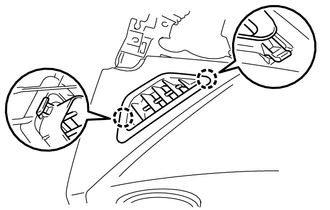
Disengage the 2 claws to remove the No. 3 defroster nozzle garnish.
-
-
REMOVE NO. 2 DEFROSTER NOZZLE GARNISH
Tech Tips
Use the same procedure as for the No. 3 defroster nozzle garnish.
-
REMOVE CENTER INSTRUMENT PANEL REGISTER ASSEMBLY
-
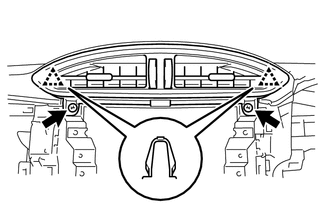
Remove the 2 screws.
-
Disengage the 2 clips to remove the center instrument panel register assembly.
-
-
REMOVE NO. 2 INSTRUMENT PANEL REGISTER SUB-ASSEMBLY
-
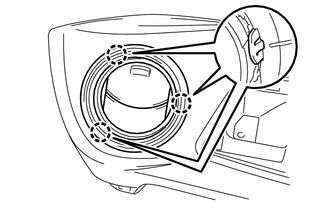
Disengage the 3 claws to remove the No. 2 instrument panel register sub-assembly.
-
-
REMOVE NO. 1 INSTRUMENT PANEL REGISTER SUB-ASSEMBLY
Tech Tips
Use the same procedure as for the No. 2 instrument panel register sub-assembly.
-
REMOVE INSTRUMENT PANEL REGISTER BEZEL (for LH Side)
-
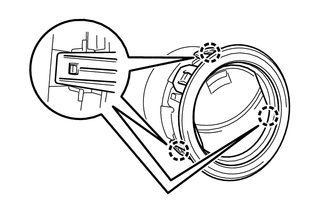
Disengage the 3 claws to remove the instrument panel register bezel.
-
-
REMOVE INSTRUMENT PANEL REGISTER BEZEL (for RH Side)
Tech Tips
Use the same procedure as for the LH side
-
REMOVE NO. 1 DEFROSTER NOZZLE GARNISH
-
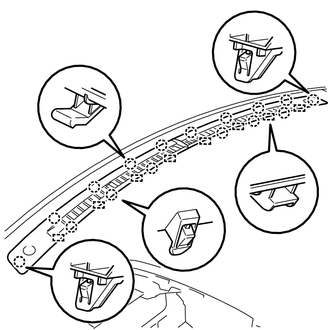
Disengage the 16 claws and 8 guides to remove the No. 1 defroster nozzle garnish.
-
-
REMOVE INSTRUMENT PANEL CUSHION
-
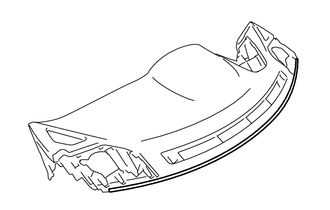
Remove the instrument panel cushion.
-