BRAKE PEDAL(for LHD M/T) ADJUSTMENT
PROCEDURE
-
CHECK AND ADJUST BRAKE PEDAL HEIGHT
-
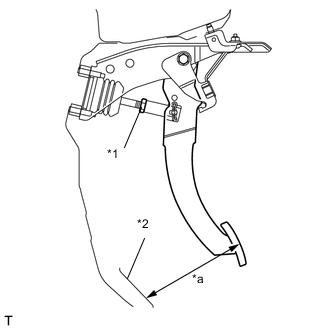
Text in Illustration *1 Clevis Lock Nut *2 Floor mat *a Pedal Height Check the pedal height.
Standard Pedal Height from floor mat for M/T 145mm
(5.709in.)
for A/T 150mm
(5.906 in.)
-
Adjust the pedal height.
-
Remove the No. 1 instrument panel under cover sub-assembly.
-
Disconnect the connector from the stop light switch.
-
Remove the stop light switch.
-
Loosen the push rod clevis lock nut.
-
Adjust the pedal height by turning the push rod.
Standard Pedal Height from floor mat for M/T 145mm
(5.709in.)
for A/T 150mm
(5.906 in.)
-
Tighten the brake master cylinder push rod clevis lock nut.
- Torque:
- 19 N*m { 194 kgf*cm, 14 ft.*lbf }
-
Install the stop light switch Click here.
-
Connect the connector to the switch.
-
Check that the stop light does not illuminate when the brake pedal is not stepped.
-
-
-
CHECK BRAKE PEDAL FREE PLAY
-
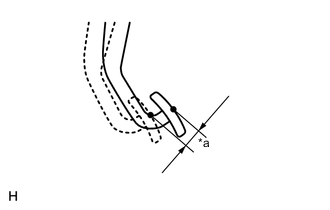
Text in Illustration *a Pedal Free Play Stop the engine. Depress the pedal several times until there is no vacuum in the booster. Then release the pedal.
-
Depress the pedal until resistance is felt.
-
Check the pedal free play by measuring the distance between the position in the previous step and the pedal released position.
When the brake pedal is depressed with a force of less than 10 N (1.0 kgf, 2.2 lbf) 0.5 to 2.7 mm (0.020 to 0.106 in.) Tech Tips
If the free play is out of the specified range, check the protruding amount of the shaft of the stop light switch assembly.
-
-
CHECK BRAKE PEDAL RESERVE DISTANCE
-
Release the parking brake pedal. Start the engine, and when the pressure in the brake booster reaches 66.7 kPa (500 mmHg, 19.6 in.Hg), proceed with the next step.
-
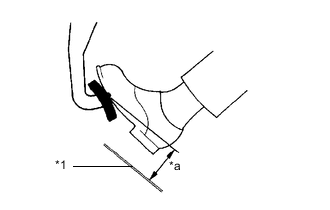
Text in Illustration *1 Floor mat *a Pedal Reserve Distance Depress the pedal and check the pedal reserve distance.
Standard Pedal Reserve Distance from the floor mat at 490 N (50 kgf, 110.2 lbf) More than 55 mm (2.165 in.) If the distance is not as specified, troubleshoot the brake system.
Tech Tips
Check the brake pedal reserve distance at the same location as that used when checking the brake pedal height.
-