LIGHTING SYSTEM OPERATION CHECK

-
AUTOMATIC LIGHT CONTROL SYSTEM OPERATION CHECK
-
Turn the power switch on (IG).
-
Turn the headlight dimmer switch to the AUTO position.
-
Cover the automatic light control sensor.
-
Check that the taillights and low beam headlights come on.
-
Uncover the automatic light control sensor.
-
Check that the low beam headlights and taillights turn off.
-
-
LIGHT AUTO TURN-OFF SYSTEM OPERATION CHECK (w/ Light Auto Turn-off Delay Function)
-
Close all of the doors (including luggage compartment door).
-
Turn the power switch on (IG).
-
Set the headlight dimmer switch to the AUTO position to illuminate the lights.
-
Turn the power switch off.
-
Open the driver door.
-
Close the driver door.
-
Check that the headlights, taillights, clearance lights and license plate lights go off after 30 seconds (delay function).
-
-
LIGHT AUTO TURN-OFF SYSTEM OPERATION CHECK (w/ Follow Me Home System)
-
*1: w/ Front Fog Light
-
*2: w/ Rear Fog Light
-
When headlight dimmer switch in AUTO position.
-
Turn the power switch on (IG).
-
Turn the headlights, front fog lights*1, rear fog lights*2, clearance lights, taillights or license plate lights on.
-
Turn the power switch off.
-
Check that all of lights go off immediately.
-
-
When light control switch in tail or head position.
-
Turn the power switch on (IG).
-
Turn the headlights, front fog lights*1, rear fog lights*2, clearance lights, taillights or license plate lights on.
-
Turn the power switch off.
-
Check that the headlights and front fog lights*1 go off immediately.
-
-
-
LIGHT AUTO TURN-OFF SYSTEM OPERATION CHECK (w/o Light Auto Turn-off Delay Function, w/o Follow Me Home System)
-
*1: w/ Front Fog Light
-
*2: w/ Rear Fog Light
-
Prepare the vehicle so that the power switch is on (IG) and the driver door is closed.
-
Set the headlight dimmer switch to the tail, head or AUTO position to illuminate the lights.
-
Turn the power switch off and open the driver door. Check that the headlights, front fog lights*1, rear fog lights*2, taillights, clearance lights and license plate lights turn off.
-
-
DAYTIME RUNNING LIGHT SYSTEM
-
Turn the headlight dimmer switch off.
-
Turn the power switch on (Ready).
-
Release the parking brake.
-
Check that the daytime running lights come on.
-
-
AUTOMATIC HEADLIGHT BEAM LEVEL CONTROL SYSTEM OPERATION CHECK (w/o AFS)
-
Check that the initialization (determination of the initial position) of the headlight swivel motor (leveling portion) is performed after the power switch is on (Ready).
-
-
AFS OPERATION CHECK (w/ AFS)
-
Check that the initialization (determination of the initial position) of the headlight swivel motor is performed after the power switch is on (Ready).
-
Check that the AFS OFF indicator light in the combination meter comes on for approximately 3 seconds and then goes off when the power switch is turned on (IG).
-
-
AUTOMATIC HIGH BEAM SYSTEM OPERATION CHECK (w/ Automatic High Beam System)
-
Check the operation of the inner rear view mirror indicator light.
-
Turn the power switch on (IG).
-
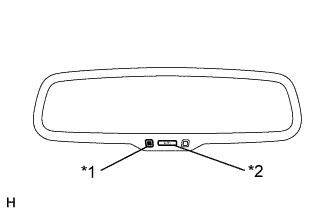
Text in Illustration *1 Indicator Light *2 AUTO Switch Check that the inner rear view mirror indicator light comes on.
-
Press the inner rear view mirror AUTO switch for 1 to 3 seconds.
-
Check that the inner rear view mirror indicator light goes off.
-
Press the inner rear view mirror AUTO switch for 1 to 3 seconds again.
-
Check that the inner rear view mirror indicator light comes on.
Tech Tips
If the inner rear view mirror indicator light flashes, turn the power switch off, and then turn the power switch on (IG). If the inner rear view mirror indicator light flashes continuously, replace the inner rear view mirror.
-
-

Text in Illustration *1 Automatic High Beam Indicator Light Check the operation of the automatic high beam indicator light.
-
Turn the power switch on (IG).
-
Move the shift lever to any position except R.
-
Turn the headlight dimmer switch to the AUTO position.
-
Cover the automatic light control sensor to turn the low beam headlights on.
-
Turn the headlight dimmer switch to the high position.
-
The integration control and panel (automatic high beam main switch) is on.
-
Check that the automatic high beam indicator comes on.
-
-
Check the operation of the automatic high beam function.
-
At night, when driving the vehicle with the automatic high beam system in standby mode, check that the headlights are changed from the low beams to the high beams automatically after a short delay when all of the following conditions are met:
-
The vehicle speed is more than 40 km/h (25 mph)*1 or 34 km/h (21 mph)*2.
-
The area in front of the vehicle is dark.
-
There are no oncoming vehicles with headlights on.
-
There are no preceding vehicles with taillights on.
-
There are few streetlights along the street ahead.
-
*1: w/ Follow Me Home System
-
*2: w/o Follow Me Home System
-
-
At night, when driving the vehicle with the high beams turned on by the automatic high beam system, check that the automatic high beam system turns off the high beams and returns to standby mode when any of the following conditions are met:
-
The vehicle speed is less than 31 km/h (19 mph)*1 or 27 km/h (17 mph)*2.
-
The level of ambient light is higher than a specified threshold.
-
There are oncoming vehicles with headlights on.
-
There are preceding vehicles with taillights on.
-
Light from the streetlights ahead is higher than a specified threshold.
-
*1: w/ Follow Me Home System
-
*2: w/o Follow Me Home System
-
-
-
Using the following procedure, the automatic high beam operation can be checked without driving the vehicle.
-
Turn the power switch on (IG).
-
Using the GTS, follow the instructions to switch to the "AFS" screen and select "Active Test".
-
Select "Automatic High Beam Operation" on the screen and forcibly operate the automatic high beam system.
-
Check that the inner rear view mirror indicator light flashes.
-
Check that the low beams change to the high beams when the surrounding area is dark enough.
-
Shine a flashlight, white LED or red LED on the camera built into the inner rear view mirror.
-
Check that the high beams change to the low beams.
Note
The high beams may not change to the low beams when the surrounding area is bright or due to on other lighting conditions. Therefore, this function check should not be used as the only method of determining if a malfunction is present (if parts need to be replaced).
-
-