FRONT CONSOLE BOX DISASSEMBLY

Tech Tips
-
Use the same procedure for RHD and LHD vehicles.
-
The procedure listed below is for LHD vehicles.
-
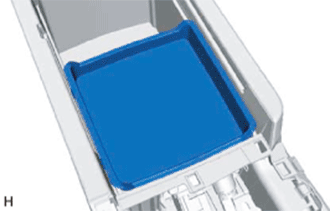
REMOVE UPPER CONSOLE BOX SUB-ASSEMBLY
-
Remove the upper console box sub-assembly.
-
-
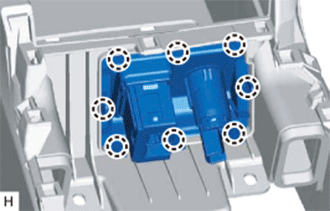
REMOVE LOWER CONSOLE BOX POCKET
-
Detach the 8 claws and remove the lower console box pocket.
-
-
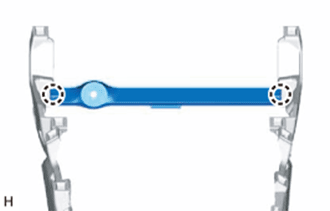
REMOVE NO. 5 CONSOLE BOX MOUNTING BRACKET
-
Detach the 2 claws and remove the No. 5 console box mounting bracket.
-
-
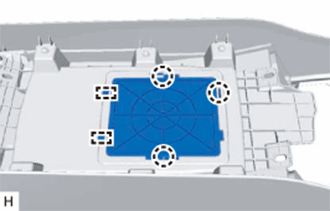
REMOVE LOWER CONSOLE COVER
-
Detach the 3 claws and 2 guides and remove the lower console cover.
-
-
REMOVE REAR CONSOLE ARMREST ASSEMBLY
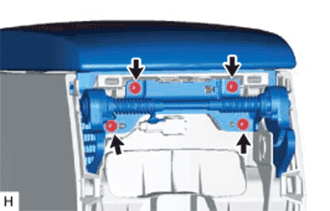
-
Remove the 4 screws and rear console armrest assembly.
-
-
REMOVE CONSOLE COMPARTMENT DOOR LOCK SUB-ASSEMBLY
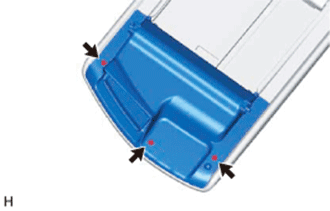
-
Remove the 3 screws and console compartment door lock sub-assembly.
-
-
REMOVE CONSOLE COMPARTMENT DOOR HINGE SUB-ASSEMBLY
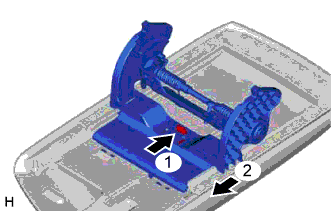
-
Push the part indicated by arrow 1, and then pull the console compartment door hinge sub-assembly in the direction of arrow 2 to remove it.
-
-
REMOVE REMOTE TOUCH ASSEMBLY
-
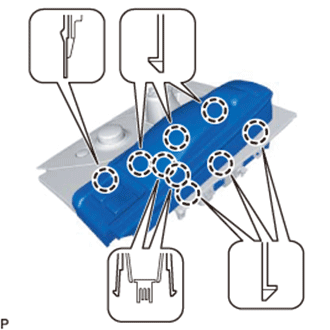
Detach the 9 claws.
-
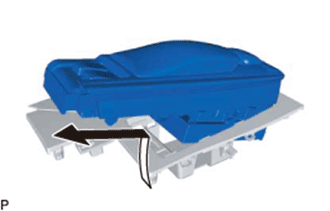
Move the remote touch assembly in the direction of the arrow in the illustration to remove it from the upper console panel.
-
-
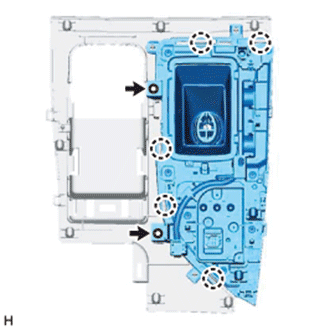
REMOVE SHIFTING HOLE FRAME SUB-ASSEMBLY
-
Remove the 2 screws.
-
Detach the 5 claws and remove the shifting hole frame sub-assembly.
-
-
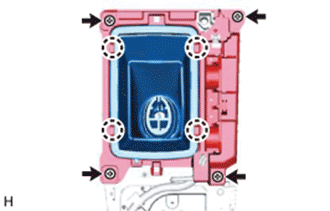
REMOVE SHIFTING HOLE COVER SUB-ASSEMBLY
-
Remove the 4 screws.
-
Detach the 4 claws and remove the shifting hole cover sub-assembly.
-
-
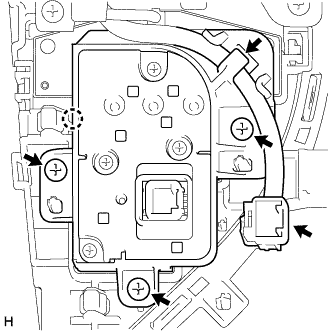
REMOVE COMBINATION SWITCH ASSEMBLY
-
Detach the wire harness and connector from the combination switch assembly.
-
Remove the 3 screws.
-
Detach the claw and remove the combination switch assembly from the upper console panel.
-