METER / GAUGE SYSTEM OPERATION CHECK

-
INSPECT INDICATOR/WARNING LIGHT
-
Check the following indicators and warning lights.
Indicator/Warning Light Switch Condition Specified Condition Master warning light Power switch off → on (IG) Comes on for 3 seconds Brake warning light Slip indicator light Tire pressure warning light*1 Automatic high beam indicator light*2 ABS warning light VSC OFF indicator light PCS warning light*3 AFS OFF indicator light*4 EPB*/ECB* warning light Brake hold standby indicator light Brake hold operated indicator light SRS warning light Power switch off → on (IG) Comes on for 6 seconds MIL Power switch off → on (IG)
-
Illuminates when power switch turned on
-
Turns off when ready on
Charge warning light EPS warning light
-
EPB*: Electric Parking Brake System
-
ECB*: Electronically Controlled Brake System
-
*1: w/ Tire Pressure Warning System
-
*2: w/ Automatic High Beam System
-
*3: w/ Pre-crash Safety System
-
*4: w/ AFS
-
-
-
INSPECT SPEEDOMETER
-
Connect the GTS to the DLC3.
-
Turn the power switch on (IG).
-
Turn the GTS on.
-
Enter the following menus: Powertrain / Engine and ECT / Data List.
for km/h (for European Community) Standard Indication Acceptable Range 20 km/h 21 to 25 km/h 40 km/h 41.7 to 46.2 km/h 60 km/h 62.7 to 67.2 km/h 80 km/h 83.4 to 88.4 km/h 100 km/h 104.3 to 109.3 km/h 120 km/h 125.1 to 130.6 km/h 140 km/h 145.8 to 151.8 km/h 160 km/h 166.2 to 173.2 km/h 180 km/h 186.9 to 194.5 km/h 200 km/h 207.7 to 215.7 km/h 220 km/h 228.4 to 236.8 km/h 240 km/h 249.2 to 258 km/h 260 km/h 270 to 279.2 km/h for km/h (except European Community) Standard Indication Acceptable Range 20 km/h 20.7 to 24.7 km/h 40 km/h 41.3 to 45.8 km/h 60 km/h 62 to 66.5 km/h 80 km/h 82.7 to 87.7 km/h 100 km/h 103.3 to 107.3 km/h 120 km/h 124 to 129 km/h 140 km/h 144.7 to 149.7 km/h 160 km/h 165.3 to 170.4 km/h 180 km/h 186 to 191 km/h 200 km/h 206.7 to 211.7 km/h 220 km/h 227.4 to 232.4 km/h 240 km/h 248 to 253 km/h 260 km/h 268.7 to 273.7 km/h for mph Standard Indication Acceptable Range 20 mph 21 to 23.5 mph 40 mph 42 to 44.5 mph 60 mph 62.5 to 66 mph 80 mph 83.1 to 87.1 mph 100 mph 103.9 to 108.4 mph 120 mph 124.7 to 129.6 mph 140 mph 145.4 to 150.7 mph 160 mph 166.2 to 171.9 mph 180 mph 187 to 193 mph If the result is not as specified, the speedometer may have a malfunction.
Note
Do not use worn, underinflated or overinflated tires as the speedometer reading will be inaccurate.
-
Check the deflection width of the speedometer indicator.
-
-
INSPECT TACHOMETER
-
Connect a tune-up tachometer and start the engine.
-
Compare the test results with the tachometer indicator.
DC 13.5 V at 25°C (77°F)
Standard Indication (rpm) Acceptable Range
Data in ( ) is for Reference
700 630 to 770 1000 (900 to 1100) 2000 (1850 to 2150) 3000 2800 to 3200 4000 (3800 to 4200) 5000 4800 to 5200 6000 (5750 to 6250) 7000 6700 to 7300 8000 (7700 to 8300) If the result is not as specified, the tachometer may have a malfunction.
-
-
INSPECT METER/GAUGE
-
Connect the GTS to the DLC3.
-
Perform the Active Test Click here.
-
-
INSPECT WARNING/INDICATOR LIGHT
-
Connect the GTS to the DLC3.
-
Perform the Active Test Click here.
-
-
INSPECT MULTI-INFORMATION DISPLAY
-
Connect the GTS to the DLC3.
-
Perform the Active Test Click here.
-
-
INSPECT HEADUP DISPLAY (w/ Headup Display)
-
Test mode
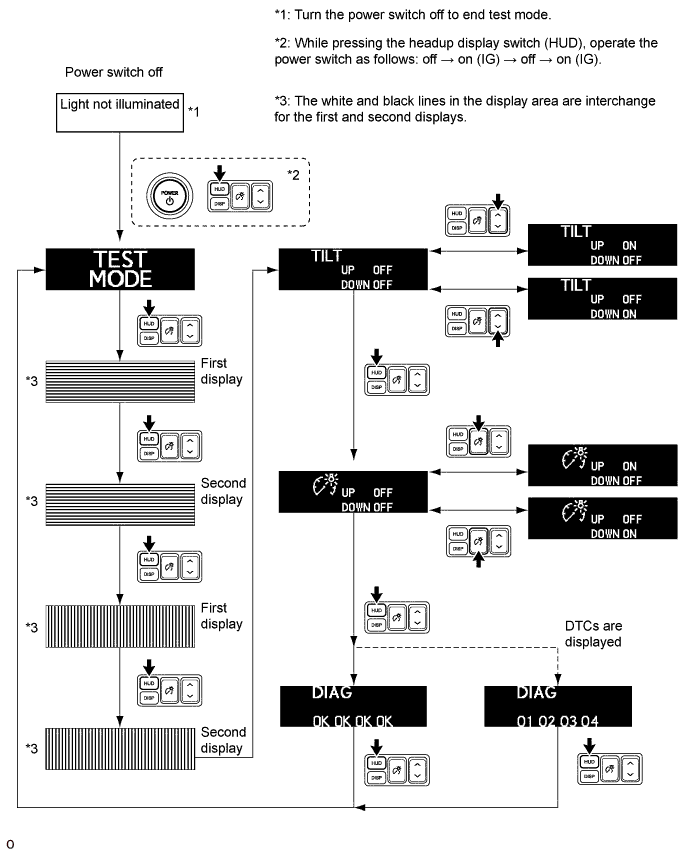
-
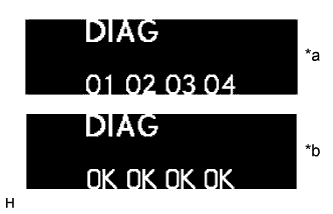
Text in Illustration *a DTCs are displayed *b DTCs are not displayed Diagnostic trouble code
-
Operate the headup display switch assembly to display the DTCs for the headup display.
Tech Tips
If any DTCs are displayed, this indicates that there is a communication malfunction with the combination meter assembly or the AVC-LAN.
DTC Malfunction Status 01 There is a loss of communication with the combination meter assembly (current malfunction). 02 There is a loss of communication with the combination meter assembly (past malfunction). 03 There is a loss of communication with the AVC-LAN (current malfunction). 04 There is a loss of communication with the AVC-LAN (past malfunction).
-
-
Customize
-
Operate the headup display switch assembly to set the display function to ON or OFF.
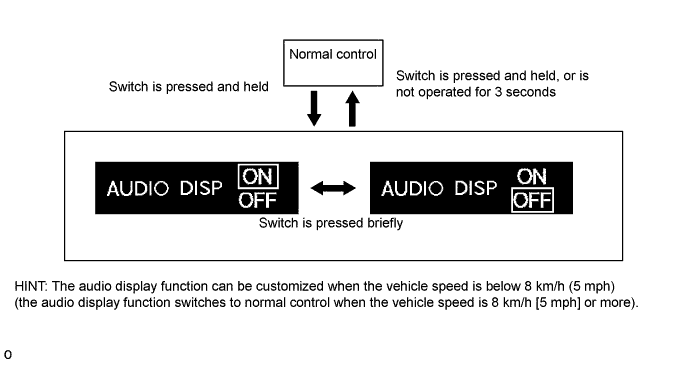
-
-