DOOR CONTROL TRANSMITTER REMOVAL

-
REMOVE TRANSMITTER BATTERY (for Standard, for Type A)
Note
Take extra care when handling these precision electronic components.
-

Push and hold the release knob in the direction indicated by the arrow in the illustration. Then take the mechanical key out of the case.
-

Text in Illustration *1 Protective Tape Insert a screwdriver, into the gap and turn the screwdriver to detach the transmitter housing cover.
Tech Tips
Tape the screwdriver tip before use.
-

Text in Illustration *1 Protective Tape Insert a screwdriver, into the gap and remove the battery (lithium battery: CR2032).
Note
-
When replacing the transmitter battery, before starting work, remove static electricity that has built up in the body by touching, for example, the vehicle to prevent the electrical transmitter from being damaged.
-
Do not push the terminals with your finger.
-
Do not forcibly pry up the battery. The terminals may be damaged.
-
Do not touch the battery with wet hands. Water may cause rust.
-
Do not touch or move any components inside the transmitter. It may interfere with proper operation.
-
-
-
REMOVE TRANSMITTER BATTERY (for Standard, for Type B)
Note
Take extra care when handling these precision electronic components.
-
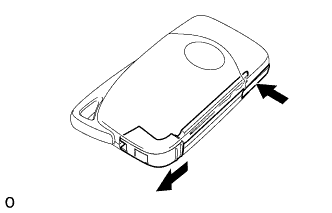
Push and hold the release knob in the direction indicated by the arrow in the illustration. Then take the mechanical key out of the case.
-

Text in Illustration *1 Protective Tape Insert a screwdriver, into the gap and turn the screwdriver to detach the transmitter housing cover.
Tech Tips
Tape the screwdriver tip before use.
-
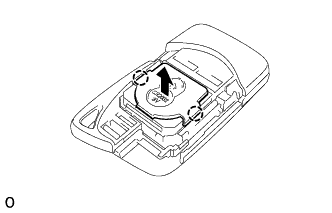
Detach the 2 claws and remove the transmitter battery housing cover.
Note
When replacing the transmitter battery, before starting work, remove static electricity that has built up in the body by touching, for example, the vehicle to prevent the electrical transmitter from being damaged.
-
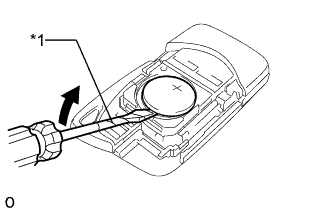
Text in Illustration *1 Protective Tape Insert a screwdriver, into the gap and remove the battery (lithium battery: CR2032).
Note
-
When replacing the transmitter battery, before starting work, remove static electricity that has built up in the body by touching, for example, the vehicle to prevent the electrical transmitter from being damaged.
-
Do not push the terminals with your finger.
-
Do not forcibly pry up the battery. The terminals may be damaged.
-
Do not touch the battery with wet hands. Water may cause rust.
-
Do not touch or move any components inside the transmitter. It may interfere with proper operation.
-
-
-
REMOVE TRANSMITTER (CARD KEY) BATTERY (for Card Type)
-

Lightly hold and pull the battery cover out in the direction indicated by the arrow in the illustration.
Note
Do not insert a screwdriver etc. between the case and battery cover and forcefully bend the battery cover. This will deform the battery cover.
Tech Tips
-
If the battery cover is held too firmly, it becomes harder to pull out.
-
If the cover is slippery and it is difficult to pull it out, use non-slip gloves to pull the cover out.
-
-
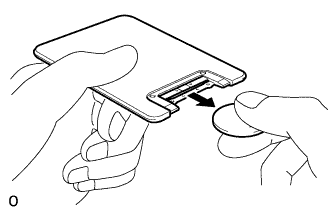
Remove the transmitter (card key) battery (lithium battery: CR2412).
Note
When replacing the transmitter battery, before starting work, remove static electricity that has built up in the body by touching, for example, the vehicle to prevent the electrical transmitter from being damaged.
-