NIGHT VIEW SYSTEM Night View Image is not Normal
DESCRIPTION
The No. 1 night view ECU receives the front image signal from the night view camera. Using the digital (GVIF) signal line, the image data is sent to the accessory meter assembly and the area in front of the vehicle is displayed for the driver (night view screen).
WIRING DIAGRAM
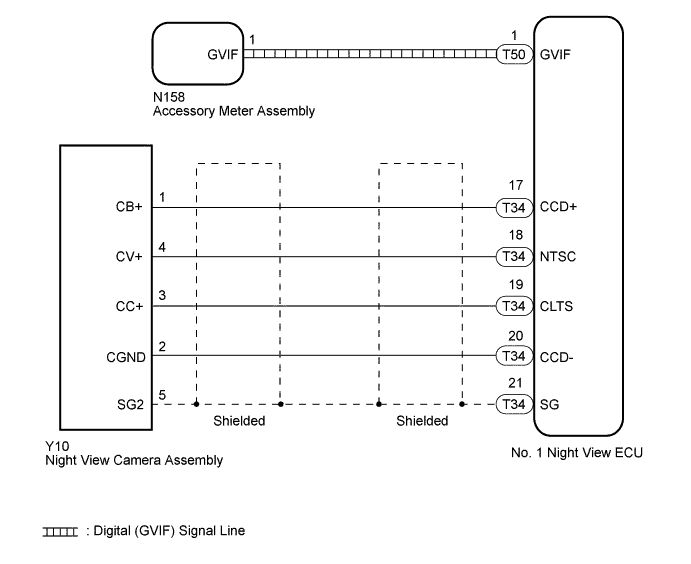
INSPECTION PROCEDURE
Note
When the No. 1 night view ECU or night view camera is replaced, perform night view camera adjustment Click here.
PROCEDURE
-
CHECK WINDSHIELD GLASS
-
Check that the area of the front windshield glass in front of the night view camera and the night view camera lens is free of dirt and damage.
OK There is no dirt or damage.
NG 
REMOVE DIRT
OK 
-
-
CHECK HARNESS AND CONNECTOR (NO. 1 NIGHT VIEW ECU - NIGHT VIEW CAMERA ASSEMBLY)
-
Disconnect the T34 No. 1 night view ECU connector.
-
Disconnect the Y10 night view camera assembly connector.
-
Measure the resistance according to the value(s) in the table below.
Standard Resistance Tester Connection Condition Specified Condition T34-17 (CCD+) - Y10-1 (CB+) Always Below 1 Ω T34-18 (NTSC) - Y10-4 (CV+) T34-19 (CLTS) - Y10-3 (CC+) T34-20 (CCD-) - Y10-2 (CGND) T34-21 (SG) - Y10-5 (SG2) T34-17 (CCD+) - Body ground Always 10 kΩ or higher T34-18 (NTSC) - Body ground T34-19 (CLTS) - Body ground T34-20 (CCD-) - Body ground T34-21 (SG) - Body ground
NG
REPAIR OR REPLACE HARNESS OR CONNECTOR
OK
-
-
CHECK NIGHT VIEW CAMERA ASSEMBLY
-
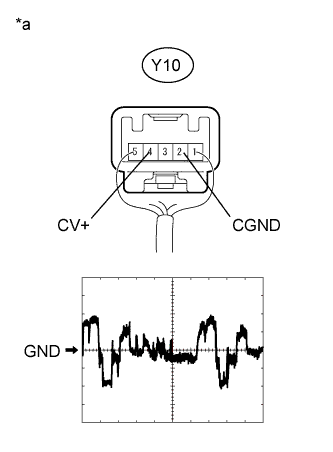
Text in Illustration *a Component with harness connected
(Night View Camera Assembly)
Measure the pulse from the rear of the No. 1 night view ECU.
Measurement Condition Item Content Terminal No. (Symbol) Y10-4 (CV+) - Y10-2 (CGND) Tool setting 200 mV/DIV., 10 μs./DIV. Condition Night view system operating and image output to accessory meter
NG
REPLACE NIGHT VIEW CAMERA ASSEMBLY Click here
OK
-
-
REPLACE HARNESS AND CONNECTOR (GVIF SIGNAL LINE)
-
Replace the wire harness and connector (GVIF signal line) with new or normally functioning ones.
NEXT
-
-
CHECK SYMPTOMS
-
Confirm that the "night view image is not normal" problem symptom is not present.
OK Symptom is not present.
NG 
REPLACE NO. 1 NIGHT VIEW ECU Click here
OK 
END (GVIF SIGNAL LINE IS DEFECTIVE)
-
-
REPLACE NO. 1 NIGHT VIEW ECU
-
Temporarily replace the No. 1 night view ECU with a new or normally functioning one Click here.
NEXT
-
-
ADJUST NIGHT VIEW CAMERA ASSEMBLY
-
Perform night view camera adjustment Click here.
NEXT
-
-
CHECK SYMPTOMS
-
Confirm that the "night view image is not normal" problem symptom is not present.
OK Symptom is not present.
NG
REPLACE ACCESSORY METER ASSEMBLY Click here
OK
END (NO. 1 NIGHT VIEW ECU IS DEFECTIVE)
-