TELEVISION CAMERA REMOVAL

-
REMOVE LUGGAGE COMPARTMENT DOOR OUTSIDE GARNISH SUB-ASSEMBLY
-
REMOVE LICENSE PLATE LIGHT ASSEMBLY
-
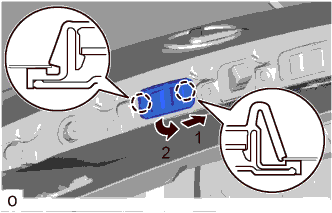
Detach the 2 claws as indicated by the arrows in the order shown in the illustration and remove the license plate light assembly.
-
Disconnect the connector.
-
-
REMOVE REAR TELEVISION CAMERA ASSEMBLY
-
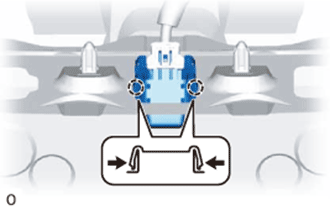
Pull the rear television camera assembly to detach the 2 claws on the outside of the rear television camera assembly.
-
Disconnect the connector and remove the rear television camera assembly.
-