BLIND SPOT MONITOR SYSTEM, Diagnostic DTC:C1AB2

| DTC Code | DTC Name |
|---|---|
| C1AB2 | Short to GND in Outer Mirror Indicator(Master) |
DESCRIPTION
This DTC is stored when the blind spot monitor sensor RH detects a ground short in the outer rear view mirror indicator RH.
| DTC Code | DTC Detection Condition | Trouble Area |
|---|---|---|
| C1AB2 | Both of the following conditions are met:
|
|
WIRING DIAGRAM
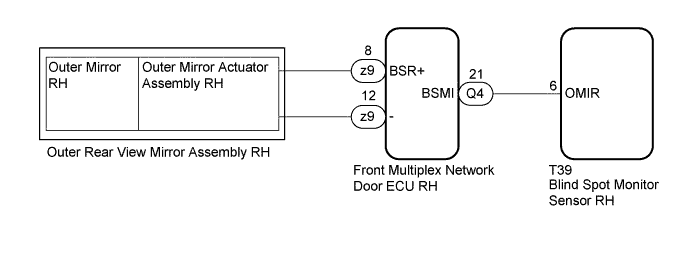
INSPECTION PROCEDURE
Note
When checking for DTCs, make sure that the blind spot monitor main switch (integration control and panel assembly) is on.
PROCEDURE
-
CHECK DTC
-
Clear the DTCs Click here.
-
Recheck for DTCs and check if the same DTC is output again Click here.
OK No DTCs are output.
NG 
CHECK HARNESS AND CONNECTOR (BLIND SPOT MONITOR SENSOR RH - FRONT MULTIPLEX NETWORK DOOR ECU RH) Click here
OK 
USE SIMULATION METHOD TO CHECK Click here
-
-
CHECK HARNESS AND CONNECTOR (BLIND SPOT MONITOR SENSOR RH - FRONT MULTIPLEX NETWORK DOOR ECU RH)
-
Disconnect connector T39 from the blind spot monitor sensor RH.
-
Disconnect connector Q4 from the front multiplex network door ECU RH.
-
Measure the resistance according to the value(s) in the table below.
Standard Resistance Tester Connection Condition Specified Condition Q4-21 (BSMI) - Body ground Always 10 kΩ or higher
NG 
REPAIR OR REPLACE HARNESS OR CONNECTOR
OK 
-
-
INSPECT OUTER MIRROR RH (OUTER REAR VIEW MIRROR INDICATOR RH)
-
Remove the outer mirror RH Click here.
-
Inspect the outer mirror RH (outer rear view mirror indicator RH) Click here.
NG
REPLACE OUTER MIRROR RH Click here
OK
-
-
REPLACE OUTER MIRROR ACTUATOR ASSEMBLY RH
-
Replace the outer mirror actuator assembly RH Click here.
NEXT
-
-
CHECK DTC
-
Clear the DTCs Click here.
-
Recheck for DTCs and check if the same DTC is output again Click here.
OK No DTCs are output.
NG
REPLACE FRONT MULTIPLEX NETWORK DOOR ECU RH Click here
OK
END (OUTER MIRROR ACTUATOR ASSEMBLY RH IS DEFECTIVE)
-
-
REPLACE FRONT MULTIPLEX NETWORK DOOR ECU RH
-
Replace the front multiplex network door ECU RH Click here.
NEXT
-
-
CHECK DTC
-
Clear the DTCs Click here.
-
Recheck for DTCs and check if the same DTC is output again Click here.
OK No DTCs are output.
NG
REPLACE BLIND SPOT MONITOR SENSOR RH Click here
OK
END (FRONT MULTIPLEX NETWORK DOOR ECU RH IS DEFECTIVE)
-