NAVIGATION SYSTEM, Diagnostic DTC:B1323

| DTC Code | DTC Name |
|---|---|
| B1323 | Lost Communication with Haptic Device |
DESCRIPTION
These DTCs are stored when data cannot be received from the remote touch (remote operation board).
| DTC Code | DTC Detection Condition | Trouble Area |
|---|---|---|
| B1323 | The multi-media module receiver assembly cannot receive data from the remote touch. |
|
WIRING DIAGRAM
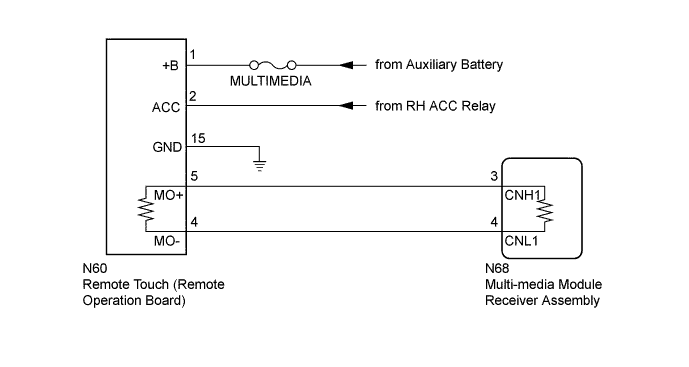
INSPECTION PROCEDURE
Note
-
Before measuring the resistance of the CAN bus, turn the power switch off and leave the vehicle for 1 minute or more without operating the key, switches or opening or closing the doors. After that, disconnect the cable from the negative (-) auxiliary battery terminal and leave the vehicle for 1 minute or more before measuring the resistance.
-
After turning the power switch off, waiting time may be required before disconnecting the cable from the auxiliary battery terminal. Therefore, make sure to read the disconnecting the cable from the auxiliary battery terminal notice before proceeding with work Click here.
-
Inspect the fuses for circuits related to this system before performing the following inspection procedure.
Tech Tips
-
Operating the power switch, any switches or any doors triggers related ECU and sensor communication with the CAN, which causes resistance variation.
-
Even after DTCs are cleared, if a DTC is stored again after driving the vehicle for a while, the malfunction may be occurring due to vibration of the vehicle. In such a case, wiggling the ECUs or wire harness while performing the inspection below may help determine the cause of the malfunction.
PROCEDURE
-
CHECK FOR OPEN IN CAN BUS WIRE (REMOTE TOUCH)
-
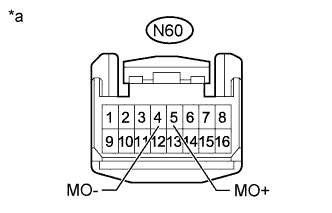
Text in Illustration *a Front view of wire harness connector
(to Remote Touch [Remote Operation Board])
Disconnect the cable from the negative (-) auxiliary battery terminal.
-
Disconnect the remote touch (remote operation board) connector.
-
Measure the resistance according to the value(s) in the table below.
Standard Resistance Tester Connection Condition Specified Condition N60-4 (MO-) - N60-5 (MO+) Cable disconnected from negative (-) auxiliary battery terminal 108 to 132 Ω
NG 
CHECK FOR OPEN IN CAN BUS WIRE (MULTI-MEDIA MODULE RECEIVER ASSEMBLY - REMOTE TOUCH) Click here
OK 
-
-
CHECK HARNESS AND CONNECTOR (REMOTE TOUCH - BATTERY AND BODY GROUND)
-
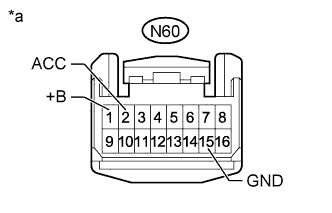
Text in Illustration *a Front view of wire harness connector
(to Remote Touch [Remote Operation Board])
Connect the cable to the negative (-) auxiliary battery terminal.
-
Disconnect the remote touch (remote operation board) connector.
-
Measure the voltage according to the value(s) in the table below.
Standard Voltage Tester Connection Condition Specified Condition N60-1 (+B) - Body ground Always 11 to 14 V N60-2 (ACC) - Body ground Power switch on (ACC) 11 to 14 V -
Measure the resistance according to the value(s) in the table below.
Standard Resistance Tester Connection Condition Specified Condition N60-15 (GND) - Body ground Always Below 1 Ω
NG 
REPAIR OR REPLACE HARNESS OR CONNECTOR
OK 
REPLACE REMOTE TOUCH (REMOTE OPERATION BOARD) Click here
-
-
CHECK FOR OPEN IN CAN BUS WIRE (MULTI-MEDIA MODULE RECEIVER ASSEMBLY - REMOTE TOUCH)
-
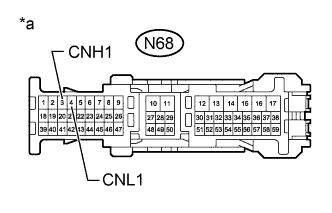
Text in Illustration *a Front view of wire harness connector
(to Multi-media Module Receiver Assembly)
Disconnect the multi-media module receiver assembly connector.
-
Measure the resistance according to the value(s) in the table below.
Standard Resistance Tester Connection Condition Specified Condition N68-3 (CNH1) - N68-4 (CNL1) Cable disconnected from negative (-) auxiliary battery terminal 108 to 132 Ω
NG
REPAIR OR REPLACE CAN MAIN WIRE OR CONNECTOR (MULTI-MEDIA MODULE RECEIVER ASSEMBLY - REMOTE TOUCH)
OK
REPLACE MULTI-MEDIA MODULE RECEIVER ASSEMBLY Click here
-