AUDIO AND VISUAL SYSTEM Speaker Circuit
DESCRIPTION
If there is a short in a speaker circuit, the stereo component amplifier assembly detects the short and stops output to the speakers.
Thus sound cannot be heard from the speakers even if there is no malfunction in the stereo component amplifier assembly, DCM (telematics transceiver)* or speakers.
WIRING DIAGRAM
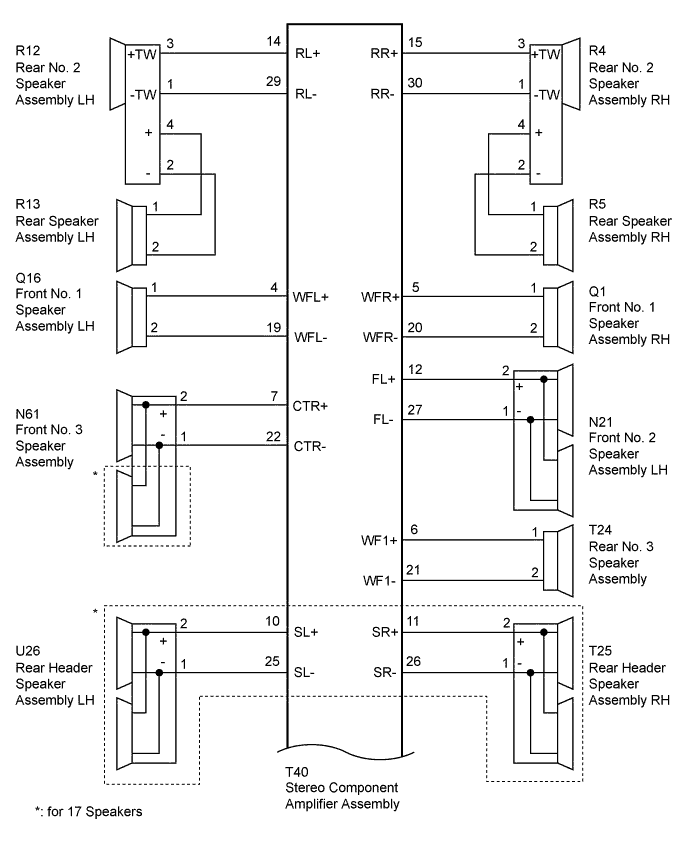
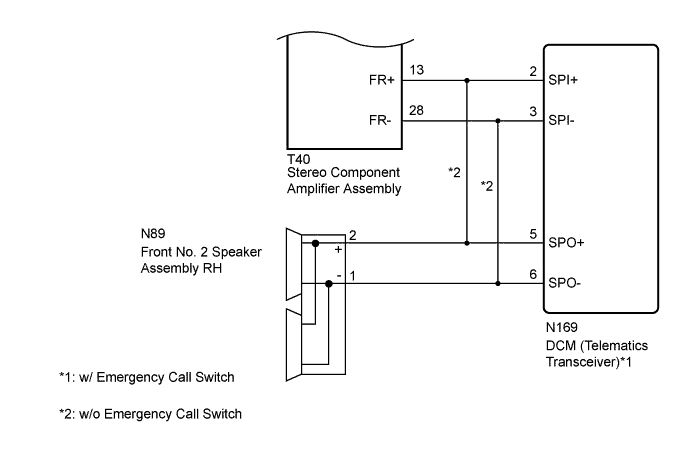
INSPECTION PROCEDURE
PROCEDURE
-
CHECK HARNESS AND CONNECTOR (STEREO COMPONENT AMPLIFIER ASSEMBLY - SPEAKERS AND DCM [TELEMATICS TRANSCEIVER])
-
*1: for RH Side
-
*2: for LH Side
-
*3: for 17 Speakers
-
*4: w/ Emergency Call Switch
-
*5: w/o Emergency Call Switch
-
Disconnect the T40 stereo component amplifier assembly connector.
-
Disconnect the Q1*1 and/or Q16*2 front No. 1 speaker assembly connector.
-
Disconnect the N89*1 and/or N21*2 front No. 2 speaker assembly connector.
-
Disconnect the N61 front No. 3 speaker assembly connector.
-
Disconnect the R4*1 and/or R12*2 rear No. 2 speaker assembly connector.
-
Disconnect the T24 rear No. 3 speaker assembly connector.
-
Disconnect the T25*1 and/or U26*2 rear header speaker assembly connector*3 .
-
Disconnect the N169 DCM (telematics transceiver) connector*4.
-
Measure the resistance according to the value(s) in the table below.
Standard Resistance Tester Connection Condition Specified Condition T40-5 (WFR+) - Q1-1 Always Below 1 Ω T40-20 (WFR-) - Q1-2 Always Below 1 Ω T40-4 (WFL+) - Q16-1 Always Below 1 Ω T40-19 (WFL-) - Q16-2 Always Below 1 Ω T40-13 (FR+) - N169-2 (SPI+)*4 Always Below 1 Ω T40-28 (FR-) - N169-3 (SPI-)*4 Always Below 1 Ω T40-13 (FR+) - N89-2 (+)*5 Always Below 1 Ω T40-28 (FR-) - N89-1 (-)*5 Always Below 1 Ω T40-12 (FL+) - N21-2 (+) Always Below 1 Ω T40-27 (FL-) - N21-1 (-) Always Below 1 Ω T40-7 (CTR+) - N61-2 (+) Always Below 1 Ω T40-22 (CTR-) - N61-1 (-) Always Below 1 Ω T40-15 (RR+) - R4-3 (+TW) Always Below 1 Ω T40-30 (RR-) - R4-1 (-TW) Always Below 1 Ω T40-14 (RL+) - R12-3 (+TW) Always Below 1 Ω T40-29 (RL-) - R12-1 (-TW) Always Below 1 Ω T40-6 (WF1+) - T24-1 Always Below 1 Ω T40-21 (WF1-) - T24-2 Always Below 1 Ω T40-11 (SR+) - T25-2 (+)*3 Always Below 1 Ω T40-26 (SR-) - T25-1 (-)*3 Always Below 1 Ω T40-10 (SL+) - U26-2 (+)*3 Always Below 1 Ω T40-25 (SL-) - U26-1 (-)*3 Always Below 1 Ω T40-5 (WFR+) - Body ground Always 10 kΩ or higher T40-20 (WFR-) - Body ground Always 10 kΩ or higher T40-4 (WFL+) - Body ground Always 10 kΩ or higher T40-19 (WFL-) - Body ground Always 10 kΩ or higher T40-13 (FR+) - Body ground Always 10 kΩ or higher T40-28 (FR-) - Body ground Always 10 kΩ or higher T40-12 (FL+) - Body ground Always 10 kΩ or higher T40-27 (FL-) - Body ground Always 10 kΩ or higher T40-7 (CTR+) - Body ground Always 10 kΩ or higher T40-22 (CTR-) - Body ground Always 10 kΩ or higher T40-15 (RR+) - Body ground Always 10 kΩ or higher T40-30 (RR-) - Body ground Always 10 kΩ or higher T40-14 (RL+) - Body ground Always 10 kΩ or higher T40-29 (RL-) - Body ground Always 10 kΩ or higher T40-6 (WF1+) - Body ground Always 10 kΩ or higher T40-21 (WF1-) - Body ground Always 10 kΩ or higher T40-11 (SR+) - Body ground*3 Always 10 kΩ or higher T40-26 (SR-) - Body ground*3 Always 10 kΩ or higher T40-10 (SL+) - Body ground*3 Always 10 kΩ or higher T40-25 (SL-) - Body ground*3 Always 10 kΩ or higher
NG 
REPAIR OR REPLACE HARNESS OR CONNECTOR
OK 
-
-
INSPECT FRONT NO. 1 SPEAKER ASSEMBLY
-
Remove the front No. 1 speaker assembly Click here.
-
Inspect the front No. 1 speaker assembly Click here.
NG
REPLACE FRONT NO. 1 SPEAKER ASSEMBLY Click here
OK
-
-
CHECK FRONT NO. 2 SPEAKER ASSEMBLY
-
Temporarily replace the front No. 2 speaker assembly with a new or normally functioning one Click here.
-
Check for DTCs and check if the same DTCs is output Click here.
OK No DTCs are output. Result Result Proceed to OK A NG (w/ Emergency Call Switch) B NG (for 17 Speakers [w/o Emergency Call Switch]) C NG (for 12 Speakers [w/o Emergency Call Switch]) D
B 
C
D
A 
END (FRONT NO. 2 SPEAKER ASSEMBLY IS DEFECTIVE)
-
-
CHECK HARNESS AND CONNECTOR (DCM [TELEMATICS TRANSCEIVER] - FRONT NO. 2 SPEAKER ASSEMBLY RH)
-
Disconnect the N169 DCM (telematics transceiver) connector.
-
Disconnect the N89 front No. 2 speaker assembly RH connector.
-
Measure the resistance according to the value(s) in the table below.
Standard Resistance Tester Connection Condition Specified Condition N169-5 (SPO+) - N89-2 (+) Always Below 1 Ω N169-6 (SPO-) - N89-1 (-) Always Below 1 Ω N169-5 (SPO+) - Body ground Always 10 kΩ or higher N169-6 (SPO-) - Body ground Always 10 kΩ or higher
NG
REPAIR OR REPLACE HARNESS OR CONNECTOR
OK
-
-
INSPECT DCM (TELEMATICS TRANSCEIVER)
-
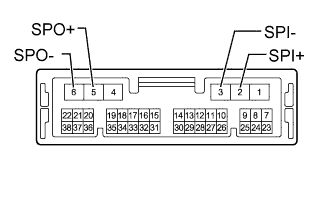
Remove the DCM (telematics transceiver) Click here.
-
Measure the resistance according to the value(s) in the table below.
Standard Resistance Tester Connection Condition Specified Condition 2 (SPI+) - 5 (SPO+) Always Below 1 Ω 3 (SPI-) - 6 (SPO-) Always Below 1 Ω 2 (SPI+) - Body ground Always 10 kΩ or higher 3 (SPI-) - Body ground Always 10 kΩ or higher
NG
REPLACE DCM (TELEMATICS TRANSCEIVER) Click here
OK
-
-
CHECK FRONT NO. 3 SPEAKER ASSEMBLY
-
Temporarily replace the front No. 3 speaker assembly with a new or normally functioning one Click here.
-
Check for DTCs and check if the same DTCs is output Click here.
OK No DTCs are output.
NG
OK
END (FRONT NO. 3 SPEAKER ASSEMBLY IS DEFECTIVE)
-
-
INSPECT FRONT NO. 3 SPEAKER ASSEMBLY
-
Remove the front No. 3 speaker assembly Click here.
-
Inspect the front No. 3 speaker assembly Click here.
NG
REPLACE FRONT NO. 3 SPEAKER ASSEMBLY Click here
OK
-
-
CHECK HARNESS AND CONNECTOR (REAR NO. 2 SPEAKER ASSEMBLY - REAR SPEAKER ASSEMBLY)
-
*1: for RH Side
-
*2: for LH Side
-
Disconnect the R4*1 and/or R12*2 rear No. 2 speaker assembly connector.
-
Disconnect the R5*1 and/or R13*2 rear speaker assembly connector.
-
Measure the resistance according to the value(s) in the table below.
Standard Resistance for RH Side Tester Connection Condition Specified Condition R4-4 (+) - R5-1 Always Below 1 Ω R4-2 (-) - R5-2 Always Below 1 Ω R4-4 (+) - Body ground Always 10 kΩ or higher R4-2 (-) - Body ground Always 10 kΩ or higher for LH Side Tester Connection Condition Specified Condition R12-4 (+) - R13-1 Always Below 1 Ω R12-2 (-) - R13-2 Always Below 1 Ω R12-4 (+) - Body ground Always 10 kΩ or higher R12-2 (-) - Body ground Always 10 kΩ or higher
NG
REPAIR OR REPLACE HARNESS OR CONNECTOR
OK
-
-
INSPECT REAR SPEAKER ASSEMBLY
-
Remove the rear speaker assembly Click here.
-
Inspect the rear speaker assembly Click here.
NG
REPLACE REAR SPEAKER ASSEMBLY Click here
OK
-
-
CHECK REAR NO. 2 SPEAKER ASSEMBLY
-
Temporarily replace the rear No. 2 speaker assembly with a new or normally functioning one Click here.
-
Check for DTCs and check if the same DTCs is output Click here.
OK No DTCs are output.
NG
OK
END (REAR NO. 2 SPEAKER ASSEMBLY IS DEFECTIVE)
-
-
INSPECT REAR NO. 3 SPEAKER ASSEMBLY
-
Remove the rear No. 3 speaker assembly Click here.
-
Inspect the rear No. 3 speaker assembly Click here.
Result Result Proceed to OK (for 17 Speakers) A OK (for 12 Speakers) B NG C
B
REPLACE STEREO COMPONENT AMPLIFIER ASSEMBLY Click here
C
REPLACE REAR NO. 3 SPEAKER ASSEMBLY Click here
A
-
-
CHECK REAR HEADER SPEAKER ASSEMBLY
-
Temporarily replace the rear header speaker assembly with a new or normally functioning one Click here.
-
Check for DTCs and check if the same DTCs is output Click here.
OK No DTCs are output.
NG
REPLACE STEREO COMPONENT AMPLIFIER ASSEMBLY Click here
OK
END (REAR HEADER SPEAKER ASSEMBLY IS DEFECTIVE)
-