ELECTRIC PARKING BRAKE SYSTEM, Diagnostic DTC:C13A8/44

| DTC Code | DTC Name |
|---|---|
| C13A8/44 | Tension Sensor Malfunction |
DESCRIPTION
The tension sensor is built into the parking brake with bracket actuator assembly. It detects the tension value of the parking brake cable and outputs the value to the parking brake ECU assembly.
| DTC Code | Detection Condition | Trouble Area |
|---|---|---|
| C13A8/44 | All of following conditions are met:
|
|
WIRING DIAGRAM
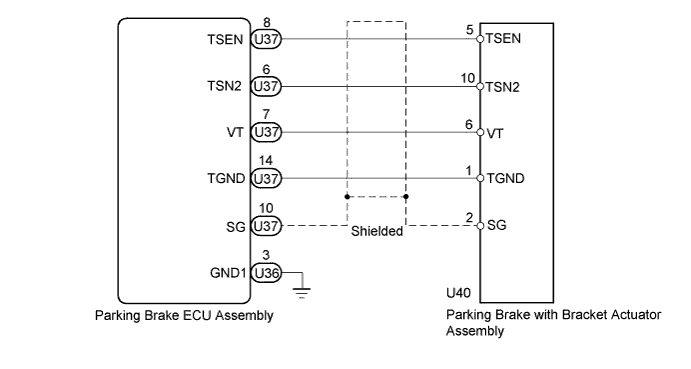
INSPECTION PROCEDURE
Note
-
If the parking brake ECU assembly or parking brake with bracket actuator assembly is replaced, perform the "Reset Memory" and "Acquire Tension Sensor Zero Point" procedures Click here.
-
Before disconnecting connectors or fuses, turn the power switch off and wait 20 seconds or more.
-
This DTC may be output if a manual release cable is used. There is no malfunction. Perform the "Reset Memory" and "Acquire Tension Sensor Zero Point" procedures Click here.
PROCEDURE
-
CLEAR DTC
-
Turn the power switch off.
-
Connect the GTS to the DLC3.
-
Turn the power switch on (IG) and the GTS on.
-
Clear the DTC Click here.
NEXT 
-
-
CHECK DTC
-
Turn the power switch off.
-
Connect the GTS to the DLC3.
-
Turn the power switch on (IG) and the GTS on.
-
Check for DTC Click here.
Result Result Proceed to DTC is output A DTC is not output B
B 
USE SIMULATION METHOD TO CHECK Click here
A
-
-
CHECK HARNESS AND CONNECTOR (PARKING BRAKE ECU - PARKING BRAKE WITH BRACKET ACTUATOR)
-
Disconnect the U36 and U37 parking brake ECU assembly connectors.
-
Disconnect the U40 parking brake with bracket actuator assembly connector.
-
Measure the resistance according to the value(s) in the table below.
Standard Resistance Tester Connection Condition Specified Condition U36-3 (GND1) - Body ground Always Below 1 Ω U37-8 (TSEN) - U40-5 (TSEN) Always Below 1 Ω U37-8 (TSEN) - Body ground Always 10 kΩ or higher U37-6 (TSN2) - U40-10 (TSN2) Always Below 1 Ω U37-6 (TSN2) - Body ground Always 10 kΩ or higher U37-7 (VT) - U40-6 (VT) Always Below 1 Ω U37-7 (VT) - Body ground Always 10 kΩ or higher U37-14 (TGND) - U40-1 (TGND) Always Below 1 Ω U37-14 (TGND) - Body ground Always 10 kΩ or higher U37-10 (SG) - U40-2 (SG) Always Below 1 Ω U37-10 (SG) - Body ground Always 10 kΩ or higher
NG
REPAIR OR REPLACE HARNESS OR CONNECTOR
OK
-
-
CHECK PARKING BRAKE ECU ASSEMBLY (VT VOLTAGE)
-
Connect the parking brake ECU assembly connector.
-
Connect the parking brake with bracket actuator assembly connector.
-
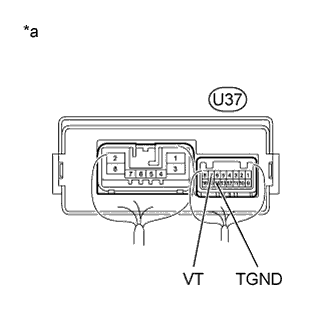
Text in Illustration *a Component with harness connected
(Parking Brake ECU Assembly)
Measure the voltage according to the value(s) in the table below.
Standard Voltage Tester Connection Switch Condition Specified Condition U37-7 (VT) - U37-14 (TGND) Power switch on (IG) 4.75 to 5.25 V
NG 
CHECK PARKING BRAKE ECU ASSEMBLY (VT VOLTAGE) Click here
OK
-
-
CHECK PARKING BRAKE ECU ASSEMBLY (TSEN, TSN2, TGND)
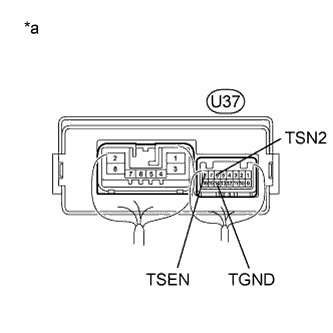
Text in Illustration *a Component with harness connected
(Parking Brake ECU Assembly)
-
Measure the voltage between the terminals below.
Tester Connection Switch Condition (A) U37-6 (TSN2) - U37-14 (TGND) Power switch on (IG) (B) U37-8 (TSEN) - U37-14 (TGND) Power switch on (IG) Tech Tips
Take a note of the measurements.
-
Turn the power switch off.
-
Connect the GTS to the DLC3.
-
Turn the power switch on (IG) and the GTS on.
-
Enter the following menus: Chassis / Electric Parking Brake / Data List.
-
Check the values by referring to the table below.
Tech Tips
This procedure is performed to compare the difference between the actual voltage and the voltage recognized by the ECU.
Electric Parking Brake Tester Display Measurement Item/Range Switch Condition Normal Condition (1) Tension1 Voltage Tension sensor 1 voltage display/
min.: 0.000 V
max.: 5.000 V
Power switch on (IG) Voltage (A) +/- 0.2 V is 0.3 to 4.7 V (2) Tension2 Voltage Tension sensor 2 voltage display/
min.: 0.000 V
max.: 5.000 V
Power switch on (IG) Voltage (B) +/- 0.2 V is 0.3 to 4.7 V (3) Invalid Tension Sensor Comp Tension sensor comparison invalid display/
Enable or Disable
Power switch on (IG) Enable OK Values are as shown in normal condition. Result Result Proceed to (1), (2) or (3) are NG A (1), (2) and (3) are OK B
B
READ VALUE USING GTS (DATA LIST) Click here
A
-
-
INSPECT PARKING BRAKE ECU ASSEMBLY
-
Remove the parking brake ECU assembly Click here.
-
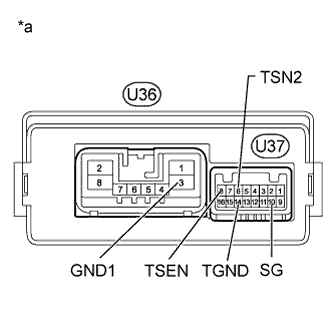
Text in Illustration *a Component without harness connected
(Parking Brake ECU Assembly)
Measure the resistance according to the value(s) in the table below.
Standard Resistance Tester Connection Condition Specified Condition U37-8 (TSEN) - U36-3 (GND1) Always 4 to 6 kΩ U37-6 (TSN2) - U36-3 (GND1) Always 4 to 6 kΩ U37-14 (TGND) - U36-3 (GND1) Always Below 1 Ω U37-10 (SG) - U36-3 (GND1) Always Below 1 Ω
NG
REPLACE PARKING BRAKE ECU ASSEMBLY Click here
OK 
REPLACE PARKING BRAKE WITH BRACKET ACTUATOR ASSEMBLY Click here
-
-
CHECK PARKING BRAKE ECU ASSEMBLY (VT VOLTAGE)
-
Disconnect the parking brake with bracket actuator assembly connector.
-
Turn the power switch on (IG).
-
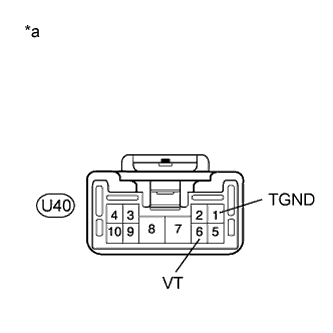
Text in Illustration *a Front view of wire harness connector
(to Parking Brake with Bracket Actuator Assembly)
Measure the voltage according to the value(s) in the table below.
Standard Voltage Tester Connection Switch Condition Specified Condition U40-6 (VT) - U40-1 (TGND) Power switch on (IG) 4.75 to 5.25 V
NG
REPLACE PARKING BRAKE ECU ASSEMBLY Click here
OK
REPLACE PARKING BRAKE WITH BRACKET ACTUATOR ASSEMBLY Click here
-
-
READ VALUE USING GTS (DATA LIST)
-
Turn the power switch off.
-
Connect the GTS to the DLC3.
-
Turn the power switch on (IG) and the GTS on.
-
Enter the following menus: Chassis / Electric Parking Brake / Data List.
-
Check the values by referring to the table below.
Electric Parking Brake Tester Display Measurement Item/Range Switch Condition Normal Condition +B Voltage Value Electric parking brake motor power source information display/
Lo, Mid or Hi
Power switch on (IG) Hi Invalid Tension Sensor Output Tension sensor output invalid display/
Enable or Disable
Power switch on (IG) Enable Invalid Tension Sensor PWR Tension sensor power source invalid display/
Enable or Disable
Power switch on (IG) Enable Invalid Tension Sensor Comp Tension sensor comparison invalid display/
Enable or Disable
Power switch on (IG) Enable OK Values are as shown in normal condition.
NG
REPLACE PARKING BRAKE ECU ASSEMBLY Click here
OK
USE SIMULATION METHOD TO CHECK Click here
-