BRAKE CONTROL POWER SUPPLY INSTALLATION

Note
While the auxiliary battery is connected, even if the power switch is off, the brake control system activates when the brake pedal is depressed or any door courtesy switch is turned on. Therefore, when servicing brake system components, do not depress the brake pedal or open/close the doors.
-
INSTALL NO. 1 BRAKE CONTROL POWER SUPPLY BRACKET
-
Install the No. 1 brake control power supply bracket so that the claws fit into the holes on the brake control power supply assembly.
-
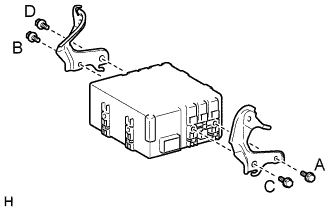
Install the 2 No. 1 brake control power supply brackets with the 4 bolts.
- Torque:
- 8.5 N*m { 87 kgf*cm, 75 in.*lbf }
Note
-
Install the bolts in alphabetical order.
-
Do not drop the brake control power supply. If the brake control power supply has been dropped replace the brake control power supply with a new one.
-
-
INSTALL BRAKE CONTROL POWER SUPPLY ASSEMBLY
-
Connect the connector.
-
Hook and the claws of the No. 1 brake control power supply bracket to the body to set it in place.
-
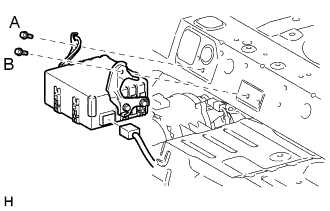
Install the brake control power supply assembly with the 2 bolts.
Note
Install the bolts in alphabetical order.
- Torque:
- 8.5 N*m { 87 kgf*cm, 75 in.*lbf }
-
-
INSTALL BENCH TYPE REAR SEATBACK ASSEMBLY
-
CONNECT CABLE TO AUXILIARY BATTERY NEGATIVE TERMINAL
Note
When disconnecting the cable, some systems need to be initialized after the cable is reconnected Click here.
-
INSTALL LUGGAGE COMPARTMENT TRIM COVER LH
-
Install the luggage compartment trim cover.
-
-
INSTALL LUGGAGE COMPARTMENT FLOOR MAT
-
Install the luggage compartment floor mat.
-
-
CHECK AND CLEAR DTC