ELECTRONICALLY CONTROLLED BRAKE SYSTEM DTC CHECK / CLEAR

-
DTC CHECK/CLEAR (When Using the GTS)
-
Check for DTCs.
-
Connect the GTS to the DLC3.
-
Turn the power switch on (IG).
-
Turn the GTS on.
-
Read the DTCs following the prompts on the GTS screen. Enter the following menus: Chassis / ABS/VSC/TRC / Trouble Codes.
-
Check the details of the DTCs Click here.
-
-
Clear the DTCs.
-
Connect the GTS to the DLC3.
-
Turn the power switch on (IG).
-
Turn the GTS on.
-
Operate the GTS to clear the codes. Enter the following menus: Chassis / ABS/VSC/TRC / Trouble Codes.
-
According to the display on the GTS, select the trouble code data display with the clear button.
-
-
-
DTC CHECK/CLEAR (When not Using the GTS)
-
Check for DTCs.
-
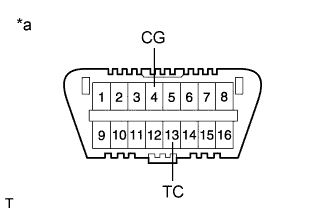
Text in Illustration *a Front view of DLC3 Using SST, connect terminals TC and CG of the DLC3.
- SST
- 09843-18040
-
Turn the power switch on (IG).
-
Observe the blinking pattern of the ABS warning, brake warning / yellow (minor malfunction), slip indicator and brake hold standby indicator lights in order to identify the DTC.
Tech Tips
If no code appears, inspect the TC and CG terminal circuit, and ABS warning, brake warning / yellow (minor malfunction), slip indicator and brake hold standby indicator light circuits.
Trouble Area See Procedure TC and CG terminal circuit ABS warning light circuit (Remains on) ABS warning light circuit (Does not come on) Brake warning light / yellow (minor malfunction) circuit (Remains on) Brake warning light / yellow (minor malfunction) circuit (Does not come on) Slip indicator light circuit (Remains on) Slip indicator light circuit (Does not come on) Brake hold standby indicator light circuit -
Count the number of blinks of the ABS warning, brake warning / yellow (minor malfunction), slip indicator and brake hold standby indicator lights.
Tech Tips
-
How to read DTCs:
Diagnostic trouble codes are represented by the number of blinks of a warning light. For example, code 21 would be shown by 2 blinks, a pause of 1.5 seconds, and then 1 blink.
-
If one code is detected:
The light repeats the same code after a pause of 4 seconds.
-
If multiple codes are detected:
The light outputs one code after another with a 2.5-second pause between each code. When all codes have been output, there is a 4-second pause and then the light begins to output the codes again.
-
Before connecting the terminals of the DLC3, if the brake hold operated indicator is blinking, the brake hold operated indicator stops blinking and turns off when terminals TC and CG of the DLC3 are connected.
-
-
Check the details of the DTCs Click here.
-
After completing the check, disconnect terminals TC and CG of the DLC3 to turn off the display.
If 2 or more DTCs are detected at the same time, the DTCs will be displayed in ascending order.
-
-
Clear the DTCs.
-
Text in Illustration *a Front view of DLC3 Using SST, connect terminals TC and CG of the DLC3.
- SST
- 09843-18040
-
Turn the power switch on (IG).
-
Clear the DTCs stored in the ECU by depressing the brake pedal 8 times or more within 5 seconds.
-
Check that the warning light indicates a normal system code.
-
Remove SST from the terminals of the DLC3.
-
-
-
END OF DTC CHECK/CLEAR
-
Turn the power switch on (IG).
-
Check that the ABS warning, brake warning / yellow (minor malfunction), slip indicator and brake hold operated indicator lights go off when the power switch is turned on (READY).
-