HEADLIGHT ASSEMBLY (for LED Headlight) DISASSEMBLY

Tech Tips
-
Use the same procedure for the RH and LH sides.
-
The procedure listed below is for the LH side.
-
REMOVE FRONT TURN SIGNAL LIGHT BULB
-
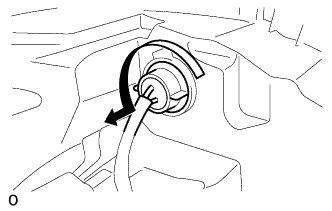
Turn the headlight cord LH in the direction indicated by the arrow in the illustration and remove the socket.
-
Remove the front turn signal light bulb from the headlight cord LH.
-
-
REMOVE FRONT BUMPER SIDE SUPPORT LH
-
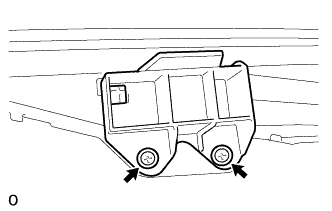
Remove the 2 screws and front bumper side support LH from the headlight unit.
-
-
REMOVE NO. 2 FRONT BUMPER SIDE SUPPORT LH
-
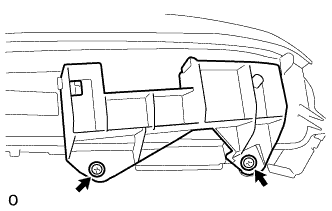
Remove the 2 screws and No. 2 front bumper side support LH from the headlight unit.
-
-
REMOVE HEADLIGHT LENS LH
-
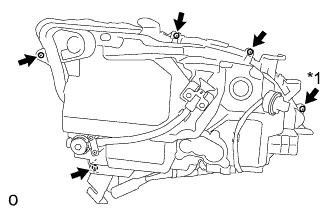
Using a T20H "TORX" driver, remove the "TORX" screw.
Text in Illustration *1 "TORX" Screw -
Remove the 4 screws.
-
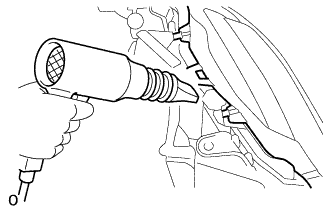
Using a dryer, heat the backside of the headlight unit.
Note
If the headlight is heated unevenly, it will deform or melt.
-
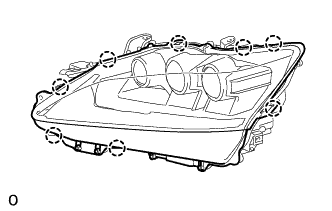
Detach the 8 claws and remove the headlight lens LH from the headlight unit.
Note
-
Wear rubber gloves when handling the headlight lens LH.
-
Do not touch the headlight lens LH or the aluminum surfaces with bare hands.
-
If there are fingerprints on the aluminum surfaces, wipe them off with a soft cloth.
-
If there are fingerprints on the back of the lens, replace the headlight lens LH.
-
Do not allow dirt or foreign matter on the headlight lens LH.
Tech Tips
If the lens cannot be removed even after heating, using a screwdriver with its tip wrapped in tape, lift the lens. Be careful not to damage the headlight unit and headlight lens LH.
-
-
-
REMOVE HEADLIGHT LENS GASKET
-
Remove the headlight lens gasket from the headlight unit.
-
-
REMOVE HEADLIGHT UNIT LH
-
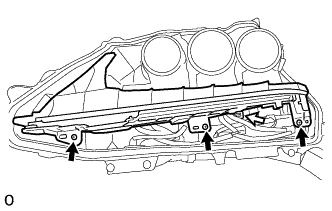
Remove the 3 screws and headlight unit LH from the headlight unit.
Text in Illustration 
Screw 
Connector Note
-
Do not touch the headlight unit LH or the aluminum surfaces with bare hands.
-
If there are fingerprints on the aluminum surfaces, wipe them off with a soft cloth.
-
-
Disconnect the connector.
-
-
REMOVE LIGHT CONTROL ECU
-
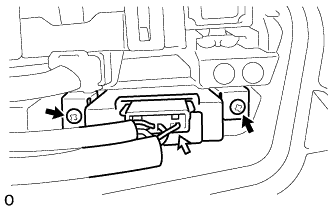
Remove the 2 screws and light control ECU from the headlight unit.
Text in Illustration Screw Connector -
Disconnect the connector.
-
-
REMOVE LIGHT CONTROL ECU
-
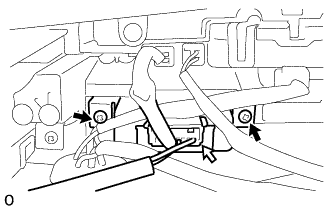
Remove the 2 screws and light control ECU from the headlight unit.
Text in Illustration Screw Connector -
Disconnect the connector.
-
-
REMOVE LIGHT CONTROL ECU (w/ Night View System)
-
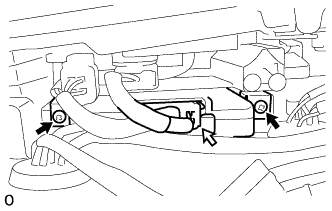
Remove the 2 screws and light control ECU from the headlight unit.
Text in Illustration Screw Connector -
Disconnect the connector.
-
-
REMOVE HEADLIGHT SUB-ASSEMBLY LH (w/ Night View System)
-
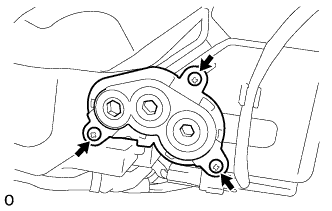
Remove the 3 screws and gear from the headlight unit.
-
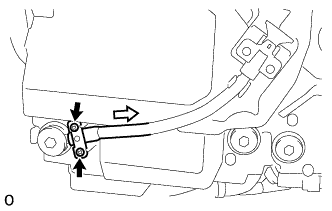
Remove the 2 screws and the plate, and remove the connected gears from the aiming screw.
Text in Illustration Screw Cable -
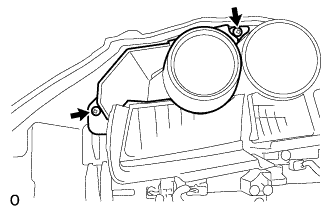
Remove the 2 screws and lens from the headlight unit.
Note
-
Do not touch the lens with bare hands.
-
If there are fingerprints on the lens, wipe them off with a soft cloth.
-
-
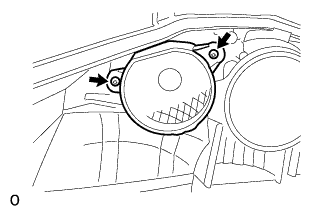
Remove the 2 screws and aluminum surfaces from the headlight unit.
Note
-
Do not touch the aluminum surfaces with bare hands.
-
If there are fingerprints on the aluminum surfaces, wipe them off with a soft cloth.
-
-
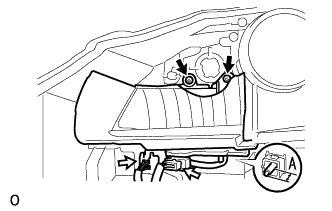
Remove the 2 screws.
Text in Illustration Screw Connector -
Disconnect the 2 connectors.
-
Before removing the headlight sub-assembly LH, measure dimensions A in the diagram and take a note.
-
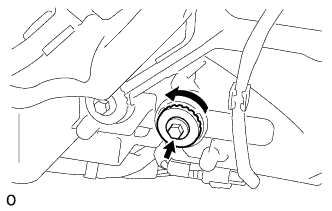
Rotate the 2 aiming screws counterclockwise and remove the headlight sub-assembly LH from the headlight unit.
Note
-
Do not touch the aluminum surfaces with bare hands.
-
If there are fingerprints on the aluminum surfaces, wipe them off with a soft cloth.
-
-
-
REMOVE HEADLIGHT LED UNIT ASSEMBLY LH
-
Remove the 2 screws and the plate, and remove the connected gears from the aiming screw.
Text in Illustration Screw Cable -
Remove the 2 screws and lens from the headlight unit.
Note
-
Do not touch the lens with bare hands.
-
If there are fingerprints on the lens, wipe them off with a soft cloth.
-
-
Remove the 2 screws and aluminum surfaces from the headlight unit.
Note
-
Do not touch the aluminum surfaces with bare hands.
-
If there are fingerprints on the aluminum surfaces, wipe them off with a soft cloth.
-
-
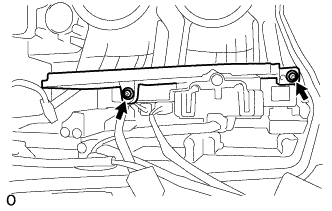
Remove the 2 screws and plate from the headlight unit.
-
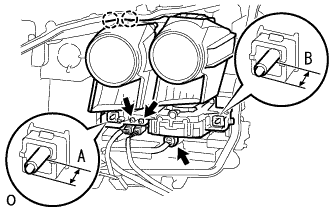
Disconnect the 3 connectors.
-
Before removing the headlight LED unit assembly LH, measure dimensions A and B in the diagram and take a note.
-
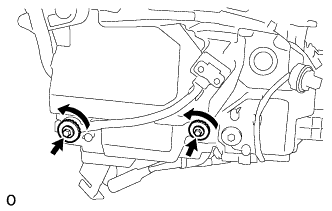
Rotate the 2 aiming screws counterclockwise.
-
Detach the 2 claws and remove the headlight LED unit assembly LH from the headlight unit.
Note
Wear rubber gloves when handling the headlight LED unit assembly LH.
-
-
REMOVE HEADLIGHT SWIVEL MOTOR LH
-
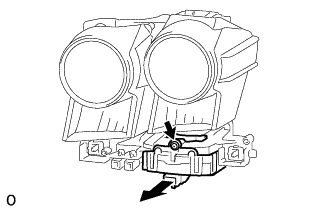
Remove the screw.
-
Move the headlight swivel motor LH as shown in the illustration and remove it from the headlight LED unit assembly LH.
-
-
REMOVE HEADLIGHT CORD LH
-
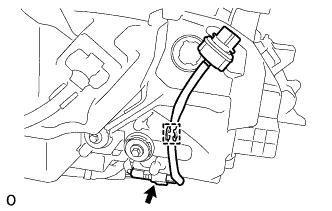
Disconnect the connector.
-
Detach the guide and remove the headlight cord LH from the headlight unit.
-