POWER MIRROR CONTROL SYSTEM Power Retractable Mirrors do not Operate with Power Retract Mirror Switch
SYSTEM DESCRIPTION
-
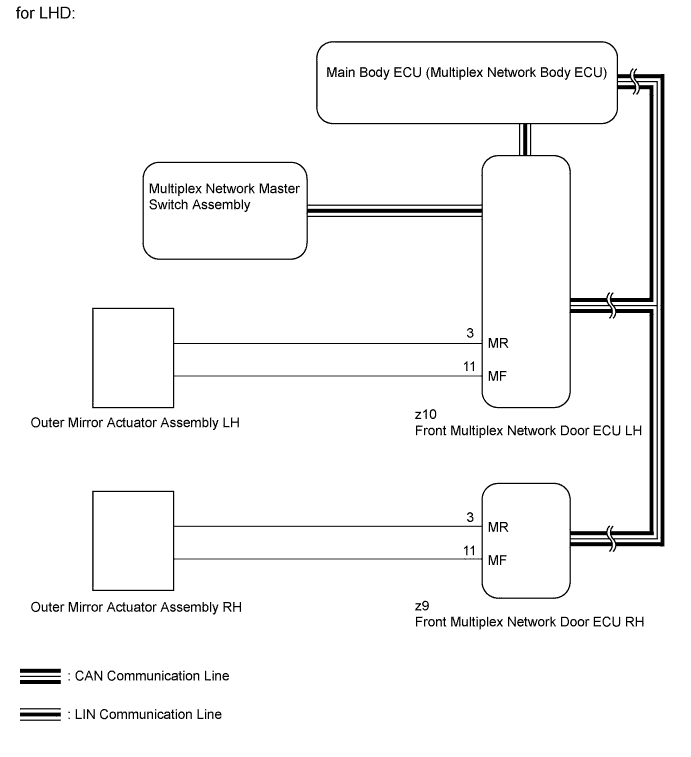
When the mirror retract switch of the multiplex network master switch assembly is operated, deploy/retract signals are sent via LIN communication to the main body ECU (multiplex network body ECU) through the front multiplex network door ECU LH. The main body ECU (multiplex network body ECU) then sends deploy/retract signals to the front multiplex door ECU LH and front multiplex door ECU RH via CAN communication. The front multiplex door ECU LH and front multiplex door ECU RH deploy and retract the mirrors based on the received signals.
for LHD:
-
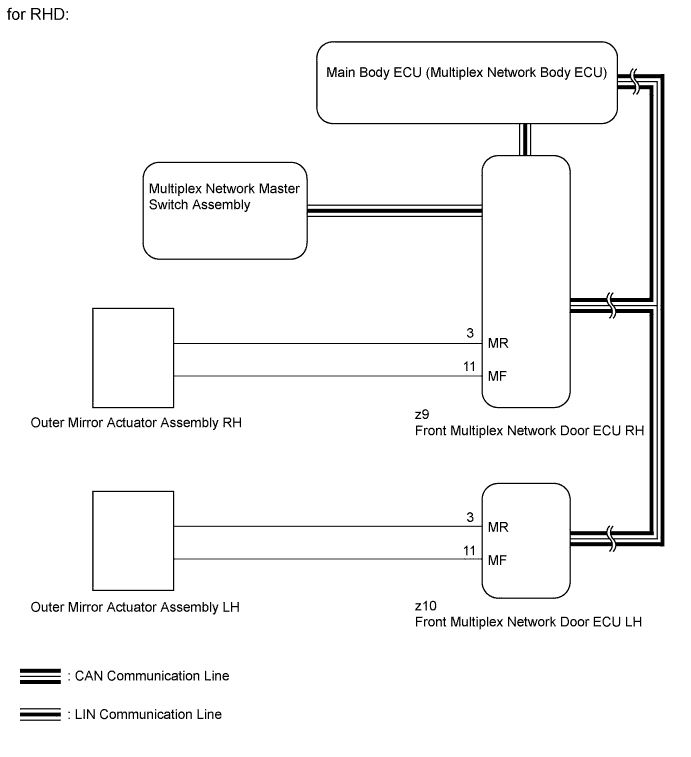
When the mirror retract switch of the multiplex network master switch assembly is operated, deploy/retract signals are sent via LIN communication to the main body ECU (multiplex network body ECU) through the front multiplex network door ECU RH. The main body ECU (multiplex network body ECU) then sends deploy/retract signals to the front multiplex door ECU LH and front multiplex door ECU RH via CAN communication. The front multiplex door ECU LH and front multiplex door ECU RH deploy and retract the mirrors based on the received signals.
for RHD:
WIRING DIAGRAM
INSPECTION PROCEDURE
Note
-
First perform the communication function inspections in How to Proceed with Troubleshooting to confirm that there are no CAN communication malfunctions before troubleshooting this problem.
-
First perform the communication function inspections in How to Proceed with Troubleshooting to confirm that there are no LIN communication malfunctions before troubleshooting this problem.
-
Recognition code registration is necessary when replacing the main body ECU (multiplex network body ECU).
-
If the main body ECU (multiplex network body ECU) is replaced, refer to the Service Bulletin.
PROCEDURE
-
READ VALUE USING GTS (RETRACTABLE OUTER MIRROR SWITCH)
-
Using the GTS, read the Data List Click here.
Master Switch Tester Display Measurement Item/Range Normal Condition Diagnostic Note Outer Mirror Fold SW Retractable outer mirror switch signal / ON or OFF ON: Retractable outer mirror switch in retract position
OFF: Retractable outer mirror switch not in retract position
- OK The display is as specified in the normal condition column.
NG 
CHECK MULTIPLEX NETWORK MASTER SWITCH ASSEMBLY Click here
OK 
-
-
CONFIRM MALFUNCTIONING PARTS
-
Check the malfunctioning outer rear view mirror.
Result Result Proceed to Both the left and right outer rear view mirror do not operate A Outer rear view mirror RH does not operate B Outer rear view mirror LH does not operate C
B
INSPECT OUTER REAR VIEW MIRROR ASSEMBLY RH (POWER RETRACT FUNCTION) Click here
C
INSPECT OUTER REAR VIEW MIRROR ASSEMBLY LH (POWER RETRACT FUNCTION) Click here
A 
REPLACE MAIN BODY ECU (MULTIPLEX NETWORK BODY ECU) Click here
-
-
INSPECT OUTER REAR VIEW MIRROR ASSEMBLY RH (POWER RETRACT FUNCTION)
-
Remove the outer rear view mirror assembly RH Click here.
-
Inspect the outer rear view mirror assembly RH Click here.
NG 
REPLACE OUTER MIRROR ACTUATOR ASSEMBLY RH Click here
OK
REPLACE FRONT MULTIPLEX NETWORK DOOR ECU RH Click here
-
-
INSPECT OUTER REAR VIEW MIRROR ASSEMBLY LH (POWER RETRACT FUNCTION)
-
Remove the outer rear view mirror assembly RH Click here.
-
Inspect the outer rear view mirror assembly RH Click here.
NG
REPLACE OUTER MIRROR ACTUATOR ASSEMBLY LH Click here
OK
REPLACE FRONT MULTIPLEX NETWORK DOOR ECU LH Click here
-
-
CHECK MULTIPLEX NETWORK MASTER SWITCH ASSEMBLY
-
Temporarily replace multiplex network master switch assembly with a new or normally functioning one Click here.
-
Check that the mirror operates.
OK Mirror operates normally.
NG
REPLACE MAIN BODY ECU (MULTIPLEX NETWORK BODY ECU) Click here
OK
END (MULTIPLEX NETWORK MASTER SWITCH ASSEMBLY IS DEFECTIVE)
-