INSIDE HANDLE LIGHT (for Front Door) INSPECTION

-
INSPECT FRONT DOOR INSIDE HANDLE ILLUMINATION LIGHT ASSEMBLY LH
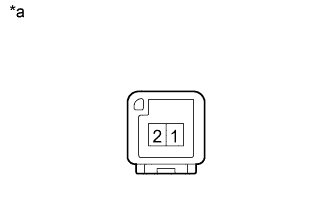
Text in Illustration *a Component without harness connected
(Front Door Inside Handle Illumination Light Assembly LH)
-
Apply battery voltage to the connector and check the light illumination condition.
OK Measurement Condition Specified Condition Battery positive (+) → Terminal 2
Battery negative (-) → Terminal 1
Illuminates If the result is not as specified, replace the front door inside handle illumination light assembly LH.
-
-
INSPECT FRONT DOOR INSIDE HANDLE ILLUMINATION LIGHT ASSEMBLY RH
Text in Illustration *a Component without harness connected
(Front Door Inside Handle Illumination Light Assembly RH)
-
Apply battery voltage to the connector and check the light illumination condition.
OK Measurement Condition Specified Condition Battery positive (+) → Terminal 2
Battery negative (-) → Terminal 1
Illuminates If the result is not as specified, replace the front door inside handle illumination light assembly RH.
-
-
INSPECT NO. 1 INTERIOR ILLUMINATION LIGHT ASSEMBLY LH
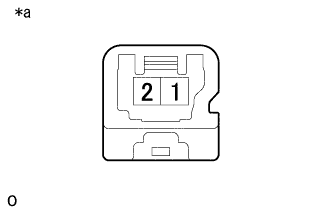
Text in Illustration *a Component without harness connected
(No. 1 Interior Illumination Light Assembly LH)
-
Apply battery voltage to the connector and check the light illumination condition.
OK Measurement Condition Specified Condition Battery positive (+) → Terminal 1
Battery negative (-) → Terminal 2
Illuminates If the result is not as specified, replace the No. 1 interior illumination light assembly LH.
-
-
INSPECT NO. 1 INTERIOR ILLUMINATION LIGHT ASSEMBLY RH
Text in Illustration *a Component without harness connected
(No. 1 Interior Illumination Light Assembly RH)
-
Apply battery voltage to the connector and check the light illumination condition.
OK Measurement Condition Specified Condition Battery positive (+) → Terminal 1
Battery negative (-) → Terminal 2
Illuminates If the result is not as specified, replace the No. 1 interior illumination light assembly RH.
-