G-BOOK SYSTEM (w/ Telematics Transceiver), Diagnostic DTC:B15E9

| DTC Code | DTC Name |
|---|---|
| B15E9 | Telematics Communication Malfunction |
DESCRIPTION
This DTC will be stored when any of the following conditions is met:
-
A manual maintenance check does not complete normally (for a reason such as no response from the G-BOOK center within specified time).
-
An automatic maintenance check does not complete normally (for a reason such as no response from the G-BOOK center within specified time) 30 times in a row.
-
A manual emergency call or automatic emergency call does not complete normally.
| DTC Code | DTC Detection Condition | Trouble Area |
|---|---|---|
| B15E9 | Communication processing error | G-BOOK center |
INSPECTION PROCEDURE
PROCEDURE
-
CHECK CONNECTION TO G-BOOK CENTER
-
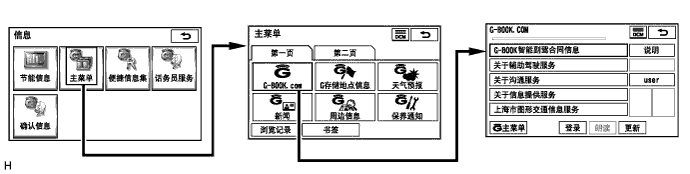
Turn the engine switch on (ACC) and wait 1 minute.
-
Perform the operations shown in the illustration and check that G-BOOK.com is displayed.
Tech Tips
-
If the G-BOOK.com screen is displayed, select "Renew" to check if it is possible to access the G-BOOK.com.
-
The screen illustrations provided are samples only and may be different from actual screens.
Result Result Proceed to G-BOOK.com can be accessed. A G-BOOK.com cannot be accessed. B -
B 
PROCEED TO NEXT SUSPECTED AREA SHOWN IN PROBLEM SYMPTOMS TABLE Click here
A 
-
-
PERFORM MANUAL MAINTENANCE CHECK
-
Move the vehicle to a communication service area. Wait for a while and perform a manual maintenance check Click here.
Result Result Proceed to Manual maintenance check completes normally. A Manual maintenance check does not complete normally. B Tech Tips
If the manual maintenance check completes normally, clear history DTCs (this problem was caused by DTCs stored due to past environmental factors).
B 
CONTACT G-BOOK SUPPORT CENTER Click here
A 
END
-
-
CONTACT G-BOOK SUPPORT CENTER
-
Contact the G-BOOK support center and inform them about the following:
-
Symptom: G-BOOK.com can be accessed but the manual maintenance check does not complete normally.
Tech Tips
The G-BOOK support center will perform an investigation and provide the results.
-
NEXT
FOLLOW INSTRUCTIONS PROVIDED BY G-BOOK SUPPORT CENTER
-